> ## Documentation Index
> Fetch the complete documentation index at: https://docs.runtm.com/llms.txt
> Use this file to discover all available pages before exploring further.
# 2. Measure success
> Add evaluation categories (when a run belongs, how to grade it pass or fail, what a human would spend), set a monthly budget, and read the scorecard. Read before `runtm-api agents update --evaluator-criteria` or the Performance evaluation section.
## Outcome
Every finished run of the agent is routed to one evaluation category, graded pass or fail with a reason, and rolled into a scorecard that shows hit rate, value returned and budget state. Without this step nothing is graded and the scorecard shows zeros.
## Decide
**What are the two to five kinds of work this agent does?** Each becomes a category. Categories are routing units: the grader reads the run and picks the one whose description matches. Too many and the grader misroutes; one catch-all and you learn nothing.
**What does a passing run look like, in one sentence a stranger could check?** This is the success criterion. It is graded true or false, so write it as a checklist of observable facts, not a quality adjective.
| | Bad | Good |
| ---------------- | ------------------------------------ | ------------------------------------------------------------------------------------------------------------------------------- |
| Category | `support` | `duplicate-charge` |
| When to use | "Any support question." | "The customer reports two charges for one order." |
| Success criteria | "The reply is helpful and accurate." | "The draft cites both charge IDs, states which one settled, proposes the refund amount, and contains no other customer's data." |
**What does the same task cost a person?** Enter the average human cost in dollars and time in minutes per category. These are the rate card: every successful run is valued at that cost, and time saved is the human minutes minus the agent's minutes. Ask the team lead; a defensible estimate beats none.
**How much may the agent spend per month?** The monthly budget is a cap in dollars across all of the agent's sessions. It is observed, not enforced: crossing it flags the agent on the scorecard and writes an audit event. Launches continue. If you need hard limits, set them at the organization level under **Guardrails > Limits**.
## Do it
Go to **Agents**, click the agent, and scroll the **Profile** tab to **Performance evaluation**. The helper text describes the whole loop: categories route each run to a rubric, the evaluator grades the session pass or fail against the matching category, tags the telemetry, and the human cost and time become the rate card behind the value and budget numbers on Activity.
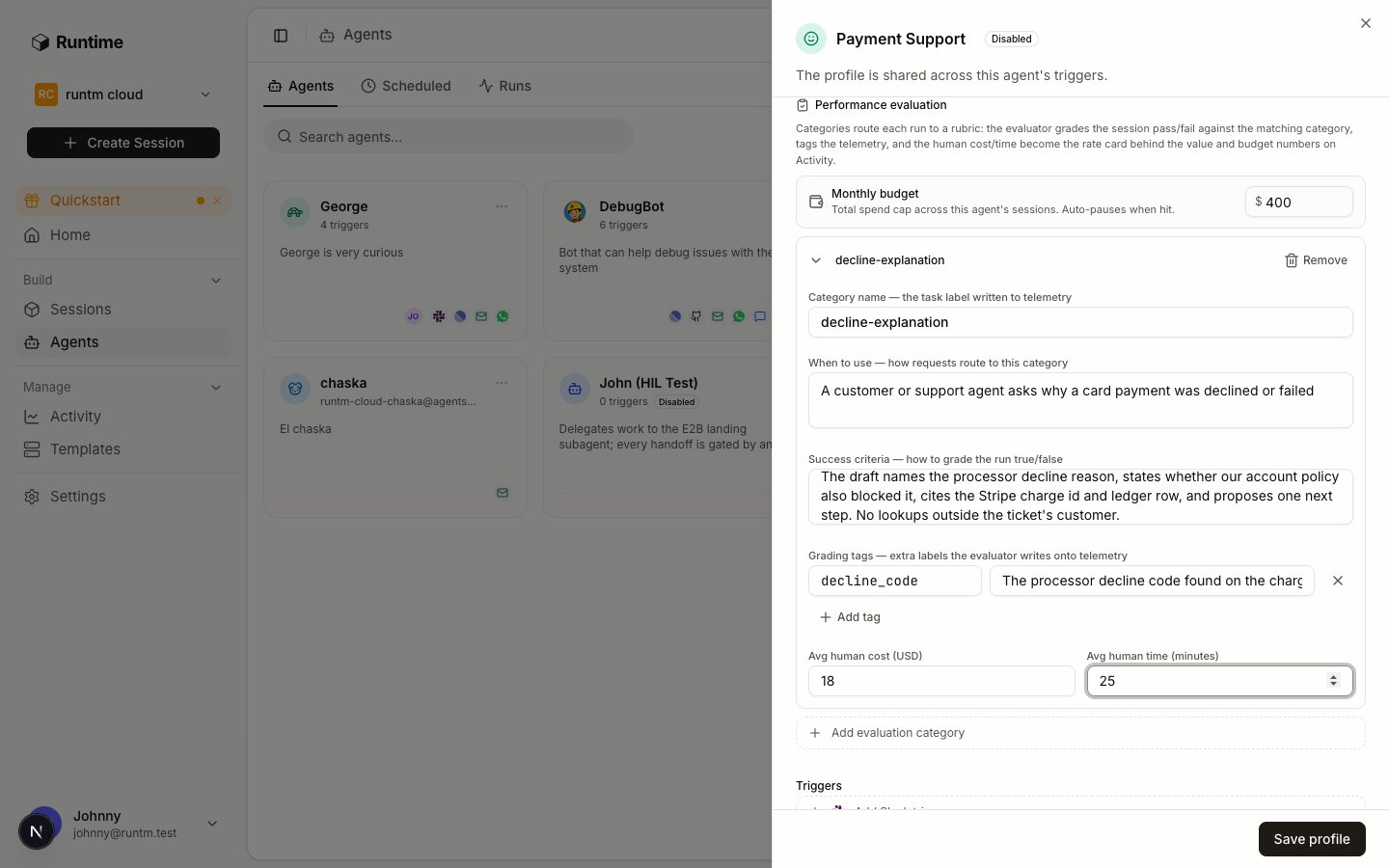 Click **Add evaluation category** and fill the card:
| Field | What to enter |
| ------------------------ | --------------------------------------------------------------------------------------------------------------------------------------------------------------------------------- |
| Category name | A short slug. It becomes the `task` label on telemetry and the key in the rate card. Example: `duplicate-charge`. |
| When to use | How requests route here. "The customer reports two charges for one order." |
| Success criteria | How to grade the run true or false. Observable facts only. |
| Grading tags | Optional extra labels the grader writes onto telemetry, each with an instruction for picking its value. Example: `refund_recommended` with "true if the draft proposes a refund". |
| Avg human cost (USD) | What the task costs when a person does it. |
| Avg human time (minutes) | How long it takes a person. |
Repeat for each kind of work. A payments support agent might carry:
| Category | When to use | Success criteria | Human cost / time |
| --------------------- | ------------------------------------------ | --------------------------------------------------------------------------------------------------------------------------- | ----------------- |
| `decline-explanation` | Customer asks why a payment was declined | Draft names the processor decline code and, separately, any account-policy reason of ours; no other customer's data appears | \$12 / 15 min |
| `duplicate-charge` | Customer reports two charges for one order | Draft cites both charge IDs, states which one settled, proposes the refund amount | \$18 / 25 min |
| `refund-status` | Customer asks where a refund is | Draft states the refund ID, its Stripe status, the date issued and the expected arrival window | \$8 / 10 min |
Click **Save profile**.
The JSON the CLI takes has this shape; the server bumps `version` on every write:
```json theme={null}
{
"categories": [
{
"key": "duplicate-charge",
"description": "The customer reports two charges for one order",
"success_criteria": "Draft cites both charge IDs, states which one settled, proposes the refund amount, contains no other customer's data",
"tags": { "refund_recommended": "true if the draft proposes a refund" },
"human_cost_usd": 18,
"human_minutes": 25
}
]
}
```
Human cost and time are also mirrored into the agent's `economics.tasks` map, which is what the scorecard reads.
At the top of the section, enter **Monthly budget** in dollars. Leave it empty for no cap. Click **Save profile**.
Spend is metered from each turn's token usage against the model's pricing, so it lags real spend by about one turn.
## Verify
Run the agent once (see [Prove it works and iterate](/build/launch-and-iterate)), wait a few minutes after the run finishes, then:
* **Activity > Agents** shows the agent with one graded run, its hit rate and value.
* `runtm-api session grade ` returns the verdict for that run.
Click **Add evaluation category** and fill the card:
| Field | What to enter |
| ------------------------ | --------------------------------------------------------------------------------------------------------------------------------------------------------------------------------- |
| Category name | A short slug. It becomes the `task` label on telemetry and the key in the rate card. Example: `duplicate-charge`. |
| When to use | How requests route here. "The customer reports two charges for one order." |
| Success criteria | How to grade the run true or false. Observable facts only. |
| Grading tags | Optional extra labels the grader writes onto telemetry, each with an instruction for picking its value. Example: `refund_recommended` with "true if the draft proposes a refund". |
| Avg human cost (USD) | What the task costs when a person does it. |
| Avg human time (minutes) | How long it takes a person. |
Repeat for each kind of work. A payments support agent might carry:
| Category | When to use | Success criteria | Human cost / time |
| --------------------- | ------------------------------------------ | --------------------------------------------------------------------------------------------------------------------------- | ----------------- |
| `decline-explanation` | Customer asks why a payment was declined | Draft names the processor decline code and, separately, any account-policy reason of ours; no other customer's data appears | \$12 / 15 min |
| `duplicate-charge` | Customer reports two charges for one order | Draft cites both charge IDs, states which one settled, proposes the refund amount | \$18 / 25 min |
| `refund-status` | Customer asks where a refund is | Draft states the refund ID, its Stripe status, the date issued and the expected arrival window | \$8 / 10 min |
Click **Save profile**.
The JSON the CLI takes has this shape; the server bumps `version` on every write:
```json theme={null}
{
"categories": [
{
"key": "duplicate-charge",
"description": "The customer reports two charges for one order",
"success_criteria": "Draft cites both charge IDs, states which one settled, proposes the refund amount, contains no other customer's data",
"tags": { "refund_recommended": "true if the draft proposes a refund" },
"human_cost_usd": 18,
"human_minutes": 25
}
]
}
```
Human cost and time are also mirrored into the agent's `economics.tasks` map, which is what the scorecard reads.
At the top of the section, enter **Monthly budget** in dollars. Leave it empty for no cap. Click **Save profile**.
Spend is metered from each turn's token usage against the model's pricing, so it lags real spend by about one turn.
## Verify
Run the agent once (see [Prove it works and iterate](/build/launch-and-iterate)), wait a few minutes after the run finishes, then:
* **Activity > Agents** shows the agent with one graded run, its hit rate and value.
* `runtm-api session grade ` returns the verdict for that run.
 ## How grading works
Knowing the mechanics makes the rubric easier to write.
* **When.** A background job runs each time a session's transcript is uploaded and shows completed turns. Grading never happens inline in the run.
* **What the grader sees.** The rendered categories, the first prompt of the session, the agent's last message (or its structured output), and the turn count. It does not see tool call logs, so the success criteria must be checkable from the final answer. If the evidence matters, instruct the agent to put it in the reply.
* **What it returns.** One routed category and one boolean, plus a reason and the declared tags. There are no scores, no weights and no per-criterion marks. A run with no matching category gets an empty category and counts as ungraded work.
* **Which model.** A small fast model (Claude Haiku by default). The grade is only as good as the criteria you wrote; ambiguous criteria produce inconsistent grades.
* **Regrading.** Every save of the categories bumps the rubric version. A run is graded once per (rubric version, last completed turn), so editing the rubric regrades runs as their next transcript arrives, and the new grade records which one it supersedes.
* **When it cannot run.** Without a provider API key or when the model call fails, the grade records `grader_unavailable` and nothing else is written.
## The scorecard
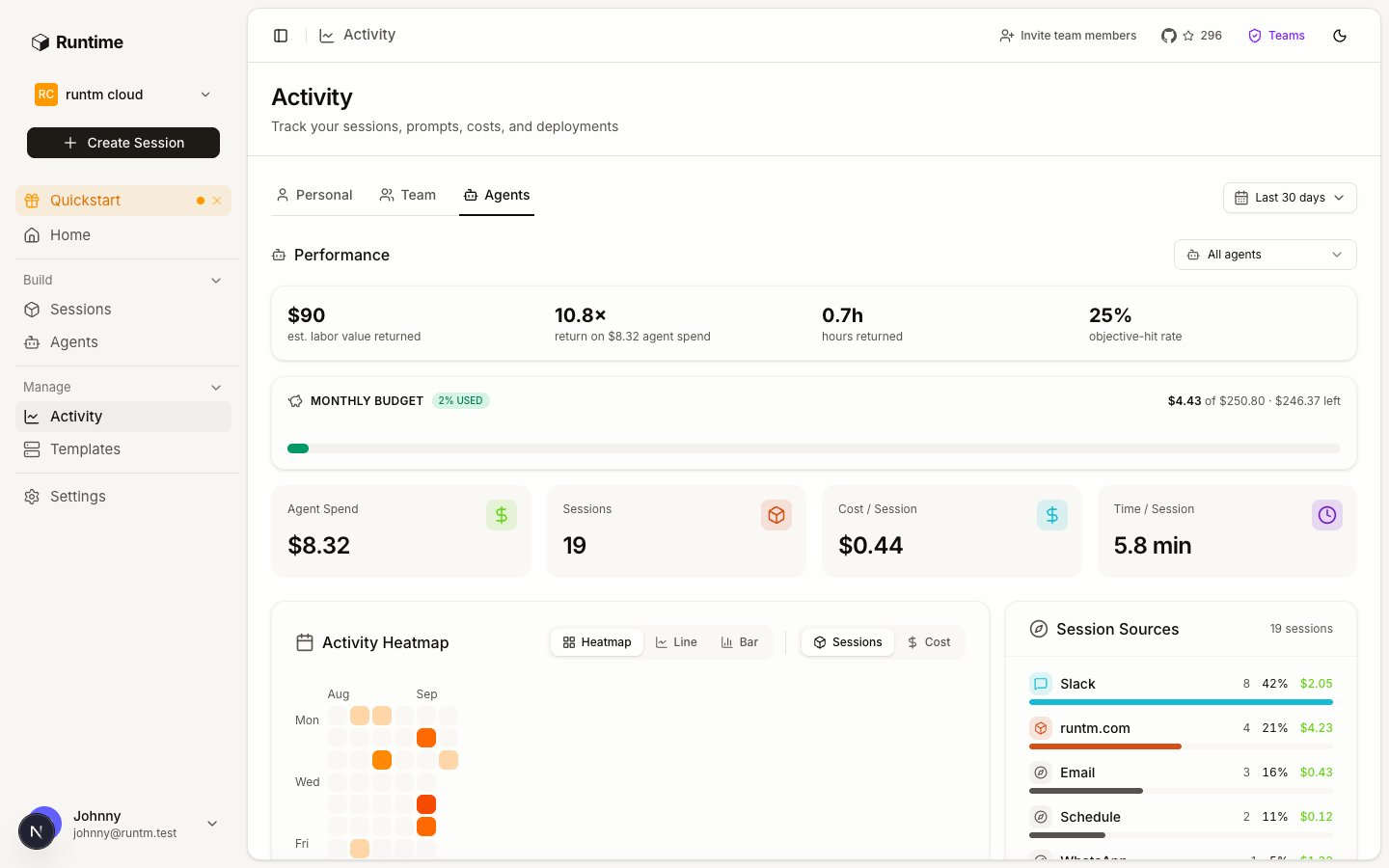
**Activity > Agents** and `runtm-api agents scorecard` aggregate per agent over a rolling window (default 30 days, or an explicit start and end):
| Field | Meaning |
| --------------------------------------------------------- | ------------------------------------------------------------------------------- |
| `sessions`, `turns`, `tokens`, `spend_usd`, `duration_ms` | Volume and cost. |
| `graded_runs`, `successful_runs` | Runs the grader scored, and how many passed. The latest grade per session wins. |
| `objective_hit_rate` | `successful_runs / graded_runs`. |
| `tasks` | Per category: runs and successes. |
| `value_usd` | Sum over successful runs of the category's human cost. |
| `minutes_returned` | Sum over successful runs of human minutes minus agent minutes, floored at zero. |
| `budget` | `monthly_usd_cap`, this month's spend, and `exceeded`. |
| `unpriced_runs` | Successful runs whose category has no human cost, so they add no value. |
Nothing here is stored. Editing a category's cost re-values history the next time you load the page.
## Gotchas
* **No categories, no grades.** An agent without evaluation categories is never graded. The scorecard shows the sessions and spend but zero graded runs. This is the most common reason "evaluation is not working".
* **Criteria the grader cannot see.** If success depends on what the agent did (queried the right table, called the right endpoint) rather than what it said, have the instructions require an evidence section in the final reply and grade that.
* **One category per run.** The grader picks a single category. If a run does two kinds of work, it is graded on one. Keep categories at the granularity of a single request.
* **Budget does not stop anything.** `monthly_usd_cap` flags and audits. It does not pause launches or reject prompts. Hard concurrency and spend limits live under **Guardrails > Limits** at the organization level.
* **Human cost is the value.** A category with no cost makes every success worth \$0 and shows up as `unpriced_runs`.
* **Personal mode has no scorecard.** Roster agents are organization-scoped; use an org-scoped key for the CLI.
* **Every grade records the rubric version that produced it.** The version bumps on every edit, so a verdict can always be traced to the criteria text that was live when it was written.
The template that carries the agent's tools, MCP servers and secrets.
Every field of the aggregate.
## How grading works
Knowing the mechanics makes the rubric easier to write.
* **When.** A background job runs each time a session's transcript is uploaded and shows completed turns. Grading never happens inline in the run.
* **What the grader sees.** The rendered categories, the first prompt of the session, the agent's last message (or its structured output), and the turn count. It does not see tool call logs, so the success criteria must be checkable from the final answer. If the evidence matters, instruct the agent to put it in the reply.
* **What it returns.** One routed category and one boolean, plus a reason and the declared tags. There are no scores, no weights and no per-criterion marks. A run with no matching category gets an empty category and counts as ungraded work.
* **Which model.** A small fast model (Claude Haiku by default). The grade is only as good as the criteria you wrote; ambiguous criteria produce inconsistent grades.
* **Regrading.** Every save of the categories bumps the rubric version. A run is graded once per (rubric version, last completed turn), so editing the rubric regrades runs as their next transcript arrives, and the new grade records which one it supersedes.
* **When it cannot run.** Without a provider API key or when the model call fails, the grade records `grader_unavailable` and nothing else is written.
## The scorecard
**Activity > Agents** and `runtm-api agents scorecard` aggregate per agent over a rolling window (default 30 days, or an explicit start and end):
| Field | Meaning |
| --------------------------------------------------------- | ------------------------------------------------------------------------------- |
| `sessions`, `turns`, `tokens`, `spend_usd`, `duration_ms` | Volume and cost. |
| `graded_runs`, `successful_runs` | Runs the grader scored, and how many passed. The latest grade per session wins. |
| `objective_hit_rate` | `successful_runs / graded_runs`. |
| `tasks` | Per category: runs and successes. |
| `value_usd` | Sum over successful runs of the category's human cost. |
| `minutes_returned` | Sum over successful runs of human minutes minus agent minutes, floored at zero. |
| `budget` | `monthly_usd_cap`, this month's spend, and `exceeded`. |
| `unpriced_runs` | Successful runs whose category has no human cost, so they add no value. |
Nothing here is stored. Editing a category's cost re-values history the next time you load the page.
## Gotchas
* **No categories, no grades.** An agent without evaluation categories is never graded. The scorecard shows the sessions and spend but zero graded runs. This is the most common reason "evaluation is not working".
* **Criteria the grader cannot see.** If success depends on what the agent did (queried the right table, called the right endpoint) rather than what it said, have the instructions require an evidence section in the final reply and grade that.
* **One category per run.** The grader picks a single category. If a run does two kinds of work, it is graded on one. Keep categories at the granularity of a single request.
* **Budget does not stop anything.** `monthly_usd_cap` flags and audits. It does not pause launches or reject prompts. Hard concurrency and spend limits live under **Guardrails > Limits** at the organization level.
* **Human cost is the value.** A category with no cost makes every success worth \$0 and shows up as `unpriced_runs`.
* **Personal mode has no scorecard.** Roster agents are organization-scoped; use an org-scoped key for the CLI.
* **Every grade records the rubric version that produced it.** The version bumps on every edit, so a verdict can always be traced to the criteria text that was live when it was written.
The template that carries the agent's tools, MCP servers and secrets.
Every field of the aggregate.