> ## Documentation Index
> Fetch the complete documentation index at: https://docs.runtm.com/llms.txt
> Use this file to discover all available pages before exploring further.
# Fraud and risk review agent
> Build a scheduled agent that sweeps new Stripe Radar reviews and velocity alerts every 30 minutes, assembles a review packet from Stripe, BigQuery and a read-only Postgres, posts it to Slack, and leaves every block to a human. Read this when you want an unattended risk agent with an agent-scoped Stripe key, a graded rubric, and guardrails added after the seeded cases pass.
## What you will have
A roster agent called **Risk Agent** that runs on a cron schedule, reads new Radar reviews and velocity alerts since its last run, and posts one review packet per alert to `#risk-review`. Each packet lists every related payment attempt in the window with Stripe ids, names the shared attribute that links the activity, cites prior cases, and ends with a recommendation of `clear`, `monitor` or `block`. The agent never blocks a customer, never refunds, never edits a Radar rule. A `block` recommendation waits for an admin to approve it before it is written into the packet. Every run is graded against three categories, and the scorecard shows the hit rate per category.
This guide follows the six steps of [Build an agent](/build/overview) in order. Guardrails come last, after the agent has proven on five historical alerts that it can assemble a correct packet with read-only credentials.
## The agent spec
| # | Question | Risk Agent |
| - | ------------------------ | --------------------------------------------------------------------------------------------------------------------------------------------------------------------------------------------------------------------------------------- |
| 1 | What is the job? | Given a new Radar review or velocity alert, assemble a review packet with every related attempt, the linking attribute, prior cases and a recommendation. Never enforce. |
| 2 | How is success measured? | Categories `card-testing`, `velocity-spike`, `merchant-linkage`. Pass when the packet is complete and the recommendation matches the analyst's historical decision. \$45 and 40 minutes of analyst time per case. \$600 monthly budget. |
| 3 | What can it reach? | Template **Risk Review**: Stripe (agent-scoped restricted key), BigQuery (org-wide, `fraud` dataset only), Postgres (org-wide, read-only role). |
| 4 | How does it work? | Skill `fraud-review-packet` with a packet template. Trigger: scheduled agent every 30 minutes, run as Risk Agent, posting to `#risk-review`. |
| 5 | Does it work? | Five historical alerts with known outcomes, run with **Run now**, graded, compared per category. |
| 6 | Now lock it down | Deny every Stripe write, deny BigQuery deletes, default policy `ask`, network rules for the four hosts it needs, approval before any `block` recommendation. |
## 1. Define the job
Read [Define the job](/build/define-the-job) first. The job here has a clear input (one alert), a clear output (one packet), and a hard boundary (no enforcement).
Go to **Agents** and click **New Agent**. On **Profile** name it `Risk Agent`. On **Instructions**, use this description:
> Sweeps new Stripe Radar reviews and velocity alerts, assembles a review packet with related attempts, linked accounts and prior cases, and recommends clear, monitor or block. Never enforces.
And these system instructions:
```markdown theme={null}
You are the Risk Agent for Northstar Payments.
Input: the Radar reviews and early fraud warnings created since the
last run, plus velocity alerts from the fraud.alerts table.
Output: one review packet per alert, following the packet template
in the fraud-review-packet skill, posted as your final message.
Method:
1. List new alerts. If there are none, say so and stop.
2. For each alert, pull every payment attempt in the 24 hour window
that shares the card fingerprint, customer, email domain, IP or
device with the alert.
3. Query fraud.attempts in BigQuery for the same attributes across
all merchants, and prior_cases in Postgres for the same accounts.
4. Name the shared attribute that links the activity, or state that
nothing links it.
5. Recommend clear, monitor or block, and say why in two sentences.
Never:
- Block, refund, update or create anything in Stripe. Reads only.
- Change Radar rules or fraud.alerts rows.
- Recommend block without an approved request; if the approval is
rejected, write monitor and record the reviewer's note.
Every fact carries its source: a Stripe id, a BigQuery row, a case id.
```
Skip **Triggers** for now and click **Create agent**.
Open the agent's card. Under **Default template** pick **Risk Review** (created in step 3; come back and set it if the template does not exist yet). Leave **Coding agent** on Claude Code. Click **Save profile**.
## 2. Measure success
Read [Measure success](/build/measure-success). The grader routes each run to one category and returns pass or fail with a reason. Because the historical alerts already have analyst decisions, the success criteria can name the decision.
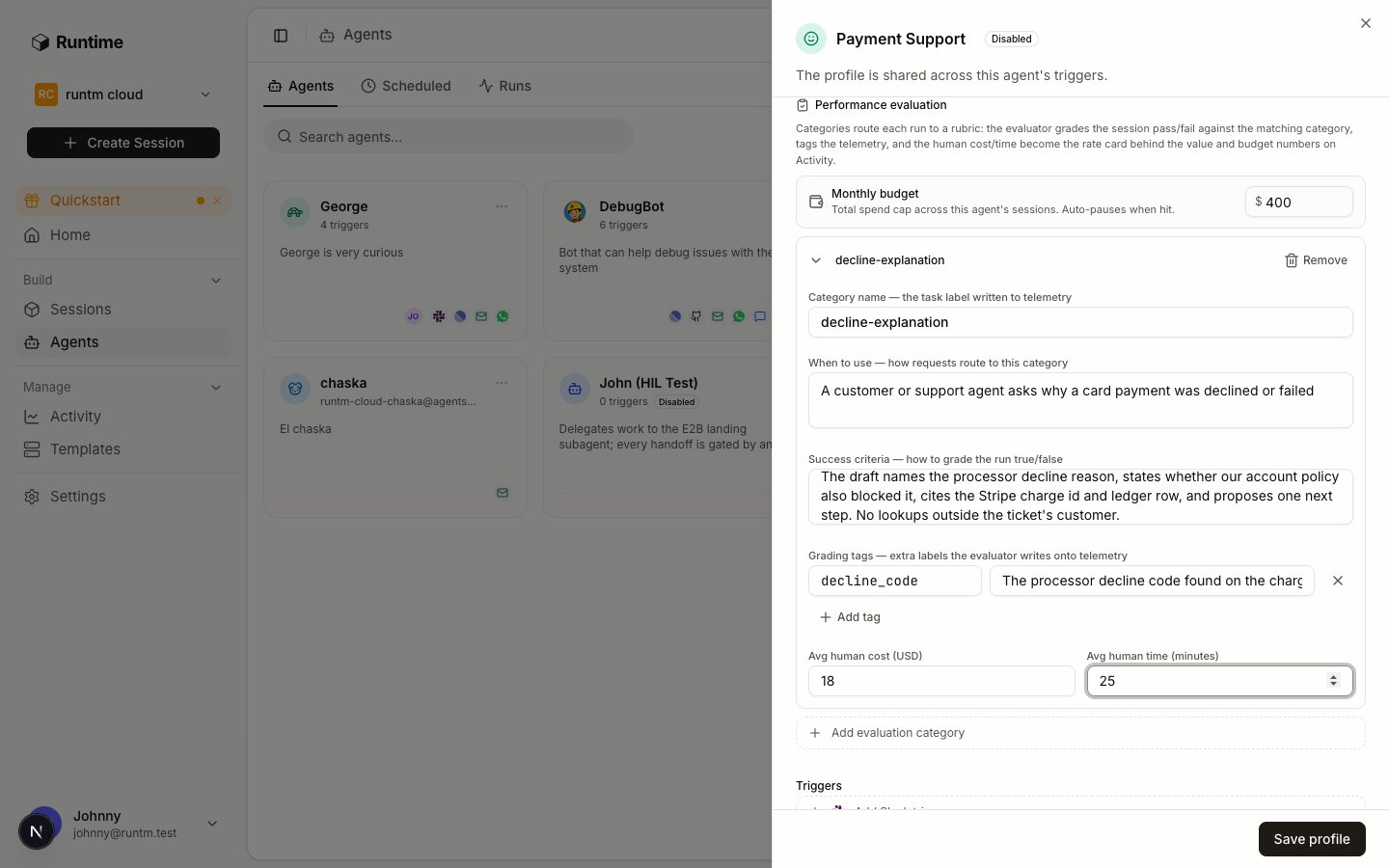
On the agent's **Profile** tab, scroll to **Performance evaluation** and click **Add evaluation category** three times.
| Category name | When to use | Success criteria |
| ------------------ | ------------------------------------------------------------------------------------ | -------------------------------------------------------------------------------------------------------------------------------------------------------------------------------------------------------------------------------------------------- |
| `card-testing` | A burst of small authorizations on many cards from one source in a short window | The packet lists every attempt in the window with its Stripe payment intent id, names the shared attribute (IP, device or BIN range), counts the distinct cards, and recommends block or monitor consistent with the analyst decision on the case. |
| `velocity-spike` | One customer or merchant with an unusual jump in attempt count or amount | The packet compares the window to the account's 30 day baseline from BigQuery with numbers, lists the attempts with Stripe ids, and recommends clear, monitor or block consistent with the analyst decision. |
| `merchant-linkage` | An alert on an account that shares attributes with a previously investigated account | The packet names the shared attribute, cites the prior case id from Postgres, lists attempts on both accounts with Stripe ids, and recommends consistent with the analyst decision. |
On each category add one grading tag, `recommendation`, with the instruction "The recommendation the packet ends with: clear, monitor or block". Set **Avg human cost (USD)** to `45` and **Avg human time (minutes)** to `40`.
Under **Monthly budget** enter `600`. This is a flag on the scorecard and an audit event when spend passes it. It does not stop runs; the hard cap lives in org limits, covered in step 6. Click **Save profile**.
## 3. Give it tools
Read [Give it tools](/build/give-it-tools), especially [the credential hierarchy](/build/give-it-tools#who-the-agent-acts-as-the-credential-hierarchy). Three systems, all read-only.
Go to **Templates**, click **New Template**, choose **Blank environment**, name it `Risk Review`, keep **Basic** and click **Create Template**. Nothing is cloned; the template exists to carry connections and the skill.
Stripe is not in the built-in catalog, but it has a ready-made static schema (one field, `STRIPE_SECRET_KEY`). If your org has not created it yet, define it once under **Settings > Context > Tools & MCP**, **New tool or MCP server**, **Tool**, then define a custom provider named `stripe` with a single secret field materialized as `STRIPE_SECRET_KEY`.
In the Stripe dashboard create a **restricted key** with read permission on Charges, Payment Intents, Customers, Reviews and Radar early fraud warnings, and nothing else. Back in Runtime, connect the provider and choose the **agent** scope, picking **Risk Agent**. An agent-scoped connection is used only by runs attributed to Risk Agent and beats any personal or org-wide Stripe key. It also skips the skill filter, so the support team's org-wide Stripe key stays theirs and this key stays the risk team's.
The CLI creates only org and personal connections. Agent scope is set in the dashboard, or with `scope: "agent"` and `agent_id` on `POST /api/cloud/knowledge/integrations`.
BigQuery is a built-in provider. Pick it from **Add a provider**, choose the **Service account JSON** method, and paste a service account key whose IAM grant is `BigQuery Data Viewer` on the `fraud` dataset only plus `BigQuery Job User` on the project. Scope: **Team**. The provider installs `gcloud` and `bq` into the snapshot and activates the service account at session start.
BigQuery is used here because it is a built-in and the fraud warehouse in this example lives in it. If your warehouse is Snowflake, define it as a custom provider with account, user and a read-only role, exactly as Stripe above.
Postgres also has a ready-made static schema (one field, a connection string). Create the provider if it does not exist, then connect it with a connection string for a role that can only `SELECT` from `prior_cases` and the account views. Scope: **Team**.
Org-wide and personal connections reach a session only when an attached skill requires the provider. The skill in the next step lists all three, so BigQuery and Postgres arrive through the skill and Stripe arrives through the agent scope.
## 4. Define how it works
Read [Define how it works](/build/how-it-works/overview). The runbook is a skill, the trigger is a schedule, and the prohibitions stay in text until step 6.
Under **Settings > Context > Skills**, click **New skill** and create `fraud-review-packet` with this `SKILL.md`:
```markdown theme={null}
---
name: fraud-review-packet
description: Assemble a review packet for a Stripe Radar review or velocity alert, with related attempts, linked accounts, prior cases and a recommendation. Use on every alert.
---
# Fraud review packet
## Requires
stripe, bigquery, postgres. Credentials arrive as STRIPE_SECRET_KEY,
an activated gcloud service account, and POSTGRES_CONNECTION_STRING.
## Steps
1. New alerts: `curl -s -u "$STRIPE_SECRET_KEY:" "https://api.stripe.com/v1/reviews?created[gte]="`
and `SELECT * FROM fraud.alerts WHERE created_at >= @since` in BigQuery.
If both are empty, write "No new alerts since
On **Templates**, open **Risk Review** and click **Build** on the **Build** tab. Wait for `ready`.
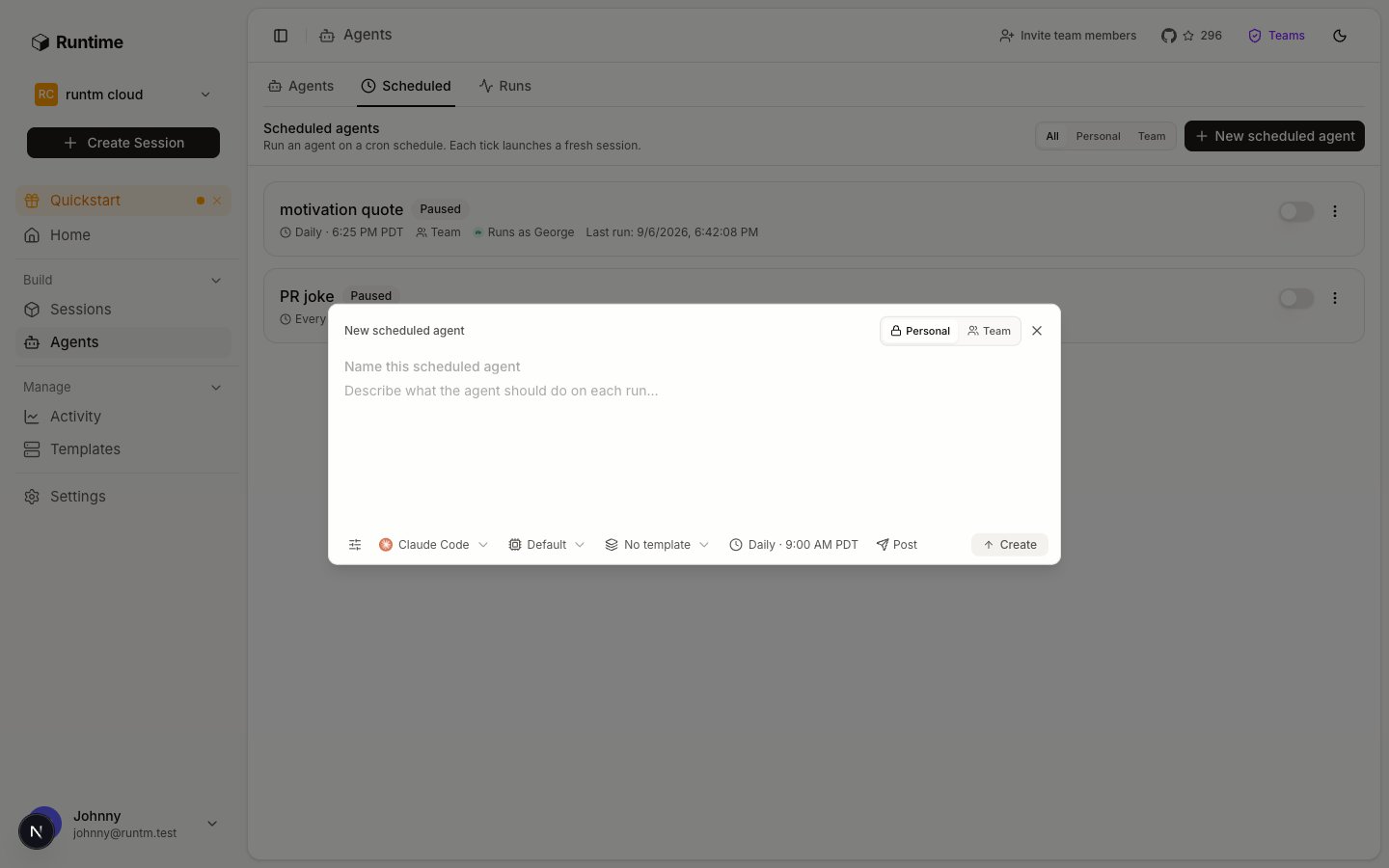
On **Agents**, open the **Scheduled** tab and click **New scheduled agent**. Fill **Name this scheduled agent** with `Risk sweep`. For the prompt, write:
> Run the fraud-review-packet skill for every Radar review, early fraud warning and fraud.alerts row created since the last run. Post one packet per alert. If there are none, say so.
Set run-as to **Agent** and pick **Risk Agent**, so the run carries the agent's identity: the agent-scoped Stripe key applies and the run is graded against the agent's categories. Set the schedule to **Interval**, **Every 30 minutes**. Under **Post**, pick the Slack integration and the `#risk-review` channel. Choose **Team** visibility. Create it, then flip the toggle off so it is disabled until step 5 proves it.
The cron expression Runtime stores is five fields in UTC. Every 30 minutes is written as minute zero and minute thirty of every hour, not with a slash-step, because the slash form cannot appear inside this page's hidden CLI comments. The CLI can create the schedule with a harness and template but cannot set run-as **Agent**; set that in the dialog.
Analysts sometimes want "look at this one now". In the agent's sheet add a **Slack** trigger so `@Risk Agent ` in `#risk-review` runs the same skill on one alert. The mention runs as Risk Agent too, so the same credentials and grading apply.
## 5. Prove it works and iterate
Read [Prove it works and iterate](/build/launch-and-iterate). No guardrail exists yet. The agent is safe because every credential is read-only, the sandbox is destroyed after each run, and the schedule is disabled so nothing runs unless you press **Run now**.
Pick five alerts from the last quarter whose analyst decisions you know. Write the expected outcome down before running anything.
| Case | Input | Expected grade | Why |
| ---- | -------------------------------------------------------------------------------------------- | ------------------------------------------------ | ----------------------------------------------------------- |
| A | Radar review on a burst of 40 authorizations under \$2 from one IP across 38 cards | `card-testing`, pass, recommendation `block` | Many cards, one source, analyst blocked |
| B | Radar review on a burst of 12 authorizations from one device, 12 cards, all declined | `card-testing`, pass, recommendation `monitor` | Same pattern but all declined; analyst monitored |
| C | Velocity alert: a merchant did 5x its daily mean on a launch day, all settled, zero disputes | `velocity-spike`, pass, recommendation `clear` | Benign spike; the packet must show the baseline comparison |
| D | Radar review on a new account sharing a device id with a merchant blocked in case 2211 | `merchant-linkage`, pass, recommendation `block` | The packet must cite case 2211 |
| E | Radar review where the fingerprint, IP and customer match nothing else in the window | one of the three, pass, recommendation `clear` | An empty linkage section is a correct packet, not a failure |
Case E exists to prove the agent can say "nothing links this". Cases A and D exercise the approval step.
For each case, temporarily set the schedule prompt to name the alert (`Run the fraud-review-packet skill for Radar review prv_...`), then click **Run now** on the schedule's row. **Run now** executes the identical code path a cron tick takes, so a failure here is the failure you would otherwise get at 03:00 UTC.
For cases A and D the session will stop in `awaiting_approval`. Open **Sessions**, find the run, and click **Approve** or **Reject** on its card. Try both across the two cases to see the packet change.
Open each run under **Agents > Runs**. Read the packet against the template: every attempt with a Stripe id, the shared attribute named, prior cases cited. Then read the grade.
A typical failure on the first pass:
```json theme={null}
{"graded": true, "success": false, "task": "velocity-spike",
"reason": "The packet lists the attempts but never states the 30 day baseline, so the spike is not compared to anything."}
```
That is a runbook gap, not a rubric gap. Add the baseline query to step 3 of the skill, rebuild, re-run case C.
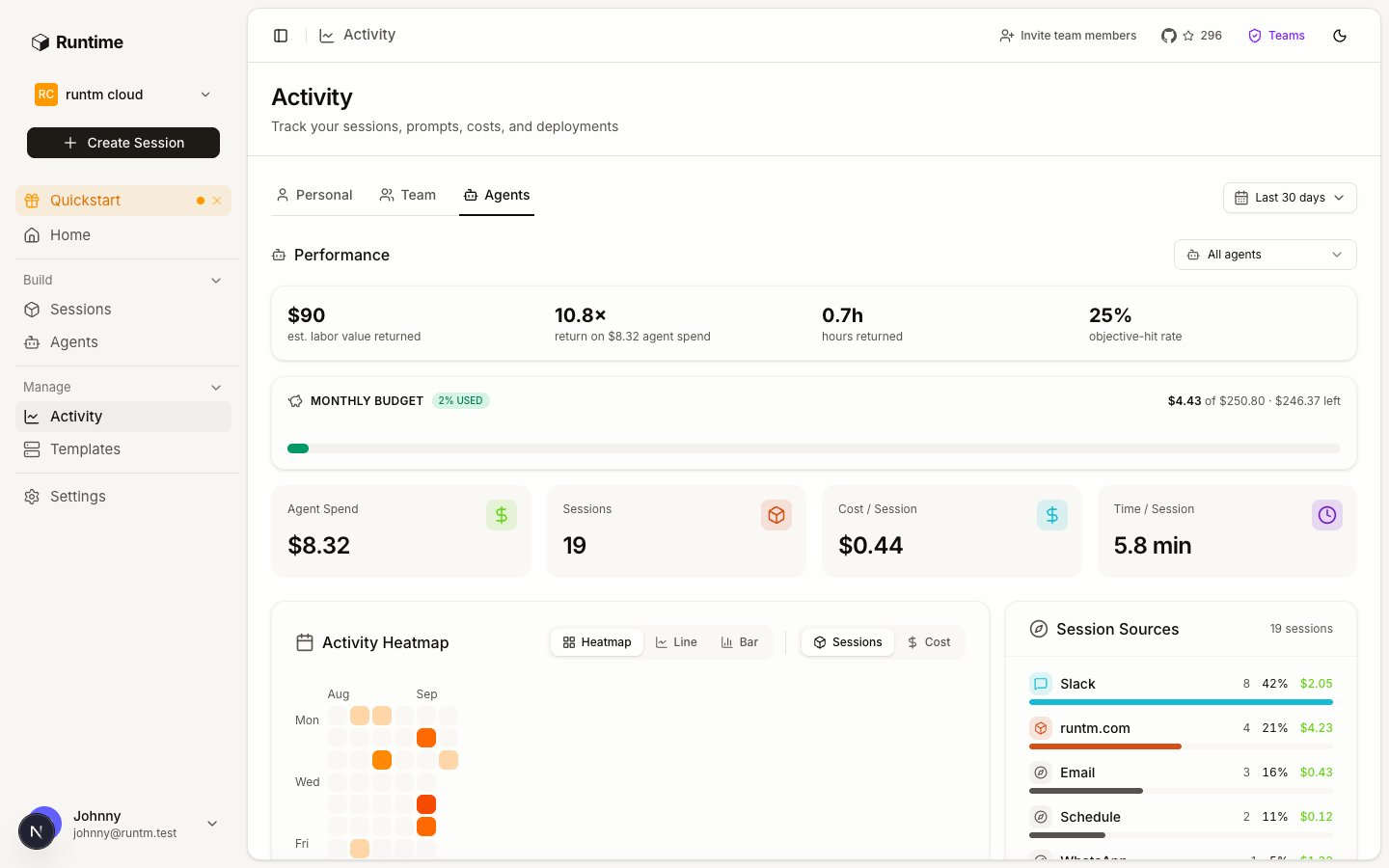
Open **Activity > Agents** and filter to Risk Agent over the last 7 days. You want five graded runs, a per-category breakdown under tasks, and a hit rate you can explain case by case.
Change one input per iteration. If the grader passed a packet you would reject, tighten the success criteria. If the agent skipped a step, add it to the skill. If it could not find data, the credential or the dataset grant is too narrow. Re-run the affected case after every change; grades are not recomputed retroactively.
Write down the exact commands and hosts the five passing runs used. That list is the input to step 6. Restore the sweep prompt before moving on.
## 6. Add guardrails and approvals
Read [Add guardrails and approvals](/build/guardrails-and-approvals). This agent runs unattended, so it gets the full set: allowlist rules, network rules, and the approval step you already exercised.
Under **Settings > Guardrails > Allowlists**, click **New rule** for each. These patterns match Bash commands the runbook could plausibly attempt.
| Type | Pattern | Purpose |
| ------- | -------------------------------- | ------------------------------------ |
| Denied | `curl*-X POST*api.stripe.com*` | No Stripe writes from the agent |
| Denied | `curl*-X DELETE*api.stripe.com*` | No Stripe deletes |
| Denied | `stripe refunds*` | Refunds are issued by a human |
| Denied | `stripe * update*` | No Stripe object updates |
| Denied | `bq query*DELETE*` | No warehouse deletes |
| Denied | `bq query*UPDATE*` | No warehouse updates |
| Denied | `psql*DELETE*` | Read-only Postgres, defense in depth |
| Allowed | `curl*api.stripe.com/v1/*` | Stripe reads the passing runs used |
| Allowed | `bq query*SELECT*` | Warehouse reads |
| Allowed | `psql*SELECT*` | Case reads |
Then set the **Default policy** to **Ask**, so any command outside these patterns pauses the run instead of running.
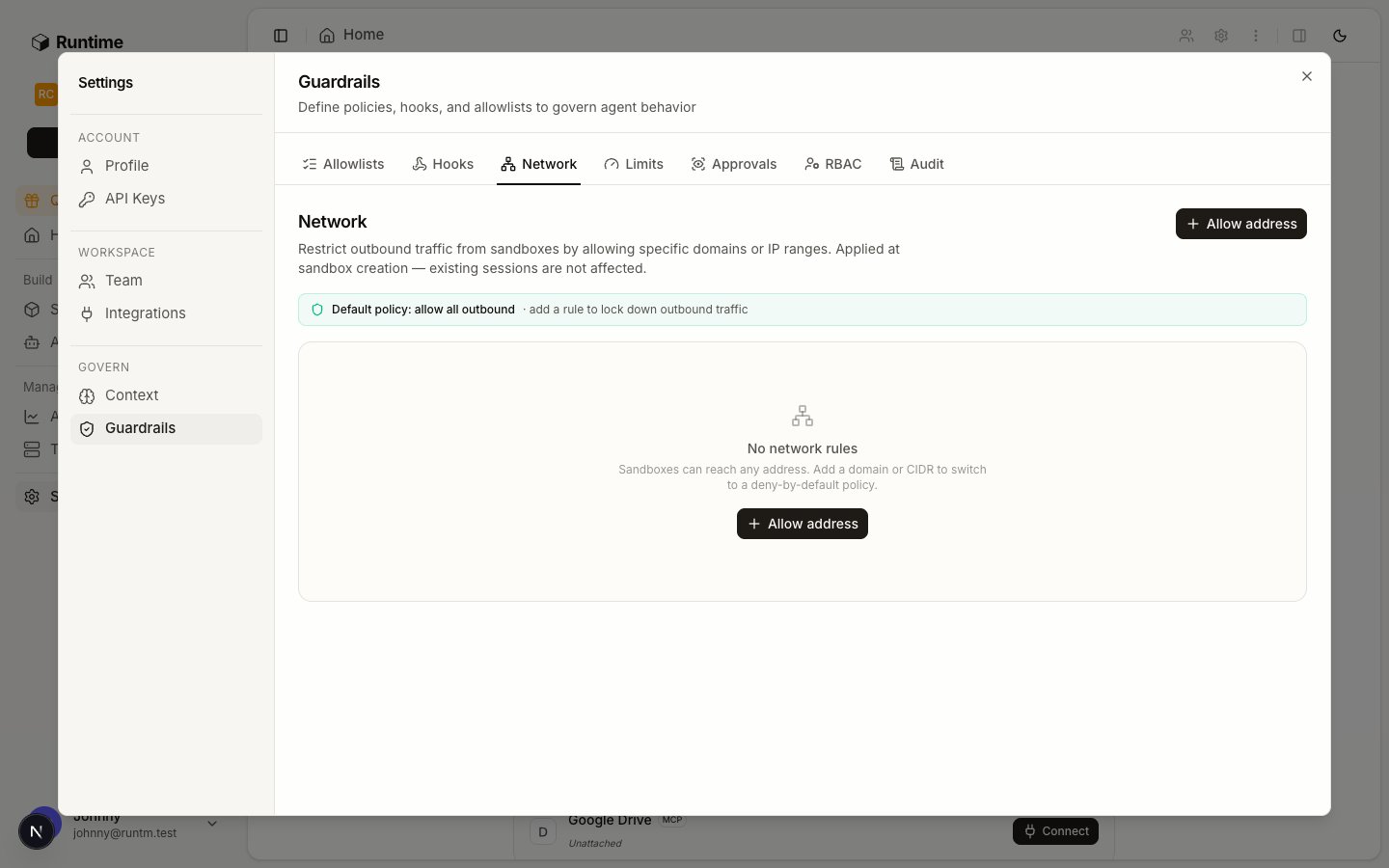
Under **Network**, add one rule per host. As soon as one rule exists, egress is deny-all plus this list. Slack posting is done by Runtime after the run, not by the sandbox, so `hooks.slack.com` is not needed.
| Host | Purpose |
| ------------------------- | ----------------------------------------------------- |
| `api.stripe.com` | Stripe reads |
| `bigquery.googleapis.com` | BigQuery queries |
| `oauth2.googleapis.com` | Service account token exchange for `bq` |
| your Postgres host | Case and account reads |
| `app.runtm.com` | The runtm CLI and `runtm-approval` inside the sandbox |
| `docs.runtm.com` | The agent reads Runtime docs when it needs to |
Allowlist rules are materialized into the snapshot, so rebuild the template. Network rules apply at session creation without a rebuild. Then **Run now** cases A, C and D again. If a case that passed in step 5 now stalls on an `ask` or fails, the last rule you added is the cause: remove it, re-run, and write it narrower.
Under **Guardrails > Limits**, set the org monthly budget and maximum concurrent sessions. These are enforced at session creation, unlike the agent's `$600` budget, which only flags.
Flip the toggle on the `Risk sweep` row. Check `next_run_at` is in the future. After the first tick, confirm a packet (or "No new alerts") landed in `#risk-review` and a graded run appears under **Runs**.
## What stays human
* **Every enforcement action.** Blocks, refunds, limit changes and Radar rule edits happen in Stripe by an analyst, using the packet as evidence. The agent's credential cannot do them and the allowlist denies the commands anyway.
* **Every `block` recommendation.** The runbook requests an approval with `--required-role admin` and waits. The request appears on the session card under **Sessions** and in `runtm-api session approvals list`. It is not delivered to Slack; someone with the admin role resolves it on the board or with the CLI. Rejected means the packet says `monitor` and quotes the note.
* **The rubric.** When the grader and the analyst disagree, the analyst is right and the success criteria change.
## Gotchas
* **Run-as Harness instead of Agent.** A schedule created in **Harness** mode runs with no agent identity: the agent-scoped Stripe key never applies, the run is not graded, and the scorecard stays at zero. Check the schedule row says "Runs as Risk Agent".
* **Skill attached, template not rebuilt.** `template get` shows `attachments_changed_since_build: true` until you build. The first sweep then runs without the skill and posts an improvised packet.
* **BigQuery works in the terminal but not in the run.** The org-wide connection reaches the session only because the skill requires `bigquery`. Remove it from `requires.integrations` and the connection is silently filtered out.
* **A network rule set without `app.runtm.com`.** The sandbox loses the runtm CLI, so `runtm-approval` fails and every `block` case errors instead of waiting.
* **Enabled before proven.** An enabled schedule with `last_run_at` null and `next_run_at` in the past never ran. Disable, **Run now**, read the session, enable.
* **The cron step form.** Runtime accepts `*/30` in the dialog, but the hidden CLI comments on this page use `0,30 * * * *` because the slash form ends an MDX comment early. Both mean every 30 minutes.
* **Budget exceeded keeps running.** `$600` is a scorecard flag. The org limit in step 6 is the cap.
A Slack and Email agent that reconstructs a charge and drafts a reply, never sends.
A Linear-triggered agent that assembles a KYB decision memo and leaves the decision to underwriters.
The six steps this example follows.
 The cron expression Runtime stores is five fields in UTC. Every 30 minutes is written as minute zero and minute thirty of every hour, not with a slash-step, because the slash form cannot appear inside this page's hidden CLI comments. The CLI can create the schedule with a harness and template but cannot set run-as **Agent**; set that in the dialog.
 | Host | Purpose |
| ------------------------- | ----------------------------------------------------- |
| `api.stripe.com` | Stripe reads |
| `bigquery.googleapis.com` | BigQuery queries |
| `oauth2.googleapis.com` | Service account token exchange for `bq` |
| your Postgres host | Case and account reads |
| `app.runtm.com` | The runtm CLI and `runtm-approval` inside the sandbox |
| `docs.runtm.com` | The agent reads Runtime docs when it needs to |
| Host | Purpose |
| ------------------------- | ----------------------------------------------------- |
| `api.stripe.com` | Stripe reads |
| `bigquery.googleapis.com` | BigQuery queries |
| `oauth2.googleapis.com` | Service account token exchange for `bq` |
| your Postgres host | Case and account reads |
| `app.runtm.com` | The runtm CLI and `runtm-approval` inside the sandbox |
| `docs.runtm.com` | The agent reads Runtime docs when it needs to |