> ## Documentation Index
> Fetch the complete documentation index at: https://docs.runtm.com/llms.txt
> Use this file to discover all available pages before exploring further.
# Merchant underwriting agent
> Build an agent that assembles a decision memo for a pending merchant application from a KYB provider (Middesk), the applications database and the underwriting policy in Notion, without ever changing an application's status. A complete worked example in the six-step order: job, rubric, tools (custom KYB provider, agent-scoped key), runbook, Linear and weekly schedule triggers, seeded cases, then guardrails and two approval gates. Read when building any review or underwriting agent.
## What you will have
A roster agent called **Underwriting Agent**. When an application ticket is assigned to it in Linear, it pulls the Middesk result, the registry and ownership records, and the application answers from a read-only database, checks each provider flag against the underwriting policy in Notion, and writes a decision memo in which every flag is either resolved with a source or listed as open. If a document is missing it drafts the request. Every Monday it re-reviews merchants due for a periodic check and posts the summary to Slack. It cannot change an application's status, write to the database, or send anything to a merchant; those wait for an underwriter.
This page follows the six steps of [Build an agent](/build/overview). The Build pages explain each step; this page gives the concrete values for this one agent.
## The agent spec
| # | Question | This agent |
| - | ------------ | ------------------------------------------------------------------------------------------------------------------------------------------------------------------------------------------------------------------------------------------------------- |
| 1 | Job | Given a pending application, assemble a decision memo: KYB result versus registry versus ownership versus application answers, every flag resolved-with-source or open, plus a draft document request. Never change status. |
| 2 | Success | Categories `new-application`, `periodic-review`, `discrepancy`. Pass when every flag is resolved or listed open with a source, the memo follows the template, and no application field changed. About \$90 and 75 minutes of underwriter time per case. |
| 3 | Tools | Template **Underwriting**: Middesk as a custom provider (agent-scoped key), Postgres read-only (custom provider), Notion (built-in, org-wide) for the policy. |
| 4 | How it works | Skill `underwriting-memo` with a memo template and a flag glossary. Linear trigger for new applications, a Monday schedule for periodic reviews, both running as the same roster agent. |
| 5 | Prove it | Five seeded applications with known outcomes, assigned in Linear or run with Run now, graded, read on the scorecard. |
| 6 | Guardrails | Deny writes to the application tables and to Middesk, default policy `ask`, five network hosts, approval before the memo is attached and before a document request goes out. |
## 1. Define the job
Read [Define the job](/build/define-the-job) first. The objective needs an input, an output and a boundary; underwriting has an unusually sharp boundary, so write it down before anything else.
Open **Agents** and click **New Agent**. On **Profile**, name it `Underwriting Agent`. On **Instructions**, use this description:
> Given a pending merchant application, compares the KYB provider result, the business registry, beneficial ownership and the application answers, and writes a decision memo where every flag is resolved with a source or listed as open, plus a draft document request. Never changes an application's status.
And these system instructions:
```markdown theme={null}
You are the underwriting agent for Northstar Payments.
Input: a Linear ticket carrying an application id, or a list of merchant ids
due for periodic review.
Output: a decision memo in the format of references/memo-template.md, followed
by a draft document request if any required document is missing.
Method:
1. Read the application, its owners and its documents from the read-only
database. Identify the merchant only from the ticket or the review list.
2. Fetch the Middesk business record and its tasks for that merchant.
3. For each Middesk flag, look it up in references/flag-glossary.md and in the
Underwriting Policy in Notion. Resolve it with a cited source, or list it
as open with what would resolve it.
4. Compare registered name, address, formation date and officers across the
application, the registry and the ownership records. Every mismatch is a
flag.
5. Write the memo. Cite every fact: table and row, Middesk object id, Notion
page.
Never:
- Approve, reject, or change the status of any application.
- Write to the database. Every query is a SELECT.
- Send anything to the merchant. Draft the document request, request an
approval, and stop.
- Look up any merchant other than the one named in the ticket or the list.
```
Skip **Triggers** for now and click **Create agent**.
Open the agent's card. Under **Default template** pick `Underwriting` (create it in step 3 if it does not exist yet) and leave **Coding agent** on Claude Code. Click **Save profile**.
## 2. Measure success
Read [Measure success](/build/measure-success). Underwriting has three kinds of run and a grader can only judge one category at a time, so give it three.
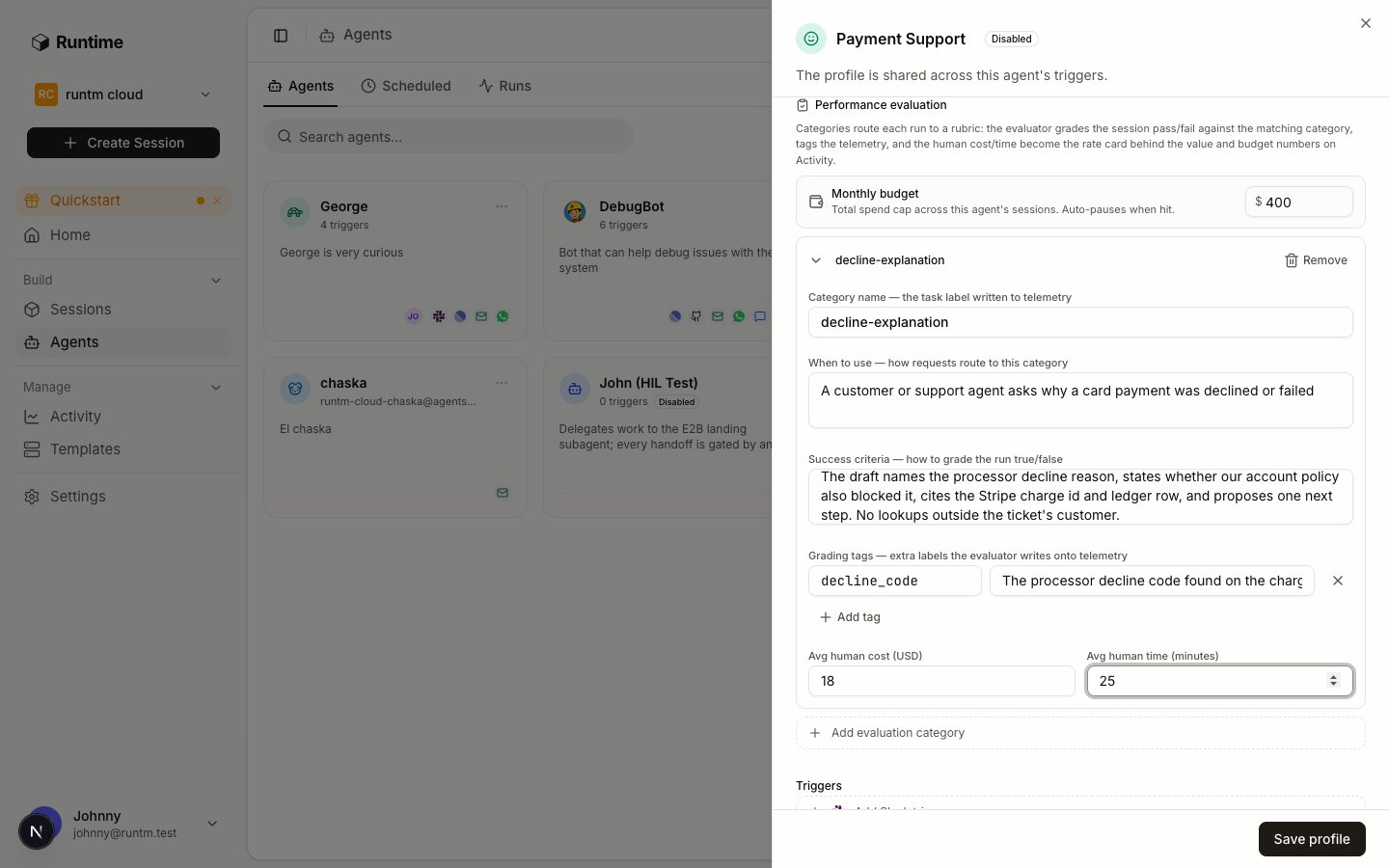 In the agent sheet, scroll to **Performance evaluation** and click **Add evaluation category** three times.
| Category | When to use | Success criteria |
| ----------------- | ------------------------------------------------------------------------------------------- | ------------------------------------------------------------------------------------------------------------------------------------------------------------------------------------------------------------------------------------------------------- |
| `new-application` | A ticket for an application that has not been reviewed before. | The memo follows the template, every Middesk flag is either resolved with a cited source or listed as open with what would resolve it, the registry comparison covers name, address, formation date and officers, and no application field was changed. |
| `periodic-review` | A merchant on the periodic review list, previously approved. | The memo states what changed since the last review with sources, or states that nothing changed and cites the checks performed. No status change. |
| `discrepancy` | The ticket or the data shows a mismatch between application, registry or ownership records. | Each mismatch is traced to its source records, a resolution or an open question is stated for each, and a document request is drafted when a document would resolve it. |
Add a grading tag `risk_tier` on every category with the instruction "low, medium or high, taken from the memo's recommendation line". Set **Avg human cost (USD)** to `90` and **Avg human time (minutes)** to `75`.
Set **Monthly budget** to `800`. This flags the agent on the scorecard and writes an audit event when spend passes the cap. It does not stop runs; use org limits under **Guardrails > Limits** for a hard cap.
`rubric.json` for the CLI:
```json theme={null}
{
"version": 3,
"categories": [
{"key": "new-application",
"description": "A ticket for an application that has not been reviewed before",
"success_criteria": "Memo follows the template; every Middesk flag resolved with a cited source or listed open; registry comparison covers name, address, formation date, officers; no application field changed",
"tags": {"risk_tier": "low, medium or high, from the memo's recommendation line"},
"human_cost_usd": 90, "human_minutes": 75},
{"key": "periodic-review",
"description": "A previously approved merchant on the periodic review list",
"success_criteria": "Memo states what changed since the last review with sources, or states nothing changed and cites the checks; no status change",
"tags": {"risk_tier": "low, medium or high, from the memo's recommendation line"},
"human_cost_usd": 90, "human_minutes": 75},
{"key": "discrepancy",
"description": "A mismatch between application, registry or ownership records",
"success_criteria": "Each mismatch traced to source records; a resolution or open question per mismatch; a document request drafted when a document would resolve it",
"tags": {"risk_tier": "low, medium or high, from the memo's recommendation line"},
"human_cost_usd": 90, "human_minutes": 75}
]
}
```
## 3. Give it tools
Read [Give it tools](/build/give-it-tools). None of the KYB vendors is a built-in provider, so Middesk is a custom provider here; Persona or Alloy would be set up the same way with their own fields. Postgres is also custom. Notion is built in.
In the agent sheet, scroll to **Performance evaluation** and click **Add evaluation category** three times.
| Category | When to use | Success criteria |
| ----------------- | ------------------------------------------------------------------------------------------- | ------------------------------------------------------------------------------------------------------------------------------------------------------------------------------------------------------------------------------------------------------- |
| `new-application` | A ticket for an application that has not been reviewed before. | The memo follows the template, every Middesk flag is either resolved with a cited source or listed as open with what would resolve it, the registry comparison covers name, address, formation date and officers, and no application field was changed. |
| `periodic-review` | A merchant on the periodic review list, previously approved. | The memo states what changed since the last review with sources, or states that nothing changed and cites the checks performed. No status change. |
| `discrepancy` | The ticket or the data shows a mismatch between application, registry or ownership records. | Each mismatch is traced to its source records, a resolution or an open question is stated for each, and a document request is drafted when a document would resolve it. |
Add a grading tag `risk_tier` on every category with the instruction "low, medium or high, taken from the memo's recommendation line". Set **Avg human cost (USD)** to `90` and **Avg human time (minutes)** to `75`.
Set **Monthly budget** to `800`. This flags the agent on the scorecard and writes an audit event when spend passes the cap. It does not stop runs; use org limits under **Guardrails > Limits** for a hard cap.
`rubric.json` for the CLI:
```json theme={null}
{
"version": 3,
"categories": [
{"key": "new-application",
"description": "A ticket for an application that has not been reviewed before",
"success_criteria": "Memo follows the template; every Middesk flag resolved with a cited source or listed open; registry comparison covers name, address, formation date, officers; no application field changed",
"tags": {"risk_tier": "low, medium or high, from the memo's recommendation line"},
"human_cost_usd": 90, "human_minutes": 75},
{"key": "periodic-review",
"description": "A previously approved merchant on the periodic review list",
"success_criteria": "Memo states what changed since the last review with sources, or states nothing changed and cites the checks; no status change",
"tags": {"risk_tier": "low, medium or high, from the memo's recommendation line"},
"human_cost_usd": 90, "human_minutes": 75},
{"key": "discrepancy",
"description": "A mismatch between application, registry or ownership records",
"success_criteria": "Each mismatch traced to source records; a resolution or open question per mismatch; a document request drafted when a document would resolve it",
"tags": {"risk_tier": "low, medium or high, from the memo's recommendation line"},
"human_cost_usd": 90, "human_minutes": 75}
]
}
```
## 3. Give it tools
Read [Give it tools](/build/give-it-tools). None of the KYB vendors is a built-in provider, so Middesk is a custom provider here; Persona or Alloy would be set up the same way with their own fields. Postgres is also custom. Notion is built in.
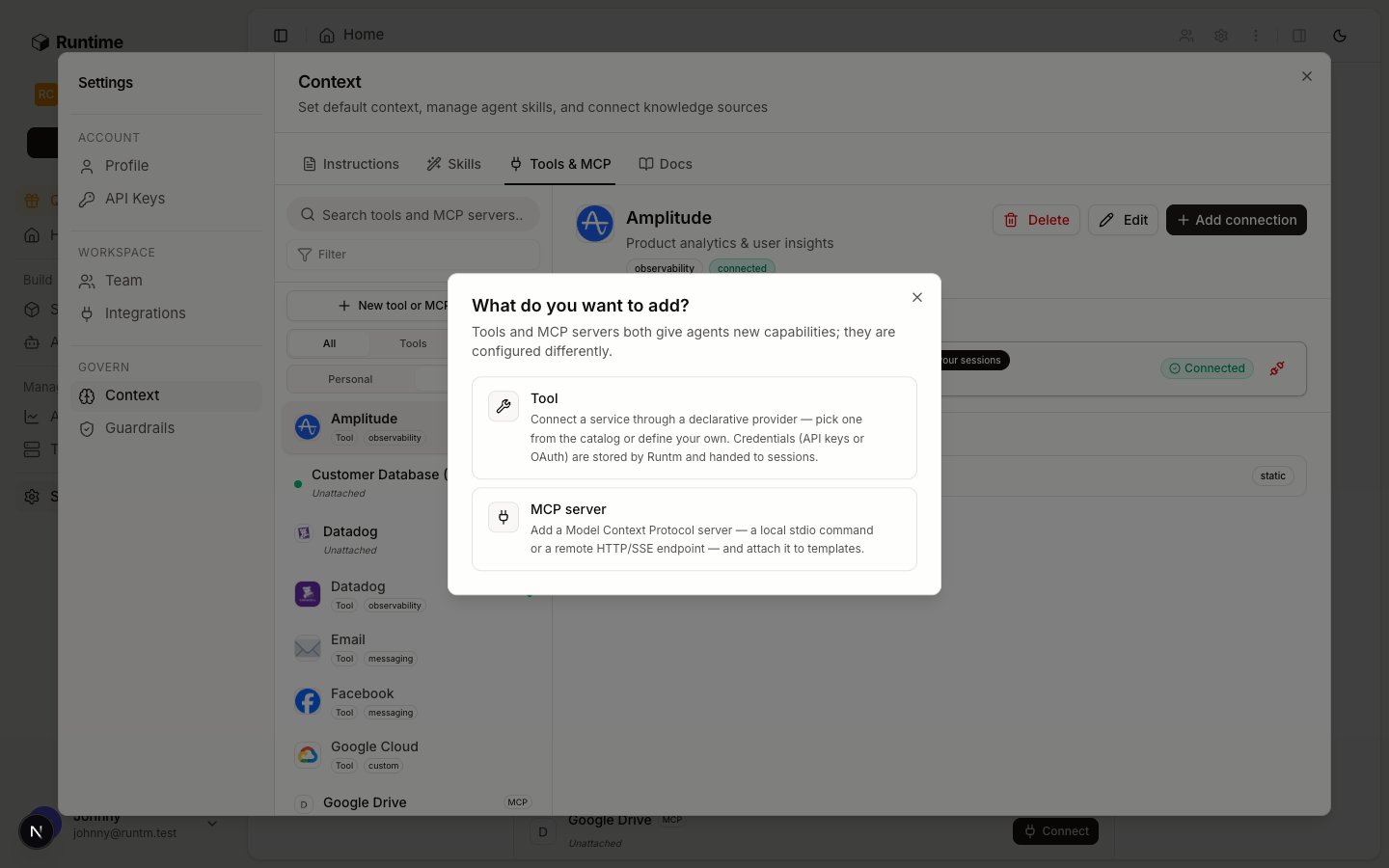 Go to **Templates**, click **New Template**, choose **Blank environment**, name it `Underwriting`, and click **Create Template**. Nothing is cloned; the template exists to carry connections, the skill and later the guardrails.
In **Settings > Context > Tools & MCP**, click **New tool or MCP server**, choose **Tool**, and define a custom provider with one static auth method. The secret lands in `MIDDESK_API_KEY`; an optional base URL lets you point the sandbox at Middesk's sandbox environment while proving.
```json theme={null}
{
"auth_methods": [
{
"id": "api_key",
"display_name": "API key",
"kind": "static",
"fields": [
{"id": "api_key", "label": "API key", "kind": "secret", "required": true},
{"id": "base_url", "label": "Base URL", "kind": "string", "required": false,
"placeholder": "https://api.middesk.com/v1"}
],
"materialization": {
"env": {"MIDDESK_API_KEY": "{fields.api_key}", "MIDDESK_BASE_URL": "{fields.base_url}"}
}
}
]
}
```
Connect the new provider and choose the agent scope, picking `Underwriting Agent`. An agent-scoped connection is used only by this agent's runs, so Middesk usage is attributed to the agent, and it reaches the agent's sessions without any skill having to require it. The CLI creates only org and personal connections, so this one is done in the dashboard. See [the credential hierarchy](/build/give-it-tools#who-the-agent-acts-as-the-credential-hierarchy).
Create a second custom provider, `postgres`, with one static field `connection_string` (kind `secret`) materialized to `POSTGRES_CONNECTION_STRING`. Connect it at org scope with a role that can only `SELECT` from the `applications`, `owners` and `documents` views. Nothing in Runtime downgrades a credential, so the read-only guarantee has to come from the database role.
Click **New tool or MCP server**, choose **Tool**, pick **Notion** from **Add a provider**, and connect it at org scope with an internal integration token that has read access to the Underwriting Policy pages. The skill cites these pages by URL.
Org and personal connections reach a session only when an attached skill lists the provider in `requires.integrations`. The skill in the next step names `middesk`, `postgres` and `notion`, so Postgres and Notion arrive through the skill and Middesk arrives both ways.
## 4. Define how it works
Read [Define how it works](/build/how-it-works/overview). The runbook is a skill, the prohibitions live in the instructions and the skill for now, and the triggers are Linear plus a schedule. Guardrails wait until step 6.
The skill has three files. `SKILL.md` is the procedure:
```markdown theme={null}
---
name: underwriting-memo
description: Assemble a merchant underwriting decision memo from Middesk, the applications database and the underwriting policy. Use for new applications, periodic reviews and discrepancy tickets.
---
# Underwriting memo
## Inputs
An application id from the Linear ticket, or merchant ids from the periodic review list.
## Procedure
1. `psql "$POSTGRES_CONNECTION_STRING" -c "SELECT ... FROM applications WHERE id = ..."`,
then the matching rows from `owners` and `documents`. SELECT only.
2. `curl -s -H "Authorization: Bearer $MIDDESK_API_KEY" "$MIDDESK_BASE_URL/businesses/"`
and `/businesses//tasks`. If the application has no Middesk business
id yet, stop and list "KYB not started" as an open flag.
3. For each task with status other than success, find its key in
references/flag-glossary.md and the matching section of the Underwriting Policy
in Notion. Resolve with a source or list as open.
4. Compare name, address, formation date and officers across application, registry
(Middesk `registrations`) and `owners`. Each mismatch becomes a flag.
5. Fill references/memo-template.md. Every line of evidence carries a source.
6. If a required document is missing, draft the request under "Document request".
7. Run `runtm-approval request --kind memo_attach --message "Memo for ready" --required-team --wait`.
On exit 0, post the memo as the ticket reply. On exit 1, report the note and stop.
8. If a document request was drafted, run a second approval with `--kind document_request`.
Never send it yourself; the approver sends it.
## Never
Change application status. Write to the database. Contact the merchant.
Query a merchant not named in the input.
```
`references/memo-template.md`, excerpt:
```markdown theme={null}
# Underwriting memo: ()
Recommendation: . Risk tier: .
## Identity and registration
| Field | Application | Registry (Middesk) | Match | Source |
|---|---|---|---|---|
## Beneficial ownership
| Owner | Application % | Verified | Source |
## Provider flags
| Flag | Status | Resolution or open question | Source |
## Document request (draft)
```
`references/flag-glossary.md` maps each Middesk task key (for example `tin`, `address_verification`, `sos_active`, `watchlist`) to what it means and which policy section governs it.
Create the skill, upload the two reference files, and declare the providers it requires.
Attach `underwriting-memo` to the `Underwriting` template and build once. Anything attached after this build is not in the snapshot until the next one.
In the agent sheet, under **Triggers**, click **Connect** on the Linear row. The OAuth flow finishes in the browser. In the **Linear** tab, keep **Default template** on `Underwriting`, and under **Team overrides** route the `Underwriting` Linear team to this template so that other teams' assignments do not launch it. Assigning a ticket to the agent, or mentioning it, launches a run; the memo comes back as agent activities and a comment on the issue.
Go to **Templates**, click **New Template**, choose **Blank environment**, name it `Underwriting`, and click **Create Template**. Nothing is cloned; the template exists to carry connections, the skill and later the guardrails.
In **Settings > Context > Tools & MCP**, click **New tool or MCP server**, choose **Tool**, and define a custom provider with one static auth method. The secret lands in `MIDDESK_API_KEY`; an optional base URL lets you point the sandbox at Middesk's sandbox environment while proving.
```json theme={null}
{
"auth_methods": [
{
"id": "api_key",
"display_name": "API key",
"kind": "static",
"fields": [
{"id": "api_key", "label": "API key", "kind": "secret", "required": true},
{"id": "base_url", "label": "Base URL", "kind": "string", "required": false,
"placeholder": "https://api.middesk.com/v1"}
],
"materialization": {
"env": {"MIDDESK_API_KEY": "{fields.api_key}", "MIDDESK_BASE_URL": "{fields.base_url}"}
}
}
]
}
```
Connect the new provider and choose the agent scope, picking `Underwriting Agent`. An agent-scoped connection is used only by this agent's runs, so Middesk usage is attributed to the agent, and it reaches the agent's sessions without any skill having to require it. The CLI creates only org and personal connections, so this one is done in the dashboard. See [the credential hierarchy](/build/give-it-tools#who-the-agent-acts-as-the-credential-hierarchy).
Create a second custom provider, `postgres`, with one static field `connection_string` (kind `secret`) materialized to `POSTGRES_CONNECTION_STRING`. Connect it at org scope with a role that can only `SELECT` from the `applications`, `owners` and `documents` views. Nothing in Runtime downgrades a credential, so the read-only guarantee has to come from the database role.
Click **New tool or MCP server**, choose **Tool**, pick **Notion** from **Add a provider**, and connect it at org scope with an internal integration token that has read access to the Underwriting Policy pages. The skill cites these pages by URL.
Org and personal connections reach a session only when an attached skill lists the provider in `requires.integrations`. The skill in the next step names `middesk`, `postgres` and `notion`, so Postgres and Notion arrive through the skill and Middesk arrives both ways.
## 4. Define how it works
Read [Define how it works](/build/how-it-works/overview). The runbook is a skill, the prohibitions live in the instructions and the skill for now, and the triggers are Linear plus a schedule. Guardrails wait until step 6.
The skill has three files. `SKILL.md` is the procedure:
```markdown theme={null}
---
name: underwriting-memo
description: Assemble a merchant underwriting decision memo from Middesk, the applications database and the underwriting policy. Use for new applications, periodic reviews and discrepancy tickets.
---
# Underwriting memo
## Inputs
An application id from the Linear ticket, or merchant ids from the periodic review list.
## Procedure
1. `psql "$POSTGRES_CONNECTION_STRING" -c "SELECT ... FROM applications WHERE id = ..."`,
then the matching rows from `owners` and `documents`. SELECT only.
2. `curl -s -H "Authorization: Bearer $MIDDESK_API_KEY" "$MIDDESK_BASE_URL/businesses/"`
and `/businesses//tasks`. If the application has no Middesk business
id yet, stop and list "KYB not started" as an open flag.
3. For each task with status other than success, find its key in
references/flag-glossary.md and the matching section of the Underwriting Policy
in Notion. Resolve with a source or list as open.
4. Compare name, address, formation date and officers across application, registry
(Middesk `registrations`) and `owners`. Each mismatch becomes a flag.
5. Fill references/memo-template.md. Every line of evidence carries a source.
6. If a required document is missing, draft the request under "Document request".
7. Run `runtm-approval request --kind memo_attach --message "Memo for ready" --required-team --wait`.
On exit 0, post the memo as the ticket reply. On exit 1, report the note and stop.
8. If a document request was drafted, run a second approval with `--kind document_request`.
Never send it yourself; the approver sends it.
## Never
Change application status. Write to the database. Contact the merchant.
Query a merchant not named in the input.
```
`references/memo-template.md`, excerpt:
```markdown theme={null}
# Underwriting memo: ()
Recommendation: . Risk tier: .
## Identity and registration
| Field | Application | Registry (Middesk) | Match | Source |
|---|---|---|---|---|
## Beneficial ownership
| Owner | Application % | Verified | Source |
## Provider flags
| Flag | Status | Resolution or open question | Source |
## Document request (draft)
```
`references/flag-glossary.md` maps each Middesk task key (for example `tin`, `address_verification`, `sos_active`, `watchlist`) to what it means and which policy section governs it.
Create the skill, upload the two reference files, and declare the providers it requires.
Attach `underwriting-memo` to the `Underwriting` template and build once. Anything attached after this build is not in the snapshot until the next one.
In the agent sheet, under **Triggers**, click **Connect** on the Linear row. The OAuth flow finishes in the browser. In the **Linear** tab, keep **Default template** on `Underwriting`, and under **Team overrides** route the `Underwriting` Linear team to this template so that other teams' assignments do not launch it. Assigning a ticket to the agent, or mentioning it, launches a run; the memo comes back as agent activities and a comment on the issue.
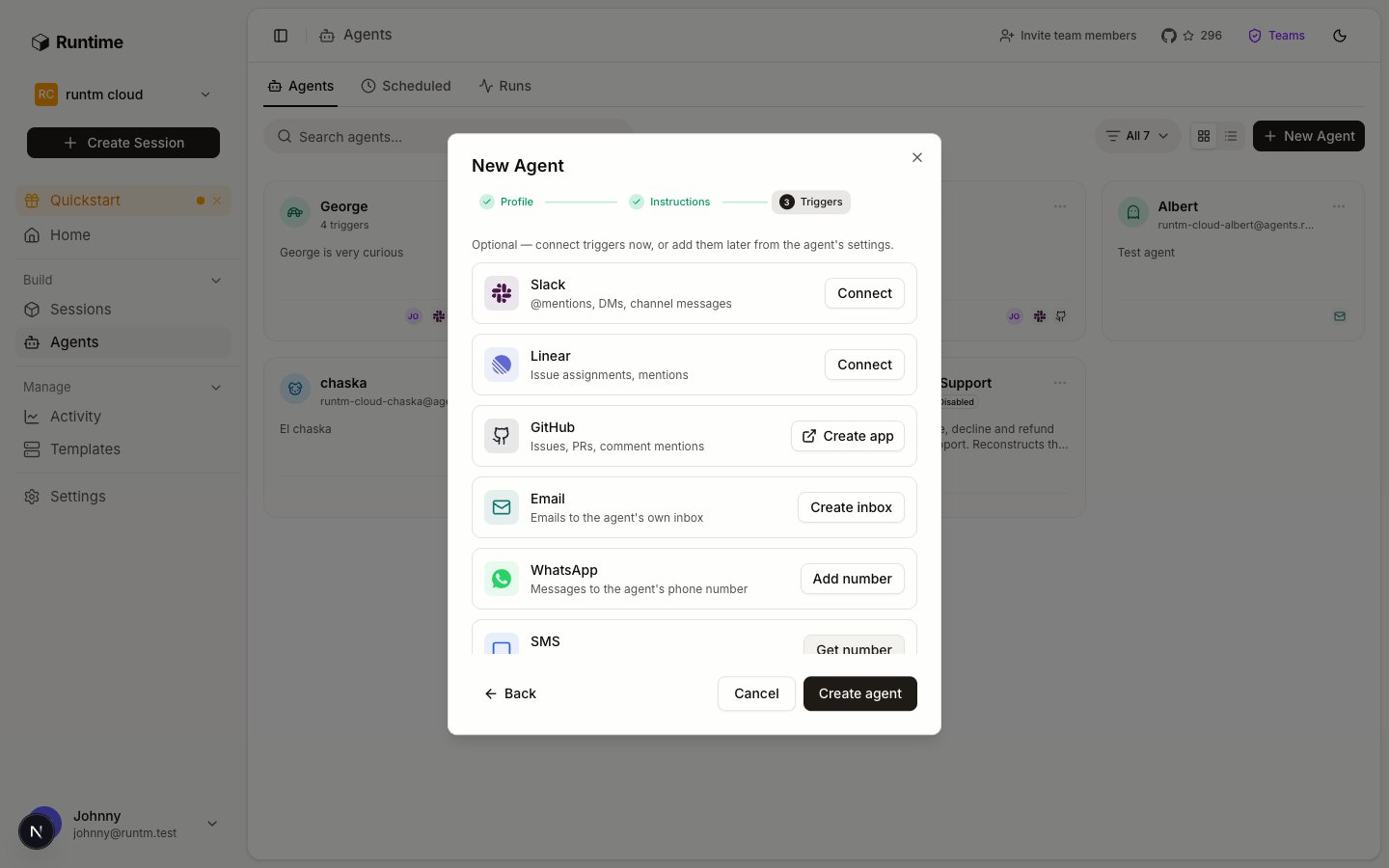 If your team does not use Linear, click **Create inbox** on the Email row instead and have the application system forward new applications to the agent's address. The reply comes back in the same email thread.
Open **Agents > Scheduled** and click **New scheduled agent**. Name it `Periodic merchant reviews`, run it as the `Underwriting Agent` roster agent so the run is graded under `periodic-review` and receives the agent-scoped Middesk key, and use this prompt:
> Run the periodic review for every merchant whose `next_review_at` is before today. One memo per merchant using the underwriting-memo skill. End with a summary table: merchant, risk tier, what changed.
Schedule it weekly on Monday at 13:00 UTC and post to the `#underwriting` Slack channel. Cron is five fields in UTC with no time zone, so 13:00 UTC is 06:00 in San Francisco in summer and 05:00 in winter. Create it disabled; you enable it in step 5 after a Run now.
## 5. Prove it works
Read [Prove it works and iterate](/build/launch-and-iterate). No guardrail exists yet on purpose. The agent is safe by scope: the database role is read-only, Middesk is called with a key you can point at its sandbox environment, the sandbox is destroyed after each run, and the Linear team is a test team or the schedule is disabled.
Put five applications with known outcomes in the database (a staging copy is fine) and write down the expected memo before running anything.
| Case | Input | Expected grade | Why |
| -------------------------- | --------------------------------------------------------------------- | ----------------------------------------- | -------------------------------------------------------------------------------------------------------- |
| Clean approval | Application matches registry and ownership; all Middesk tasks succeed | `new-application`, pass, `risk_tier: low` | Every flag resolved, memo complete, recommendation approve |
| Beneficial-owner mismatch | Application lists 60/40 ownership; state filing shows a third officer | `discrepancy`, pass | The third officer traced to the registry source, listed as open, document request drafted |
| Registry status | Middesk `sos_active` fails, entity shows as inactive | `new-application`, pass | Flag resolved against the policy section on inactive entities, recommendation decline or needs documents |
| Periodic review, no change | Approved merchant, nothing changed since last review | `periodic-review`, pass | Memo says nothing changed and cites the checks performed |
| Missing document | Application without a bank statement | `discrepancy`, pass with a draft request | Open flag plus a document request draft, then an approval request |
Also include one case you expect to fail the grade, such as a ticket that names an application id that does not exist, so you see what a failure looks like.
Assign the first three tickets to the agent in the test Linear team. Each launches a session. Watch it under **Sessions** or **Agents > Runs**. When a run reaches the `memo_attach` approval, the session card shows **Approve** and **Reject**; approve to let it finish so it can be graded.
If your team does not use Linear, click **Create inbox** on the Email row instead and have the application system forward new applications to the agent's address. The reply comes back in the same email thread.
Open **Agents > Scheduled** and click **New scheduled agent**. Name it `Periodic merchant reviews`, run it as the `Underwriting Agent` roster agent so the run is graded under `periodic-review` and receives the agent-scoped Middesk key, and use this prompt:
> Run the periodic review for every merchant whose `next_review_at` is before today. One memo per merchant using the underwriting-memo skill. End with a summary table: merchant, risk tier, what changed.
Schedule it weekly on Monday at 13:00 UTC and post to the `#underwriting` Slack channel. Cron is five fields in UTC with no time zone, so 13:00 UTC is 06:00 in San Francisco in summer and 05:00 in winter. Create it disabled; you enable it in step 5 after a Run now.
## 5. Prove it works
Read [Prove it works and iterate](/build/launch-and-iterate). No guardrail exists yet on purpose. The agent is safe by scope: the database role is read-only, Middesk is called with a key you can point at its sandbox environment, the sandbox is destroyed after each run, and the Linear team is a test team or the schedule is disabled.
Put five applications with known outcomes in the database (a staging copy is fine) and write down the expected memo before running anything.
| Case | Input | Expected grade | Why |
| -------------------------- | --------------------------------------------------------------------- | ----------------------------------------- | -------------------------------------------------------------------------------------------------------- |
| Clean approval | Application matches registry and ownership; all Middesk tasks succeed | `new-application`, pass, `risk_tier: low` | Every flag resolved, memo complete, recommendation approve |
| Beneficial-owner mismatch | Application lists 60/40 ownership; state filing shows a third officer | `discrepancy`, pass | The third officer traced to the registry source, listed as open, document request drafted |
| Registry status | Middesk `sos_active` fails, entity shows as inactive | `new-application`, pass | Flag resolved against the policy section on inactive entities, recommendation decline or needs documents |
| Periodic review, no change | Approved merchant, nothing changed since last review | `periodic-review`, pass | Memo says nothing changed and cites the checks performed |
| Missing document | Application without a bank statement | `discrepancy`, pass with a draft request | Open flag plus a document request draft, then an approval request |
Also include one case you expect to fail the grade, such as a ticket that names an application id that does not exist, so you see what a failure looks like.
Assign the first three tickets to the agent in the test Linear team. Each launches a session. Watch it under **Sessions** or **Agents > Runs**. When a run reaches the `memo_attach` approval, the session card shows **Approve** and **Reject**; approve to let it finish so it can be graded.
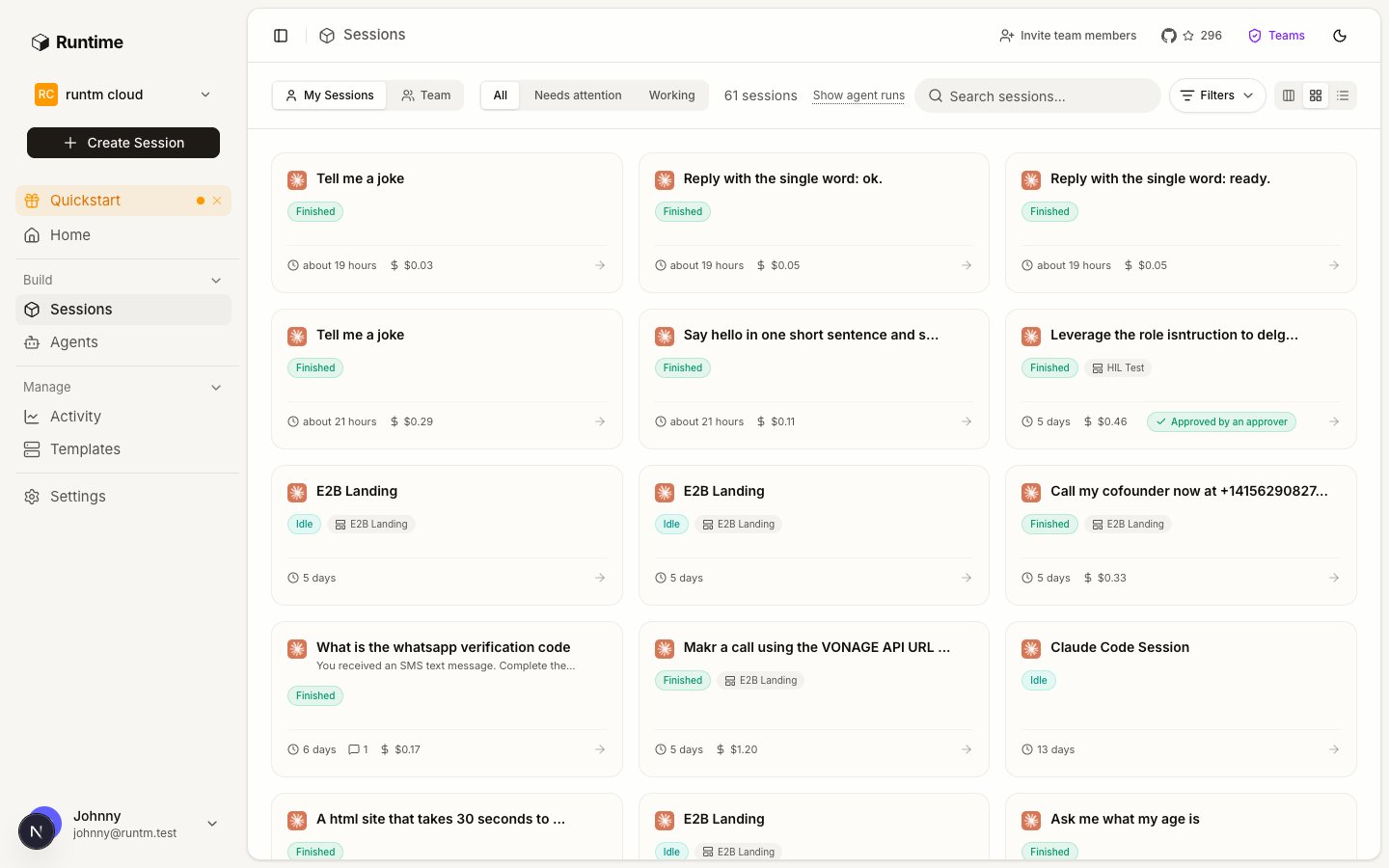 On **Agents > Scheduled**, use **Run now** on `Periodic merchant reviews`. It executes the identical code path a Monday tick takes, so a misconfigured schedule fails in front of you instead of silently at 13:00 UTC. Read the summary in `#underwriting`.
A few minutes after each run finishes, read its grade. Then open **Activity > Agents** and pick `Underwriting Agent`: six graded runs, the hit rate, and value returned at \$90 per success.
A memo that missed the third officer gets a step in the skill. A grader that passed a memo without sources gets a stricter `success_criteria`. A run that could not read `documents` gets the view added to the role. Change one thing, re-run the affected case, and only when all five pass enable the schedule.
While the cases run, write down every command pattern and host the agent used. That list is the input to step 6.
## 6. Add guardrails and approvals
Read [Add guardrails and approvals](/build/guardrails-and-approvals). Only now, with five passing cases, do you know what the agent runs. Add one rule at a time and re-run a seeded case after each.
Under **Settings > Guardrails > Allowlists**, create deny rules for anything that writes through `psql`, then attach them to the `Underwriting` template.
Creating a Middesk business is a `POST` to `/v1/businesses`. Ordering extra verifications is a `POST` under `/v1/businesses//`. Deny beats allow whenever both match, so the deny pattern itself has to leave out any path you intend to keep.
If onboarding already created the Middesk business and the runbook only reads, deny every `POST`:
If the runbook must create the business itself, deny only writes below an existing business plus every `PATCH` and `DELETE`. The create call matches no deny rule and falls through to the allow rule, so it needs no rule of its own:
On the **Allowlists** tab set the default policy to `ask`, so any command outside the patterns above pauses for a permission decision instead of running. The CLI does not set this; use the tab or `PUT /api/cloud/organizations//allowlist-policy` with `{"default_policy": "ask"}`.
As soon as one network rule exists, egress is deny-all plus the list. This agent needs five hosts.
Allowlist rules are materialized into the snapshot; network rules apply at session creation. Rebuild, then re-run the clean approval and the missing-document cases. If one now stalls, the last rule you added is the cause.
The skill already requests two approvals: `memo_attach` before the memo is posted to the ticket, and `document_request` before any request goes to the merchant. Both use `--required-team ` so only underwriters can resolve them; admins and owners always can. Approvals are resolved on the session card or with the CLI, not in Slack or Linear.
```bash theme={null}
runtm-approval request --kind memo_attach \
--message "Memo for APP-4471 ready: approve with conditions, risk tier medium" \
--required-team --wait
```
## What stays human
* **The decision.** The memo ends in a recommendation; an underwriter approves, declines or conditions the application in the application system. The agent has no path to that status field: the database role cannot write, and the deny rules refuse the attempt.
* **Anything sent to the merchant.** The agent drafts the document request; a person sends it after the `document_request` approval.
* **Ordering new verifications.** Unless you deliberately allow the single create-business path, the agent reads what onboarding already ordered.
* **Changing the rubric.** When the grader disagrees with an underwriter, the underwriter edits the success criteria, not the agent.
## Gotchas
* **Middesk is not built in.** It is a custom provider you define; the JSON above is the whole definition. Persona and Alloy are set up the same way with their own field names and base URLs.
* **The agent-scoped Middesk key applies only to this agent's runs.** A session someone opens from the `Underwriting` template by hand does not receive it, and falls to a personal or org-wide Middesk connection if one exists, otherwise `middesk` shows as an unmet requirement.
* **Postgres and Notion arrive through the skill.** If `requires.integrations` on `underwriting-memo` does not list `postgres` and `notion`, those org-wide connections are silently left out of the session.
* **Attached is not built.** After attaching the skill or a rule, `template get` shows `attachments_changed_since_build: true` until you build again.
* **Schedules run in UTC.** `0 13 * * 1` is Monday 13:00 UTC all year; local time shifts with daylight saving.
* **A periodic run with no post target is silent.** Set the Slack channel on the schedule or the summary is only visible under **Sessions**.
* **Deny beats allow.** A deny pattern such as `curl*-X POST*api.middesk.com*` also matches the create-business call, and no allow rule can rescue it. If the runbook creates the business, narrow the deny to `api.middesk.com/v1/businesses/*` so the create path never matches a deny rule.
* **Approvals with nobody watching wait forever.** Scope `--required-team` to the team that is on rotation, and give the runbook a `wait --timeout` so a run fails cleanly at end of day instead of idling.
A ticket-driven agent that reconstructs a charge and drafts the reply.
A scheduled agent that assembles review packets from Stripe and the warehouse.
The six steps this example follows.
On **Agents > Scheduled**, use **Run now** on `Periodic merchant reviews`. It executes the identical code path a Monday tick takes, so a misconfigured schedule fails in front of you instead of silently at 13:00 UTC. Read the summary in `#underwriting`.
A few minutes after each run finishes, read its grade. Then open **Activity > Agents** and pick `Underwriting Agent`: six graded runs, the hit rate, and value returned at \$90 per success.
A memo that missed the third officer gets a step in the skill. A grader that passed a memo without sources gets a stricter `success_criteria`. A run that could not read `documents` gets the view added to the role. Change one thing, re-run the affected case, and only when all five pass enable the schedule.
While the cases run, write down every command pattern and host the agent used. That list is the input to step 6.
## 6. Add guardrails and approvals
Read [Add guardrails and approvals](/build/guardrails-and-approvals). Only now, with five passing cases, do you know what the agent runs. Add one rule at a time and re-run a seeded case after each.
Under **Settings > Guardrails > Allowlists**, create deny rules for anything that writes through `psql`, then attach them to the `Underwriting` template.
Creating a Middesk business is a `POST` to `/v1/businesses`. Ordering extra verifications is a `POST` under `/v1/businesses//`. Deny beats allow whenever both match, so the deny pattern itself has to leave out any path you intend to keep.
If onboarding already created the Middesk business and the runbook only reads, deny every `POST`:
If the runbook must create the business itself, deny only writes below an existing business plus every `PATCH` and `DELETE`. The create call matches no deny rule and falls through to the allow rule, so it needs no rule of its own:
On the **Allowlists** tab set the default policy to `ask`, so any command outside the patterns above pauses for a permission decision instead of running. The CLI does not set this; use the tab or `PUT /api/cloud/organizations//allowlist-policy` with `{"default_policy": "ask"}`.
As soon as one network rule exists, egress is deny-all plus the list. This agent needs five hosts.
Allowlist rules are materialized into the snapshot; network rules apply at session creation. Rebuild, then re-run the clean approval and the missing-document cases. If one now stalls, the last rule you added is the cause.
The skill already requests two approvals: `memo_attach` before the memo is posted to the ticket, and `document_request` before any request goes to the merchant. Both use `--required-team ` so only underwriters can resolve them; admins and owners always can. Approvals are resolved on the session card or with the CLI, not in Slack or Linear.
```bash theme={null}
runtm-approval request --kind memo_attach \
--message "Memo for APP-4471 ready: approve with conditions, risk tier medium" \
--required-team --wait
```
## What stays human
* **The decision.** The memo ends in a recommendation; an underwriter approves, declines or conditions the application in the application system. The agent has no path to that status field: the database role cannot write, and the deny rules refuse the attempt.
* **Anything sent to the merchant.** The agent drafts the document request; a person sends it after the `document_request` approval.
* **Ordering new verifications.** Unless you deliberately allow the single create-business path, the agent reads what onboarding already ordered.
* **Changing the rubric.** When the grader disagrees with an underwriter, the underwriter edits the success criteria, not the agent.
## Gotchas
* **Middesk is not built in.** It is a custom provider you define; the JSON above is the whole definition. Persona and Alloy are set up the same way with their own field names and base URLs.
* **The agent-scoped Middesk key applies only to this agent's runs.** A session someone opens from the `Underwriting` template by hand does not receive it, and falls to a personal or org-wide Middesk connection if one exists, otherwise `middesk` shows as an unmet requirement.
* **Postgres and Notion arrive through the skill.** If `requires.integrations` on `underwriting-memo` does not list `postgres` and `notion`, those org-wide connections are silently left out of the session.
* **Attached is not built.** After attaching the skill or a rule, `template get` shows `attachments_changed_since_build: true` until you build again.
* **Schedules run in UTC.** `0 13 * * 1` is Monday 13:00 UTC all year; local time shifts with daylight saving.
* **A periodic run with no post target is silent.** Set the Slack channel on the schedule or the summary is only visible under **Sessions**.
* **Deny beats allow.** A deny pattern such as `curl*-X POST*api.middesk.com*` also matches the create-business call, and no allow rule can rescue it. If the runbook creates the business, narrow the deny to `api.middesk.com/v1/businesses/*` so the create path never matches a deny rule.
* **Approvals with nobody watching wait forever.** Scope `--required-team` to the team that is on rotation, and give the runbook a `wait --timeout` so a run fails cleanly at end of day instead of idling.
A ticket-driven agent that reconstructs a charge and drafts the reply.
A scheduled agent that assembles review packets from Stripe and the warehouse.
The six steps this example follows.