Give an agent persistent memory in Notion or Confluence
Connect Notion or Confluence to one agent and make a playbook page and a memory page its source of truth, so every run reads what earlier runs learned and writes back what it learned. Read when an agent should remember across sessions, or when your team already keeps playbooks in a wiki.
Each run of the agent starts by reading two pages: a playbook your team owns and a memory page the agent maintains. Before it finishes, the agent appends a dated entry to the memory page. The next run, from any trigger and in any fresh session, starts with what the previous runs learned.This is the recommended way to give an agent memory. Sessions are disposable and every run boots from a clean template snapshot, so anything written only inside the sandbox is gone when the session ends. A wiki page keeps that memory outside the sandbox. People can read and correct it in the tool they already use, and it is versioned there, without a PR or a template rebuild. If the memory has to live in git, see Agent that opens a PR on your GitHub repo.
In Notion, create an internal integration under Settings > Connections > Develop or manage integrations and copy its secret. Open the playbook page and the memory page and add the integration under Connections. The token can read and write only the pages shared with it.Give it Read content, Update content and Insert content. It needs nothing else.
2
Connect Notion to the agent only
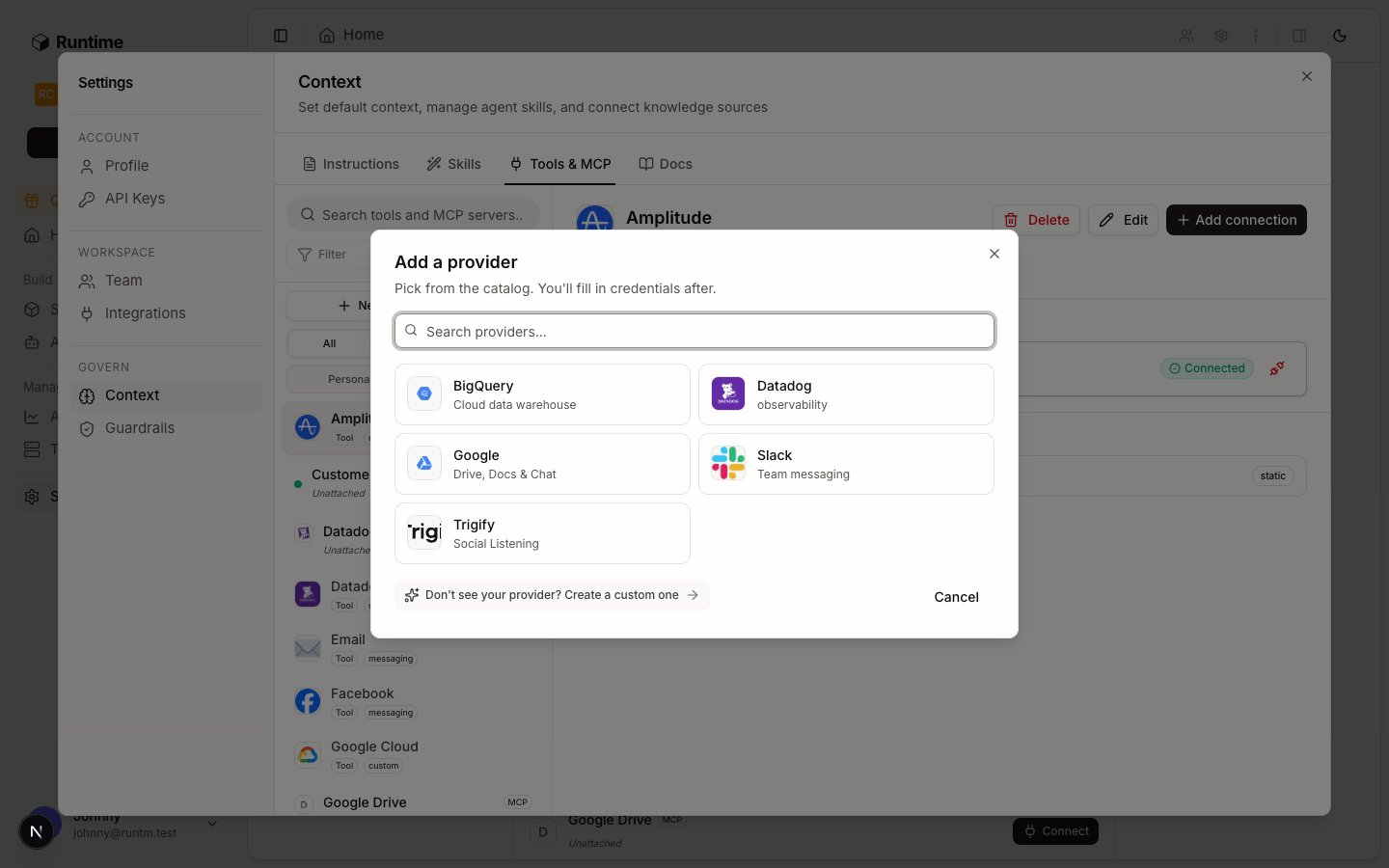
Notion is a built-in provider. In Settings > Context > Tools & MCP, click New tool or MCP server, choose Tool, and pick Notion from the catalog.
Notion is in the built-in catalog.
On the Notion page, click Add connection. Choose API key, set Scope to Agent, pick the agent, and paste the integration secret into Add a personal API token. Click Connect. Sessions that run as that agent get the token as NOTION_API_TOKEN. No other agent or person receives it.
An agent-scoped connection is used only in that agent's sessions.
1
Create an Atlassian API token
Sign in as the account the agent should act as, ideally a dedicated bot user, and create an API token at id.atlassian.com/manage-profile/security/api-tokens. Give that user view and edit rights only on the space that holds the playbook and memory pages.
2
Define Confluence as a custom provider
Confluence is not in the built-in catalog, so define it once as a custom provider. In Settings > Context > Tools & MCP, click New tool or MCP server, choose Tool, and add one static auth method with three fields: the site URL, the bot user’s email and the API token.
3
Connect Confluence to the agent only
Pick Confluence from the catalog, click Add connection, fill in the three fields, set Scope to Agent and pick the agent. The dialog is the same one shown for Notion. Sessions that run as the agent get CONFLUENCE_BASE_URL, CONFLUENCE_EMAIL and CONFLUENCE_API_TOKEN.
1
Write the memory skill
The skill tells the agent where its memory lives and when to read and write it. Create it in Settings > Context > Skills with this SKILL.md, using your page ids. List the provider slug (notion or confluence) under requires.integrations.
# MemoryYour playbook and your memory live outside this sandbox. Sessions aredeleted after each run, so anything you only write locally is lost.- Playbook (read-only, owned by the team): <playbook page id>- Memory (yours, append-only): <memory page id>At the start of every run, read both pages before doing anything else.Follow the playbook. Use the memory for context, never to override it.Before your final answer, append one entry to the memory page:`YYYY-MM-DD: <what happened, what you learned, what to do next time>`.Keep it under five lines. Never edit or delete earlier entries, and neverwrite to the playbook. Suggest playbook changes in your answer instead.Notion: send `Authorization: Bearer $NOTION_API_TOKEN` and`Notion-Version: 2022-06-28` to https://api.notion.com. Read with`GET /v1/blocks/<page id>/children`, append with`PATCH /v1/blocks/<memory page id>/children`.Confluence: authenticate with `$CONFLUENCE_EMAIL:$CONFLUENCE_API_TOKEN`against $CONFLUENCE_BASE_URL. Read with`GET /wiki/api/v2/pages/<id>?body-format=storage`, append by sending theexisting body plus the new entry to `PUT /wiki/api/v2/pages/<id>`with `version.number` set to the current version + 1.
2
Attach it to the agent's template and rebuild
Attach the skill to the agent’s default template, then build. Like any skill, it is not in sessions until the template builds.
3
Edit the playbook, not the template
From now on, change how the agent works by editing the playbook page. The next run reads the new version. Template context and skills still need a rebuild or a new session to change. The playbook page does not.
Run the agent twice, each time in a new session. Ask the first run to note something specific (“remember that refunds over $500 need a second reviewer"). Ask the second run what it knows about refunds over $500. The second run should quote the memory entry, and the memory page should show one new dated entry per run.
Notion returns 404 for pages it can see in the UI. The integration has to be added under Connections on each page, or on a parent page. A valid token with no shared pages finds nothing.
Dashboard sessions don’t get agent connections. A session you open from the dashboard runs as no agent, so it has no NOTION_API_TOKEN unless you add a personal connection. Test through the agent’s trigger, or with --agent-id.
Keep the playbook read-only to the agent. In Confluence, use page restrictions so the bot user can edit only the memory page. In Notion, an integration has the same capabilities on every page shared with it. The skill’s rule and Notion’s page history are your guardrail, or you can use a second read-only integration for the playbook.
Memory grows. Have someone prune or summarize the memory page now and then, or tell the agent to read only the latest 50 entries. A long page costs tokens on every run.
Confluence updates need the version number. A PUT with a stale version.number returns 409. The agent should read the page, then write right away.
Tools and connections
Providers, connections and scopes, and which connection a run uses.
{"docsConfig":{"$schema":"https://mintlify.com/docs.json","theme":"mint","name":"Runtime","colors":{"primary":"#18181b","light":"#71717a","dark":"#18181b"},"favicon":"https://mintcdn.com/runtm/5BRbZxh1joq_9si2/images/favicon.svg?fit=max\u0026auto=format\u0026n=5BRbZxh1joq_9si2\u0026q=85\u0026s=957716cbd1f84c5995ece94d6ac63ffd","logo":{"light":"https://mintcdn.com/runtm/5BRbZxh1joq_9si2/images/logo-light.svg?fit=max\u0026auto=format\u0026n=5BRbZxh1joq_9si2\u0026q=85\u0026s=dd91f6d3dfa4840b854b016d7add405d","dark":"https://mintcdn.com/runtm/5BRbZxh1joq_9si2/images/logo-dark.svg?fit=max\u0026auto=format\u0026n=5BRbZxh1joq_9si2\u0026q=85\u0026s=996520fef61624cf8b0b4583342e3300"},"api":{"mdx":{"server":"https://app.runtm.com/api/cloud","auth":{"method":"bearer","name":null}}},"appearance":{"default":"light","strict":null},"background":{"decoration":null,"color":{"light":"#fafafa","dark":"#18181b"}},"footer":{"socials":{"github":"https://github.com/runtm-ai/runtm","x":"https://twitter.com/runtm_ai"}},"styling":{"latex":true},"navigation":{"global":{"anchors":[{"anchor":"GitHub","href":"https://github.com/runtm-ai/runtm","icon":"github"}]},"pages":[]}},"deployment":{"deploymentMetadataValue":{"subdomain":"runtm","hasAudioNarration":false,"actualSubdomain":"runtm","customDomains":["docs.runtm.com"],"gitSource":{"type":"github","owner":"runtm-ai","repo":"runtm","deployBranch":"main","contentDirectory":"docs","isPrivate":true,"mountPath":"","label":""},"chroma":{"liveDeploymentHistoryId":"6ae513ed05ddb97afbab990f","collectionId":"63d087b9-cc50-4139-8512-4005e4c5a340","schemaVersion":"v3","latestBuiltDeploymentHistoryId":"6ae513ed05ddb97afbab990f"},"entitlements":{},"buildId":"6ae513ed05ddb97afbab990f","clientVersion":"0.0.4044","searchFilterCounts":[{"language":"default","tag":"API Reference","count":222},{"language":"default","tag":"Open Source","count":49},{"language":"default","tag":"Sessions","count":47},{"language":"default","tag":"Documentation","count":24},{"language":"default","tag":"Templates","count":22},{"language":"default","tag":"Context","count":21},{"language":"default","tag":"Guides","count":19},{"language":"default","tag":"CLI Reference","count":17},{"language":"default","tag":"Linear","count":16},{"language":"default","tag":"Skills","count":14}]},"assistantConfig":{"enableAskAiButton":false,"enableStarterQuestions":false,"enableAskAiSearchBar":true},"basePath":"","hasChatPermissions":false,"hasWebMcpPermissions":false,"toggles":[{"name":"kill-isr","enabled":true,"variant":{"name":"disabled","enabled":false,"feature_enabled":true},"impressionData":false},{"name":"agent-mintlify-slack","enabled":true,"variant":{"name":"disabled","enabled":false,"feature_enabled":true},"impressionData":false},{"name":"agent-integrations-settings","enabled":true,"variant":{"name":"disabled","enabled":false,"feature_enabled":true},"impressionData":false},{"name":"automations-pr-grouping","enabled":true,"variant":{"name":"disabled","enabled":false,"feature_enabled":true},"impressionData":false},{"name":"custom-prefix","enabled":true,"variant":{"name":"disabled","enabled":false,"feature_enabled":true},"impressionData":false},{"name":"analytics-v7","enabled":true,"variant":{"name":"disabled","enabled":false,"feature_enabled":true},"impressionData":false},{"name":"user-flows-analytics","enabled":true,"variant":{"name":"disabled","enabled":false,"feature_enabled":true},"impressionData":false},{"name":"no-publish-flow","enabled":true,"variant":{"name":"disabled","enabled":false,"feature_enabled":true},"impressionData":false},{"name":"workos-onboarding","enabled":true,"variant":{"name":"disabled","enabled":false,"feature_enabled":true},"impressionData":false},{"name":"llms-txt-v2","enabled":true,"variant":{"name":"disabled","enabled":false,"feature_enabled":true},"impressionData":false},{"name":"snapshot-serving-live","enabled":true,"variant":{"name":"disabled","enabled":false,"feature_enabled":true},"impressionData":false},{"name":"stripTemperatureMiddleware","enabled":true,"variant":{"name":"disabled","enabled":false,"feature_enabled":true},"impressionData":false},{"name":"support-platform-pylon-zendesk","enabled":true,"variant":{"name":"disabled","enabled":false,"feature_enabled":true},"impressionData":false},{"name":"snapshot-serving","enabled":true,"variant":{"name":"disabled","enabled":false,"feature_enabled":true},"impressionData":false},{"name":"instant-rollback","enabled":true,"variant":{"name":"disabled","enabled":false,"feature_enabled":true},"impressionData":false},{"name":"granular-notifications-server","enabled":true,"variant":{"name":"disabled","enabled":false,"feature_enabled":true},"impressionData":false},{"name":"granular-notifications","enabled":true,"variant":{"name":"disabled","enabled":false,"feature_enabled":true},"impressionData":false},{"name":"automations-fable","enabled":true,"variant":{"name":"disabled","enabled":false,"feature_enabled":true},"impressionData":false},{"name":"fixed-ai-action-pricing","enabled":true,"variant":{"name":"disabled","enabled":false,"feature_enabled":true},"impressionData":false},{"name":"automation-resolve-merge-conflict","enabled":true,"variant":{"name":"disabled","enabled":false,"feature_enabled":true},"impressionData":false},{"name":"scoped-publishing","enabled":true,"variant":{"name":"disabled","enabled":false,"feature_enabled":true},"impressionData":false},{"name":"mintql","enabled":true,"variant":{"name":"disabled","enabled":false,"feature_enabled":true},"impressionData":false},{"name":"page-level-analytics","enabled":true,"variant":{"name":"disabled","enabled":false,"feature_enabled":true},"impressionData":false},{"name":"editor-version-history-v2","enabled":true,"variant":{"name":"disabled","enabled":false,"feature_enabled":true},"impressionData":false},{"name":"billing-page-v2","enabled":true,"variant":{"name":"disabled","enabled":false,"feature_enabled":true},"impressionData":false},{"name":"full-page-search","enabled":true,"variant":{"name":"disabled","enabled":false,"feature_enabled":true},"impressionData":false},{"name":"workspace-projects","enabled":true,"variant":{"name":"disabled","enabled":false,"feature_enabled":true},"impressionData":false},{"name":"assistant-v5","enabled":true,"variant":{"name":"disabled","enabled":false,"feature_enabled":true},"impressionData":false},{"name":"byok-sep-25","enabled":true,"variant":{"name":"disabled","enabled":false,"feature_enabled":true},"impressionData":false},{"name":"fork-pr-previews","enabled":true,"variant":{"name":"disabled","enabled":false,"feature_enabled":true},"impressionData":false},{"name":"revalidation-jwt","enabled":true,"variant":{"name":"disabled","enabled":false,"feature_enabled":true},"impressionData":false},{"name":"vite-origin","enabled":true,"variant":{"name":"disabled","enabled":false,"feature_enabled":true},"impressionData":false},{"name":"billing-updated-9-15","enabled":true,"variant":{"name":"disabled","enabled":false,"feature_enabled":true},"impressionData":false},{"name":"workos-sso-scim","enabled":true,"variant":{"name":"disabled","enabled":false,"feature_enabled":true},"impressionData":false},{"name":"hobby-abuse-scan","enabled":true,"variant":{"name":"disabled","enabled":false,"feature_enabled":true},"impressionData":false},{"name":"dashboard-inbox","enabled":true,"variant":{"name":"disabled","enabled":false,"feature_enabled":true},"impressionData":false},{"name":"workos-signup","enabled":true,"variant":{"name":"disabled","enabled":false,"feature_enabled":true},"impressionData":false},{"name":"turbopuffer-dual-write","enabled":true,"variant":{"name":"disabled","enabled":false,"feature_enabled":true},"impressionData":false},{"name":"workos-enabled","enabled":true,"variant":{"name":"disabled","enabled":false,"feature_enabled":true},"impressionData":false},{"name":"approve-review-flow","enabled":true,"variant":{"name":"disabled","enabled":false,"feature_enabled":true},"impressionData":false},{"name":"sso-setup-deadline-banner","enabled":true,"variant":{"name":"disabled","enabled":false,"feature_enabled":true},"impressionData":false}],"googleFontsInlined":false},"customCss":[],"page":{"pagePath":"guides/recipes/agent-memory-in-notion-or-confluence","slug":"/guides/recipes/agent-memory-in-notion-or-confluence","pageMetadata":{"title":"Give an agent persistent memory in Notion or Confluence","sidebarTitle":"Persistent memory in Notion or Confluence","description":"Connect Notion or Confluence to one agent and make a playbook page and a memory page its source of truth, so every run reads what earlier runs learned and writes back what it learned. Read when an agent should remember across sessions, or when your team already keeps playbooks in a wiki.","keywords":["memory","persistent memory","notion","confluence","playbook","knowledge","wiki","across sessions"],"href":"/guides/recipes/agent-memory-in-notion-or-confluence"},"description":{"compiledSource":"\"use strict\";\nconst {jsx: _jsx} = arguments[0];\nconst {useMDXComponents: _provideComponents} = arguments[0];\nfunction _createMdxContent(props) {\n const _components = {\n p: \"p\",\n ..._provideComponents(),\n ...props.components\n };\n return _jsx(_components.p, {\n children: \"Connect Notion or Confluence to one agent and make a playbook page and a memory page its source of truth, so every run reads what earlier runs learned and writes back what it learned. Read when an agent should remember across sessions, or when your team already keeps playbooks in a wiki.\"\n });\n}\nfunction MDXContent(props = {}) {\n const {wrapper: MDXLayout} = {\n ..._provideComponents(),\n ...props.components\n };\n return MDXLayout ? _jsx(MDXLayout, {\n ...props,\n children: _jsx(_createMdxContent, {\n ...props\n })\n }) : _createMdxContent(props);\n}\nreturn {\n default: MDXContent\n};\n","frontmatter":{},"scope":{}},"pageType":"default","mdx":{"mdxSource":{"compiledSource":"\"use strict\";const{Fragment:_Fragment,jsx:_jsx,jsxs:_jsxs}=arguments[0];const{useMDXComponents:_provideComponents}=arguments[0];function _createMdxContent(props){const _components={a:`a`,code:`code`,li:`li`,p:`p`,pre:`pre`,span:`span`,strong:`strong`,ul:`ul`,..._provideComponents(),...props.components},{Card,CodeBlock,Frame,Heading,OptimizedImage,Step,Steps,Tab,Tabs,Visibility}=_components;if(!Card)_missingMdxReference(`Card`,true);if(!CodeBlock)_missingMdxReference(`CodeBlock`,true);if(!Frame)_missingMdxReference(`Frame`,true);if(!Heading)_missingMdxReference(`Heading`,true);if(!OptimizedImage)_missingMdxReference(`OptimizedImage`,true);if(!Step)_missingMdxReference(`Step`,true);if(!Steps)_missingMdxReference(`Steps`,true);if(!Tab)_missingMdxReference(`Tab`,true);if(!Tabs)_missingMdxReference(`Tabs`,true);if(!Visibility)_missingMdxReference(`Visibility`,true);return _jsxs(_Fragment,{children:[_jsx(Heading,{level:`2`,id:`outcome`,children:`Outcome`}),`\n`,_jsxs(_components.p,{children:[`Each run of the agent starts by reading two pages: a `,_jsx(_components.strong,{children:`playbook`}),` your team owns and a `,_jsx(_components.strong,{children:`memory`}),` page the agent maintains. Before it finishes, the agent appends a dated entry to the memory page. The next run, from any trigger and in any fresh session, starts with what the previous runs learned.`]}),`\n`,_jsxs(_components.p,{children:[`This is the recommended way to give an agent memory. Sessions are disposable and every run boots from a clean template snapshot, so anything written only inside the sandbox is gone when the session ends. A wiki page keeps that memory outside the sandbox. People can read and correct it in the tool they already use, and it is versioned there, without a PR or a template rebuild. If the memory has to live in git, see `,_jsx(_components.a,{href:`/guides/recipes/repo-agent-opens-prs`,children:`Agent that opens a PR on your GitHub repo`}),`.`]}),`\n`,_jsx(Heading,{level:`2`,id:`before-you-start`,children:`Before you start`}),`\n`,_jsxs(_components.ul,{children:[`\n`,_jsx(_components.li,{children:`You are an org admin.`}),`\n`,_jsxs(_components.li,{children:[`The agent exists on the roster and has a default template. See `,_jsx(_components.a,{href:`/build/define-the-job`,children:`Create the agent`}),`.`]}),`\n`,_jsx(_components.li,{children:`You can create an integration in Notion, or an API token in Atlassian, for the account the agent should act as.`}),`\n`,_jsx(_components.li,{children:`Two pages exist: a playbook (for example “Support playbook”) and an empty memory page (for example “Support agent memory”). Copy their URLs or ids.`}),`\n`]}),`\n`,_jsx(Heading,{level:`2`,id:`do-it`,children:`Do it`}),`\n`,_jsxs(Tabs,{children:[_jsx(Tab,{title:`Notion`,id:`notion`,children:_jsxs(Steps,{children:[_jsxs(Step,{title:`Create a Notion integration and share the pages`,children:[_jsxs(_components.p,{children:[`In Notion, create an internal integration under `,_jsx(_components.strong,{children:`Settings > Connections > Develop or manage integrations`}),` and copy its secret. Open the playbook page and the memory page and add the integration under `,_jsx(_components.strong,{children:`Connections`}),`. The token can read and write only the pages shared with it.`]}),_jsxs(_components.p,{children:[`Give it `,_jsx(_components.strong,{children:`Read content`}),`, `,_jsx(_components.strong,{children:`Update content`}),` and `,_jsx(_components.strong,{children:`Insert content`}),`. It needs nothing else.`]})]}),_jsxs(Step,{title:`Connect Notion to the agent only`,children:[_jsxs(_components.p,{children:[`Notion is a built-in provider. In `,_jsx(_components.strong,{children:`Settings > Context > Tools \u0026 MCP`}),`, click `,_jsx(_components.strong,{children:`New tool or MCP server`}),`, choose `,_jsx(_components.strong,{children:`Tool`}),`, and pick `,_jsx(_components.strong,{children:`Notion`}),` from the catalog.`]}),_jsx(Frame,{caption:`Notion is in the built-in catalog.`,children:_jsx(OptimizedImage,{src:`https://mintcdn.com/runtm/N90MV6Hfql5ejv1J/images/dashboard/tools-catalog.png?fit=max\u0026auto=format\u0026n=N90MV6Hfql5ejv1J\u0026q=85\u0026s=35ada79c35aa3dbb027995cbb174f8fb`,alt:`Add a provider dialog showing the built-in provider catalog, including Notion`,\"data-og-width\":`1440`,width:`1440`,\"data-og-height\":`900`,height:`900`,\"data-path\":`images/dashboard/tools-catalog.png`,\"data-optimize\":`true`,\"data-opv\":`3`,srcset:`https://mintcdn.com/runtm/N90MV6Hfql5ejv1J/images/dashboard/tools-catalog.png?w=280\u0026fit=max\u0026auto=format\u0026n=N90MV6Hfql5ejv1J\u0026q=85\u0026s=9caa6e8234889cef66cbe84259c9371e 280w, https://mintcdn.com/runtm/N90MV6Hfql5ejv1J/images/dashboard/tools-catalog.png?w=560\u0026fit=max\u0026auto=format\u0026n=N90MV6Hfql5ejv1J\u0026q=85\u0026s=705bcc5798cd6987c528f9c6dc6ba910 560w, https://mintcdn.com/runtm/N90MV6Hfql5ejv1J/images/dashboard/tools-catalog.png?w=840\u0026fit=max\u0026auto=format\u0026n=N90MV6Hfql5ejv1J\u0026q=85\u0026s=8b06d760429fb5971778ced3b370d6b4 840w, https://mintcdn.com/runtm/N90MV6Hfql5ejv1J/images/dashboard/tools-catalog.png?w=1100\u0026fit=max\u0026auto=format\u0026n=N90MV6Hfql5ejv1J\u0026q=85\u0026s=8d28e9ea78264ea7ebc72b4e6bb82c60 1100w, https://mintcdn.com/runtm/N90MV6Hfql5ejv1J/images/dashboard/tools-catalog.png?w=1650\u0026fit=max\u0026auto=format\u0026n=N90MV6Hfql5ejv1J\u0026q=85\u0026s=72aa54218796ff05efda9d44fd79b1bb 1650w, https://mintcdn.com/runtm/N90MV6Hfql5ejv1J/images/dashboard/tools-catalog.png?w=2500\u0026fit=max\u0026auto=format\u0026n=N90MV6Hfql5ejv1J\u0026q=85\u0026s=3168cc01dc7cacaeb8263e891f794409 2500w`})}),_jsxs(_components.p,{children:[`On the Notion page, click `,_jsx(_components.strong,{children:`Add connection`}),`. Choose `,_jsx(_components.strong,{children:`API key`}),`, set `,_jsx(_components.strong,{children:`Scope`}),` to `,_jsx(_components.strong,{children:`Agent`}),`, pick the agent, and paste the integration secret into `,_jsx(_components.strong,{children:`Add a personal API token`}),`. Click `,_jsx(_components.strong,{children:`Connect`}),`. Sessions that run as that agent get the token as `,_jsx(_components.code,{children:`NOTION_API_TOKEN`}),`. No other agent or person receives it.`]}),_jsx(Frame,{caption:`An agent-scoped connection is used only in that agent's sessions.`,children:_jsx(OptimizedImage,{src:`https://mintcdn.com/runtm/iJWxKfbB60RR5Rab/images/dashboard/tools-connect-notion-agent.png?fit=max\u0026auto=format\u0026n=iJWxKfbB60RR5Rab\u0026q=85\u0026s=8cc81f0a063fa94b72de304947be0710`,alt:`Connect Notion dialog with API key authentication, Agent scope selected and an agent picker`,\"data-og-width\":`1152`,width:`1152`,\"data-og-height\":`1080`,height:`1080`,\"data-path\":`images/dashboard/tools-connect-notion-agent.png`,\"data-optimize\":`true`,\"data-opv\":`3`,srcset:`https://mintcdn.com/runtm/iJWxKfbB60RR5Rab/images/dashboard/tools-connect-notion-agent.png?w=280\u0026fit=max\u0026auto=format\u0026n=iJWxKfbB60RR5Rab\u0026q=85\u0026s=6cdb0458008671576998ff76241e2f0f 280w, https://mintcdn.com/runtm/iJWxKfbB60RR5Rab/images/dashboard/tools-connect-notion-agent.png?w=560\u0026fit=max\u0026auto=format\u0026n=iJWxKfbB60RR5Rab\u0026q=85\u0026s=631578aadc67103a107fdc031e15c134 560w, https://mintcdn.com/runtm/iJWxKfbB60RR5Rab/images/dashboard/tools-connect-notion-agent.png?w=840\u0026fit=max\u0026auto=format\u0026n=iJWxKfbB60RR5Rab\u0026q=85\u0026s=0c0cd01f2b8e5fc0499b40b1c4a725df 840w, https://mintcdn.com/runtm/iJWxKfbB60RR5Rab/images/dashboard/tools-connect-notion-agent.png?w=1100\u0026fit=max\u0026auto=format\u0026n=iJWxKfbB60RR5Rab\u0026q=85\u0026s=55379ed8d9f7db0db6a0b09434bbe143 1100w, https://mintcdn.com/runtm/iJWxKfbB60RR5Rab/images/dashboard/tools-connect-notion-agent.png?w=1650\u0026fit=max\u0026auto=format\u0026n=iJWxKfbB60RR5Rab\u0026q=85\u0026s=4b8b6b865e6363fde45353e01696deec 1650w, https://mintcdn.com/runtm/iJWxKfbB60RR5Rab/images/dashboard/tools-connect-notion-agent.png?w=2500\u0026fit=max\u0026auto=format\u0026n=iJWxKfbB60RR5Rab\u0026q=85\u0026s=9b9012c388648cbba95d93d1fead0f33 2500w`})}),_jsx(Visibility,{for:`agents`,children:_jsx(CodeBlock,{filename:``,numberOfLines:`3`,language:`text`,children:_jsx(_components.pre,{className:`shiki shiki-themes github-light-default dark-plus`,style:{backgroundColor:`#ffffff`,\"--shiki-dark-bg\":`#0B0C0E`,color:`#1f2328`,\"--shiki-dark\":`#D4D4D4`},language:`text`,children:_jsxs(_components.code,{language:`text`,numberOfLines:`3`,children:[_jsx(_components.span,{className:`line`,children:_jsx(_components.span,{children:`cli-handoff: https://app.runtm.com/connect?provider=notion\u0026agent=\u003cagent_id>\u0026method=static`})}),`\n`,_jsx(_components.span,{className:`line`,children:_jsx(_components.span,{children:`cli-verify: runtm-api tools list --provider notion`})}),`\n`,_jsx(_components.span,{className:`line`,children:_jsx(_components.span,{})})]})})})})]})]})}),_jsx(Tab,{title:`Confluence`,id:`confluence`,children:_jsxs(Steps,{children:[_jsx(Step,{title:`Create an Atlassian API token`,children:_jsxs(_components.p,{children:[`Sign in as the account the agent should act as, ideally a dedicated bot user, and create an API token at `,_jsx(_components.code,{children:`id.atlassian.com/manage-profile/security/api-tokens`}),`. Give that user view and edit rights only on the space that holds the playbook and memory pages.`]})}),_jsxs(Step,{title:`Define Confluence as a custom provider`,children:[_jsxs(_components.p,{children:[`Confluence is not in the built-in catalog, so define it once as a custom provider. In `,_jsx(_components.strong,{children:`Settings > Context > Tools \u0026 MCP`}),`, click `,_jsx(_components.strong,{children:`New tool or MCP server`}),`, choose `,_jsx(_components.strong,{children:`Tool`}),`, and add one static auth method with three fields: the site URL, the bot user’s email and the API token.`]}),_jsx(Visibility,{for:`agents`,children:_jsx(CodeBlock,{filename:``,numberOfLines:`2`,language:`text`,children:_jsx(_components.pre,{className:`shiki shiki-themes github-light-default dark-plus`,style:{backgroundColor:`#ffffff`,\"--shiki-dark-bg\":`#0B0C0E`,color:`#1f2328`,\"--shiki-dark\":`#D4D4D4`},language:`text`,children:_jsxs(_components.code,{language:`text`,numberOfLines:`2`,children:[_jsx(_components.span,{className:`line`,children:_jsx(_components.span,{children:`cli: runtm-api tools providers create --slug confluence --name Confluence --category custom --tagline \"Playbooks and agent memory in Confluence\" --auth-methods '[{\"id\":\"api_token\",\"display_name\":\"API token\",\"kind\":\"static\",\"fields\":[{\"id\":\"base_url\",\"label\":\"Site URL (https://\u003csite>.atlassian.net)\",\"kind\":\"string\",\"required\":true},{\"id\":\"email\",\"label\":\"Bot user email\",\"kind\":\"string\",\"required\":true},{\"id\":\"api_token\",\"label\":\"API token\",\"kind\":\"secret\",\"required\":true}],\"materialization\":{\"env\":{\"CONFLUENCE_BASE_URL\":\"{fields.base_url}\",\"CONFLUENCE_EMAIL\":\"{fields.email}\",\"CONFLUENCE_API_TOKEN\":\"{fields.api_token}\"}}}]'`})}),`\n`,_jsx(_components.span,{className:`line`,children:_jsx(_components.span,{})})]})})})})]}),_jsxs(Step,{title:`Connect Confluence to the agent only`,children:[_jsxs(_components.p,{children:[`Pick `,_jsx(_components.strong,{children:`Confluence`}),` from the catalog, click `,_jsx(_components.strong,{children:`Add connection`}),`, fill in the three fields, set `,_jsx(_components.strong,{children:`Scope`}),` to `,_jsx(_components.strong,{children:`Agent`}),` and pick the agent. The dialog is the same one shown for Notion. Sessions that run as the agent get `,_jsx(_components.code,{children:`CONFLUENCE_BASE_URL`}),`, `,_jsx(_components.code,{children:`CONFLUENCE_EMAIL`}),` and `,_jsx(_components.code,{children:`CONFLUENCE_API_TOKEN`}),`.`]}),_jsx(Visibility,{for:`agents`,children:_jsx(CodeBlock,{filename:``,numberOfLines:`3`,language:`text`,children:_jsx(_components.pre,{className:`shiki shiki-themes github-light-default dark-plus`,style:{backgroundColor:`#ffffff`,\"--shiki-dark-bg\":`#0B0C0E`,color:`#1f2328`,\"--shiki-dark\":`#D4D4D4`},language:`text`,children:_jsxs(_components.code,{language:`text`,numberOfLines:`3`,children:[_jsx(_components.span,{className:`line`,children:_jsx(_components.span,{children:`cli-handoff: https://app.runtm.com/connect?provider=confluence\u0026agent=\u003cagent_id>\u0026method=api_token`})}),`\n`,_jsx(_components.span,{className:`line`,children:_jsx(_components.span,{children:`cli-verify: runtm-api tools list --provider confluence`})}),`\n`,_jsx(_components.span,{className:`line`,children:_jsx(_components.span,{})})]})})})})]})]})})]}),`\n`,_jsxs(Steps,{children:[_jsxs(Step,{title:`Write the memory skill`,children:[_jsxs(_components.p,{children:[`The skill tells the agent where its memory lives and when to read and write it. Create it in `,_jsx(_components.strong,{children:`Settings > Context > Skills`}),` with this `,_jsx(_components.code,{children:`SKILL.md`}),`, using your page ids. List the provider slug (`,_jsx(_components.code,{children:`notion`}),` or `,_jsx(_components.code,{children:`confluence`}),`) under `,_jsx(_components.code,{children:`requires.integrations`}),`.`]}),_jsx(CodeBlock,{filename:``,numberOfLines:`26`,language:`markdown`,children:_jsx(_components.pre,{className:`shiki shiki-themes github-light-default dark-plus`,style:{backgroundColor:`#ffffff`,\"--shiki-dark-bg\":`#0B0C0E`,color:`#1f2328`,\"--shiki-dark\":`#D4D4D4`},language:`markdown`,children:_jsxs(_components.code,{language:`markdown`,numberOfLines:`26`,children:[_jsx(_components.span,{className:`line`,children:_jsx(_components.span,{style:{color:`#0550AE`,\"--shiki-light-font-weight\":`bold`,\"--shiki-dark\":`#569CD6`,\"--shiki-dark-font-weight\":`bold`},children:`# Memory`})}),`\n`,_jsx(_components.span,{className:`line`}),`\n`,_jsx(_components.span,{className:`line`,children:_jsx(_components.span,{style:{color:`#1F2328`,\"--shiki-dark\":`#D4D4D4`},children:`Your playbook and your memory live outside this sandbox. Sessions are`})}),`\n`,_jsx(_components.span,{className:`line`,children:_jsx(_components.span,{style:{color:`#1F2328`,\"--shiki-dark\":`#D4D4D4`},children:`deleted after each run, so anything you only write locally is lost.`})}),`\n`,_jsx(_components.span,{className:`line`}),`\n`,_jsxs(_components.span,{className:`line`,children:[_jsx(_components.span,{style:{color:`#953800`,\"--shiki-dark\":`#6796E6`},children:`-`}),_jsx(_components.span,{style:{color:`#1F2328`,\"--shiki-dark\":`#D4D4D4`},children:` Playbook (read-only, owned by the team): `}),_jsx(_components.span,{style:{color:`#1F2328`,\"--shiki-dark\":`#808080`},children:`\u003c`}),_jsx(_components.span,{style:{color:`#116329`,\"--shiki-dark\":`#569CD6`},children:`playbook`}),_jsx(_components.span,{style:{color:`#0550AE`,\"--shiki-dark\":`#9CDCFE`},children:` page`}),_jsx(_components.span,{style:{color:`#0550AE`,\"--shiki-dark\":`#9CDCFE`},children:` id`}),_jsx(_components.span,{style:{color:`#1F2328`,\"--shiki-dark\":`#808080`},children:`>`})]}),`\n`,_jsxs(_components.span,{className:`line`,children:[_jsx(_components.span,{style:{color:`#953800`,\"--shiki-dark\":`#6796E6`},children:`-`}),_jsx(_components.span,{style:{color:`#1F2328`,\"--shiki-dark\":`#D4D4D4`},children:` Memory (yours, append-only): `}),_jsx(_components.span,{style:{color:`#1F2328`,\"--shiki-dark\":`#808080`},children:`\u003c`}),_jsx(_components.span,{style:{color:`#116329`,\"--shiki-dark\":`#569CD6`},children:`memory`}),_jsx(_components.span,{style:{color:`#0550AE`,\"--shiki-dark\":`#9CDCFE`},children:` page`}),_jsx(_components.span,{style:{color:`#0550AE`,\"--shiki-dark\":`#9CDCFE`},children:` id`}),_jsx(_components.span,{style:{color:`#1F2328`,\"--shiki-dark\":`#808080`},children:`>`})]}),`\n`,_jsx(_components.span,{className:`line`}),`\n`,_jsx(_components.span,{className:`line`,children:_jsx(_components.span,{style:{color:`#1F2328`,\"--shiki-dark\":`#D4D4D4`},children:`At the start of every run, read both pages before doing anything else.`})}),`\n`,_jsx(_components.span,{className:`line`,children:_jsx(_components.span,{style:{color:`#1F2328`,\"--shiki-dark\":`#D4D4D4`},children:`Follow the playbook. Use the memory for context, never to override it.`})}),`\n`,_jsx(_components.span,{className:`line`}),`\n`,_jsx(_components.span,{className:`line`,children:_jsx(_components.span,{style:{color:`#1F2328`,\"--shiki-dark\":`#D4D4D4`},children:`Before your final answer, append one entry to the memory page:`})}),`\n`,_jsxs(_components.span,{className:`line`,children:[_jsx(_components.span,{style:{color:`#0550AE`,\"--shiki-dark\":`#CE9178`},children:\"`YYYY-MM-DD: \u003cwhat happened, what you learned, what to do next time>`\"}),_jsx(_components.span,{style:{color:`#1F2328`,\"--shiki-dark\":`#D4D4D4`},children:`.`})]}),`\n`,_jsx(_components.span,{className:`line`,children:_jsx(_components.span,{style:{color:`#1F2328`,\"--shiki-dark\":`#D4D4D4`},children:`Keep it under five lines. Never edit or delete earlier entries, and never`})}),`\n`,_jsx(_components.span,{className:`line`,children:_jsx(_components.span,{style:{color:`#1F2328`,\"--shiki-dark\":`#D4D4D4`},children:`write to the playbook. Suggest playbook changes in your answer instead.`})}),`\n`,_jsx(_components.span,{className:`line`}),`\n`,_jsxs(_components.span,{className:`line`,children:[_jsx(_components.span,{style:{color:`#1F2328`,\"--shiki-dark\":`#D4D4D4`},children:`Notion: send `}),_jsx(_components.span,{style:{color:`#0550AE`,\"--shiki-dark\":`#CE9178`},children:\"`Authorization: Bearer $NOTION_API_TOKEN`\"}),_jsx(_components.span,{style:{color:`#1F2328`,\"--shiki-dark\":`#D4D4D4`},children:` and`})]}),`\n`,_jsxs(_components.span,{className:`line`,children:[_jsx(_components.span,{style:{color:`#0550AE`,\"--shiki-dark\":`#CE9178`},children:\"`Notion-Version: 2022-06-28`\"}),_jsx(_components.span,{style:{color:`#1F2328`,\"--shiki-dark\":`#D4D4D4`},children:` to https://api.notion.com. Read with`})]}),`\n`,_jsxs(_components.span,{className:`line`,children:[_jsx(_components.span,{style:{color:`#0550AE`,\"--shiki-dark\":`#CE9178`},children:\"`GET /v1/blocks/\u003cpage id>/children`\"}),_jsx(_components.span,{style:{color:`#1F2328`,\"--shiki-dark\":`#D4D4D4`},children:`, append with`})]}),`\n`,_jsxs(_components.span,{className:`line`,children:[_jsx(_components.span,{style:{color:`#0550AE`,\"--shiki-dark\":`#CE9178`},children:\"`PATCH /v1/blocks/\u003cmemory page id>/children`\"}),_jsx(_components.span,{style:{color:`#1F2328`,\"--shiki-dark\":`#D4D4D4`},children:`.`})]}),`\n`,_jsx(_components.span,{className:`line`}),`\n`,_jsxs(_components.span,{className:`line`,children:[_jsx(_components.span,{style:{color:`#1F2328`,\"--shiki-dark\":`#D4D4D4`},children:`Confluence: authenticate with `}),_jsx(_components.span,{style:{color:`#0550AE`,\"--shiki-dark\":`#CE9178`},children:\"`$CONFLUENCE_EMAIL:$CONFLUENCE_API_TOKEN`\"})]}),`\n`,_jsx(_components.span,{className:`line`,children:_jsx(_components.span,{style:{color:`#1F2328`,\"--shiki-dark\":`#D4D4D4`},children:`against $CONFLUENCE_BASE_URL. Read with`})}),`\n`,_jsxs(_components.span,{className:`line`,children:[_jsx(_components.span,{style:{color:`#0550AE`,\"--shiki-dark\":`#CE9178`},children:\"`GET /wiki/api/v2/pages/\u003cid>?body-format=storage`\"}),_jsx(_components.span,{style:{color:`#1F2328`,\"--shiki-dark\":`#D4D4D4`},children:`, append by sending the`})]}),`\n`,_jsxs(_components.span,{className:`line`,children:[_jsx(_components.span,{style:{color:`#1F2328`,\"--shiki-dark\":`#D4D4D4`},children:`existing body plus the new entry to `}),_jsx(_components.span,{style:{color:`#0550AE`,\"--shiki-dark\":`#CE9178`},children:\"`PUT /wiki/api/v2/pages/\u003cid>`\"})]}),`\n`,_jsxs(_components.span,{className:`line`,children:[_jsx(_components.span,{style:{color:`#1F2328`,\"--shiki-dark\":`#D4D4D4`},children:`with `}),_jsx(_components.span,{style:{color:`#0550AE`,\"--shiki-dark\":`#CE9178`},children:\"`version.number`\"}),_jsx(_components.span,{style:{color:`#1F2328`,\"--shiki-dark\":`#D4D4D4`},children:` set to the current version + 1.`})]}),`\n`]})})}),_jsx(Visibility,{for:`agents`,children:_jsx(CodeBlock,{filename:``,numberOfLines:`2`,language:`text`,children:_jsx(_components.pre,{className:`shiki shiki-themes github-light-default dark-plus`,style:{backgroundColor:`#ffffff`,\"--shiki-dark-bg\":`#0B0C0E`,color:`#1f2328`,\"--shiki-dark\":`#D4D4D4`},language:`text`,children:_jsxs(_components.code,{language:`text`,numberOfLines:`2`,children:[_jsx(_components.span,{className:`line`,children:_jsx(_components.span,{children:`cli: runtm-api skills create --name agent-memory --display-name \"Agent memory\" --content '{\"entry_md\":\"SKILL.md\",\"files\":[{\"path\":\"SKILL.md\",\"mode\":\"text\",\"inline\":\"...\"}],\"requires\":{\"integrations\":[\"notion\"]}}'`})}),`\n`,_jsx(_components.span,{className:`line`,children:_jsx(_components.span,{})})]})})})})]}),_jsxs(Step,{title:`Attach it to the agent's template and rebuild`,children:[_jsx(_components.p,{children:`Attach the skill to the agent’s default template, then build. Like any skill, it is not in sessions until the template builds.`}),_jsx(Visibility,{for:`agents`,children:_jsx(CodeBlock,{filename:``,numberOfLines:`4`,language:`text`,children:_jsx(_components.pre,{className:`shiki shiki-themes github-light-default dark-plus`,style:{backgroundColor:`#ffffff`,\"--shiki-dark-bg\":`#0B0C0E`,color:`#1f2328`,\"--shiki-dark\":`#D4D4D4`},language:`text`,children:_jsxs(_components.code,{language:`text`,numberOfLines:`4`,children:[_jsx(_components.span,{className:`line`,children:_jsx(_components.span,{children:`cli: runtm-api skills attach \u003cskill_id> --template \u003ctemplate_id>`})}),`\n`,_jsx(_components.span,{className:`line`,children:_jsx(_components.span,{children:`cli: runtm-api template build \u003ctemplate_id>`})}),`\n`,_jsx(_components.span,{className:`line`,children:_jsx(_components.span,{children:`cli-verify: runtm-api template get \u003ctemplate_id> | jq '{build_status, stale: .attachments_changed_since_build, skills: [.skills[].name]}'`})}),`\n`,_jsx(_components.span,{className:`line`,children:_jsx(_components.span,{})})]})})})})]}),_jsx(Step,{title:`Edit the playbook, not the template`,children:_jsx(_components.p,{children:`From now on, change how the agent works by editing the playbook page. The next run reads the new version. Template context and skills still need a rebuild or a new session to change. The playbook page does not.`})})]}),`\n`,_jsx(Heading,{level:`2`,id:`verify`,children:`Verify`}),`\n`,_jsxs(_components.p,{children:[`Run the agent twice, each time in a new session. Ask the first run to note something specific (“remember that refunds over `,`$500 need a second reviewer\"). Ask the second run what it knows about refunds over $`,`500. The second run should quote the memory entry, and the memory page should show one new dated entry per run.`]}),`\n`,_jsx(Visibility,{for:`agents`,children:_jsx(CodeBlock,{filename:``,numberOfLines:`3`,language:`text`,children:_jsx(_components.pre,{className:`shiki shiki-themes github-light-default dark-plus`,style:{backgroundColor:`#ffffff`,\"--shiki-dark-bg\":`#0B0C0E`,color:`#1f2328`,\"--shiki-dark\":`#D4D4D4`},language:`text`,children:_jsxs(_components.code,{language:`text`,numberOfLines:`3`,children:[_jsx(_components.span,{className:`line`,children:_jsx(_components.span,{children:`cli: runtm-api session create --template-id \u003ctemplate_id> --agent-id \u003cagent_id> --agent claude-code`})}),`\n`,_jsx(_components.span,{className:`line`,children:_jsx(_components.span,{children:`cli-verify: runtm-api session prompt \u003csession_id> \"Read your playbook and memory, then tell me the last three memory entries.\"`})}),`\n`,_jsx(_components.span,{className:`line`,children:_jsx(_components.span,{})})]})})})}),`\n`,_jsx(Heading,{level:`2`,id:`gotchas`,children:`Gotchas`}),`\n`,_jsxs(_components.ul,{children:[`\n`,_jsxs(_components.li,{children:[_jsx(_components.strong,{children:`Notion returns 404 for pages it can see in the UI.`}),` The integration has to be added under `,_jsx(_components.strong,{children:`Connections`}),` on each page, or on a parent page. A valid token with no shared pages finds nothing.`]}),`\n`,_jsxs(_components.li,{children:[_jsx(_components.strong,{children:`Dashboard sessions don’t get agent connections.`}),` A session you open from the dashboard runs as no agent, so it has no `,_jsx(_components.code,{children:`NOTION_API_TOKEN`}),` unless you add a personal connection. Test through the agent’s trigger, or with `,_jsx(_components.code,{children:`--agent-id`}),`.`]}),`\n`,_jsxs(_components.li,{children:[_jsx(_components.strong,{children:`Keep the playbook read-only to the agent.`}),` In Confluence, use page restrictions so the bot user can edit only the memory page. In Notion, an integration has the same capabilities on every page shared with it. The skill’s rule and Notion’s page history are your guardrail, or you can use a second read-only integration for the playbook.`]}),`\n`,_jsxs(_components.li,{children:[_jsx(_components.strong,{children:`Memory grows.`}),` Have someone prune or summarize the memory page now and then, or tell the agent to read only the latest 50 entries. A long page costs tokens on every run.`]}),`\n`,_jsxs(_components.li,{children:[_jsx(_components.strong,{children:`Confluence updates need the version number.`}),` A `,_jsx(_components.code,{children:`PUT`}),` with a stale `,_jsx(_components.code,{children:`version.number`}),` returns 409. The agent should read the page, then write right away.`]}),`\n`]}),`\n`,_jsx(Card,{title:`Tools and connections`,icon:`plug`,href:`/concepts/tools`,children:_jsx(_components.p,{children:`Providers, connections and scopes, and which connection a run uses.`})})]})}function MDXContent(props={}){const{wrapper:MDXLayout}={..._provideComponents(),...props.components};return MDXLayout?_jsx(MDXLayout,{...props,children:_jsx(_createMdxContent,{...props})}):_createMdxContent(props)}return{default:MDXContent};function _missingMdxReference(id,component){throw new Error(`Expected `+(component?`component`:`object`)+\" `\"+id+\"` to be defined: you likely forgot to import, pass, or provide it.\")}","frontmatter":{},"scope":{"config":{},"pageMetadata":{"title":"Give an agent persistent memory in Notion or Confluence","sidebarTitle":"Persistent memory in Notion or Confluence","description":"Connect Notion or Confluence to one agent and make a playbook page and a memory page its source of truth, so every run reads what earlier runs learned and writes back what it learned. Read when an agent should remember across sessions, or when your team already keeps playbooks in a wiki.","keywords":["memory","persistent memory","notion","confluence","playbook","knowledge","wiki","across sessions"],"href":"/guides/recipes/agent-memory-in-notion-or-confluence"}}},"mdxSourceWithNoJs":null},"mdxExtracts":{"tableOfContents":[{"title":"Outcome","slug":"outcome","depth":2,"children":[]},{"title":"Before you start","slug":"before-you-start","depth":2,"children":[]},{"title":"Do it","slug":"do-it","depth":2,"children":[]},{"title":"Verify","slug":"verify","depth":2,"children":[]},{"title":"Gotchas","slug":"gotchas","depth":2,"children":[]}],"codeExamples":{}},"jsLinks":[],"subdomain":"runtm","siteName":"Runtime","title":"Give an agent persistent memory in Notion or Confluence - Runtime","navMaps":{"firstHrefInVersion":{},"firstHrefInLanguage":{}},"lastModified":"2026-10-30T17:18:43.913Z","originalFileLocation":"guides/recipes/agent-memory-in-notion-or-confluence.mdx"},"headHtml":"\u003cscript data-mint-head>(function(){var d=document.documentElement,p=null;if(!p){try{p=localStorage.getItem(\"isDarkMode\")}catch(e){}if(p==='true')p='dark';else if(p==='false')p='light';if(p!=='light'\u0026\u0026p!=='dark'\u0026\u0026p!=='system')p=\"light\"}var r=p==='system'?(matchMedia(\"(prefers-color-scheme: dark)\").matches?'dark':'light'):p;d.classList.remove(r==='dark'?'light':'dark');d.classList.add(r);d.setAttribute(\"data-theme-preference\",p)})();\u003c/script>\u003cmeta data-mint-head name=\"description\" content=\"Connect Notion or Confluence to one agent and make a playbook page and a memory page its source of truth, so every run reads what earlier runs learned and writes back what it learned. Read when an agent should remember across sessions, or when your team already keeps playbooks in a wiki.\">\u003cmeta data-mint-head name=\"application-name\" content=\"Runtime\">\u003cmeta data-mint-head name=\"generator\" content=\"Mintlify\">\u003clink data-mint-head rel=\"icon\" type=\"image/png\" sizes=\"192x192\" href=\"/mintlify-assets/_mintlify/favicons/runtm/FI6B-a_qdEC-_rSp/_generated/favicon/android-chrome-192x192.png\" media=\"(prefers-color-scheme: light)\">\u003clink data-mint-head rel=\"apple-touch-icon\" type=\"image/png\" sizes=\"180x180\" href=\"/mintlify-assets/_mintlify/favicons/runtm/FI6B-a_qdEC-_rSp/_generated/favicon/apple-touch-icon.png\">\u003clink data-mint-head rel=\"icon\" type=\"image/png\" sizes=\"16x16\" href=\"/mintlify-assets/_mintlify/favicons/runtm/FI6B-a_qdEC-_rSp/_generated/favicon/favicon-16x16.png\" media=\"(prefers-color-scheme: light)\">\u003clink data-mint-head rel=\"icon\" type=\"image/png\" sizes=\"32x32\" href=\"/mintlify-assets/_mintlify/favicons/runtm/FI6B-a_qdEC-_rSp/_generated/favicon/favicon-32x32.png\" media=\"(prefers-color-scheme: light)\">\u003clink data-mint-head rel=\"shortcut icon\" type=\"image/x-icon\" href=\"/mintlify-assets/_mintlify/favicons/runtm/FI6B-a_qdEC-_rSp/_generated/favicon/favicon.ico\" media=\"(prefers-color-scheme: light)\">\u003clink data-mint-head rel=\"icon\" type=\"image/png\" sizes=\"192x192\" href=\"/mintlify-assets/_mintlify/favicons/runtm/FI6B-a_qdEC-_rSp/_generated/favicon-dark/android-chrome-192x192.png\" media=\"(prefers-color-scheme: dark)\">\u003clink data-mint-head rel=\"icon\" type=\"image/png\" sizes=\"16x16\" href=\"/mintlify-assets/_mintlify/favicons/runtm/FI6B-a_qdEC-_rSp/_generated/favicon-dark/favicon-16x16.png\" media=\"(prefers-color-scheme: dark)\">\u003clink data-mint-head rel=\"icon\" type=\"image/png\" sizes=\"32x32\" href=\"/mintlify-assets/_mintlify/favicons/runtm/FI6B-a_qdEC-_rSp/_generated/favicon-dark/favicon-32x32.png\" media=\"(prefers-color-scheme: dark)\">\u003clink data-mint-head rel=\"shortcut icon\" type=\"image/x-icon\" href=\"/mintlify-assets/_mintlify/favicons/runtm/FI6B-a_qdEC-_rSp/_generated/favicon-dark/favicon.ico\" media=\"(prefers-color-scheme: dark)\">\u003cmeta data-mint-head property=\"og:title\" content=\"Give an agent persistent memory in Notion or Confluence - Runtime\">\u003cmeta data-mint-head property=\"og:description\" content=\"Connect Notion or Confluence to one agent and make a playbook page and a memory page its source of truth, so every run reads what earlier runs learned and writes back what it learned. Read when an agent should remember across sessions, or when your team already keeps playbooks in a wiki.\">\u003cmeta data-mint-head property=\"og:site_name\" content=\"Runtime\">\u003cmeta data-mint-head property=\"og:url\" content=\"https://docs.runtm.com/guides/recipes/agent-memory-in-notion-or-confluence\">\u003cmeta data-mint-head property=\"og:type\" content=\"website\">\u003cmeta data-mint-head property=\"og:image\" content=\"https://runtm.mintlify.app/_mintlify/api/og/v2?division=Recipes\u0026amp;title=Give+an+agent+persistent+memory+in+Notion+or+Confluence\u0026amp;description=Connect+Notion+or+Confluence+to+one+agent+and+make+a+playbook+page+and+a+memory+page+its+source+of+truth%2C+so+every+run+reads+what+earlier+runs+learned+and+write\u0026amp;theme=091400d6292a704b2a8cfd77\u0026amp;signature=727149d7eae5bd5014d49f418ebf25eaeed5c78e3bfa67f6c74f6bb1e62c0d2b\">\u003cmeta data-mint-head property=\"og:image:width\" content=\"1200\">\u003cmeta data-mint-head property=\"og:image:height\" content=\"630\">\u003cmeta data-mint-head name=\"twitter:card\" content=\"summary_large_image\">\u003cmeta data-mint-head name=\"twitter:title\" content=\"Give an agent persistent memory in Notion or Confluence - Runtime\">\u003cmeta data-mint-head name=\"twitter:description\" content=\"Connect Notion or Confluence to one agent and make a playbook page and a memory page its source of truth, so every run reads what earlier runs learned and writes back what it learned. Read when an agent should remember across sessions, or when your team already keeps playbooks in a wiki.\">\u003cmeta data-mint-head name=\"twitter:image\" content=\"https://runtm.mintlify.app/_mintlify/api/og/v2?division=Recipes\u0026amp;title=Give+an+agent+persistent+memory+in+Notion+or+Confluence\u0026amp;description=Connect+Notion+or+Confluence+to+one+agent+and+make+a+playbook+page+and+a+memory+page+its+source+of+truth%2C+so+every+run+reads+what+earlier+runs+learned+and+write\u0026amp;theme=091400d6292a704b2a8cfd77\u0026amp;signature=727149d7eae5bd5014d49f418ebf25eaeed5c78e3bfa67f6c74f6bb1e62c0d2b\">\u003cmeta data-mint-head name=\"twitter:image:width\" content=\"1200\">\u003cmeta data-mint-head name=\"twitter:image:height\" content=\"630\">\u003cmeta data-mint-head name=\"msapplication-config\" content=\"/mintlify-assets/_mintlify/favicons/runtm/FI6B-a_qdEC-_rSp/_generated/favicon/browserconfig.xml\">\u003cmeta data-mint-head name=\"apple-mobile-web-app-title\" content=\"Runtime\">\u003cmeta data-mint-head name=\"msapplication-TileColor\" content=\"#18181b\">\u003clink data-mint-head rel=\"canonical\" href=\"https://docs.runtm.com/guides/recipes/agent-memory-in-notion-or-confluence\">\u003clink data-mint-head rel=\"alternate\" type=\"application/xml\" href=\"/sitemap.xml\">\u003clink data-mint-head rel=\"alternate\" type=\"text/markdown\" href=\"/guides/recipes/agent-memory-in-notion-or-confluence.md\">\u003cscript data-mint-head type=\"application/ld+json\">{\"@context\":\"https://schema.org\",\"@graph\":[{\"@type\":\"Organization\",\"@id\":\"https://docs.runtm.com/#organization\",\"name\":\"Runtime\",\"url\":\"https://docs.runtm.com\",\"logo\":{\"@type\":\"ImageObject\",\"url\":\"https://mintcdn.com/runtm/5BRbZxh1joq_9si2/images/logo-light.svg?fit=max\u0026auto=format\u0026n=5BRbZxh1joq_9si2\u0026q=85\u0026s=dd91f6d3dfa4840b854b016d7add405d\"}},{\"@type\":\"WebSite\",\"@id\":\"https://docs.runtm.com#website\",\"name\":\"Runtime\",\"url\":\"https://docs.runtm.com\",\"publisher\":{\"@id\":\"https://docs.runtm.com/#organization\"}},{\"@type\":\"WebPage\",\"@id\":\"https://docs.runtm.com/guides/recipes/agent-memory-in-notion-or-confluence#webpage\",\"url\":\"https://docs.runtm.com/guides/recipes/agent-memory-in-notion-or-confluence\",\"name\":\"Give an agent persistent memory in Notion or Confluence\",\"description\":\"Connect Notion or Confluence to one agent and make a playbook page and a memory page its source of truth, so every run reads what earlier runs learned and writes back what it learned. Read when an agent should remember across sessions, or when your team already keeps playbooks in a wiki.\",\"dateModified\":\"2026-10-30T17:18:43.913Z\",\"isPartOf\":{\"@id\":\"https://docs.runtm.com#website\"},\"breadcrumb\":{\"@id\":\"https://docs.runtm.com/guides/recipes/agent-memory-in-notion-or-confluence#breadcrumb\"}},{\"@type\":\"BreadcrumbList\",\"@id\":\"https://docs.runtm.com/guides/recipes/agent-memory-in-notion-or-confluence#breadcrumb\",\"itemListElement\":[{\"@type\":\"ListItem\",\"position\":1,\"name\":\"Recipes\",\"item\":\"https://docs.runtm.com/guides/recipes/connect-stripe-read-only\"},{\"@type\":\"ListItem\",\"position\":2,\"name\":\"Give an agent persistent memory in Notion or Confluence\",\"item\":\"https://docs.runtm.com/guides/recipes/agent-memory-in-notion-or-confluence\"}]},{\"@type\":[\"Article\",\"TechArticle\"],\"@id\":\"https://docs.runtm.com/guides/recipes/agent-memory-in-notion-or-confluence#article\",\"headline\":\"Give an agent persistent memory in Notion or Confluence\",\"name\":\"Give an agent persistent memory in Notion or Confluence\",\"description\":\"Connect Notion or Confluence to one agent and make a playbook page and a memory page its source of truth, so every run reads what earlier runs learned and writes back what it learned. Read when an agent should remember across sessions, or when your team already keeps playbooks in a wiki.\",\"url\":\"https://docs.runtm.com/guides/recipes/agent-memory-in-notion-or-confluence\",\"mainEntityOfPage\":{\"@id\":\"https://docs.runtm.com/guides/recipes/agent-memory-in-notion-or-confluence#webpage\"},\"dateModified\":\"2026-10-30T17:18:43.913Z\",\"keywords\":\"memory, persistent memory, notion, confluence, playbook, knowledge, wiki, across sessions\",\"publisher\":{\"@id\":\"https://docs.runtm.com/#organization\"},\"isPartOf\":{\"@id\":\"https://docs.runtm.com#website\"}}]}\u003c/script>\u003cscript data-mint-head type=\"application/ld+json\">{\"@context\":\"https://schema.org\",\"@type\":\"WebSite\",\"name\":\"Runtime\",\"creator\":{\"@type\":\"Organization\",\"name\":\"Mintlify\",\"url\":\"https://mintlify.com\"}}\u003c/script>","siteName":"Runtime","nav":{"global":{"anchors":[{"anchor":"GitHub","href":"https://github.com/runtm-ai/runtm","icon":"github"}]},"tabs":[{"tab":"Documentation","pages":[{"title":"Documentation","href":"/introduction"}]},{"tab":"Guides","groups":[{"group":"Guides","pages":[{"title":"Guides","href":"/guides/overview"}]},{"group":"Payments operations","pages":[{"title":"Payment support agent","href":"/guides/payments/support-agent"},{"title":"Fraud and risk review agent","href":"/guides/payments/fraud-risk-agent"},{"title":"Merchant underwriting agent","href":"/guides/payments/underwriting-agent"},{"title":"Multi-agent: underwriting re-review with two approval gates","href":"/guides/payments/multi-agent-underwriting"}]},{"group":"Recipes","pages":[{"title":"Connect Stripe with a restricted read-only key","href":"/guides/recipes/connect-stripe-read-only"},{"title":"Add a KYB provider as a custom tool provider","href":"/guides/recipes/add-kyb-provider"},{"title":"Add an MCP server with an API-token connection","href":"/guides/recipes/add-mcp-server-with-token"},{"title":"Route one Linear team to a different template","href":"/guides/recipes/route-linear-team-to-template"},{"title":"Test a scheduled agent before enabling it","href":"/guides/recipes/test-scheduled-agent-before-enabling"},{"title":"Request an approval from inside a run","href":"/guides/recipes/request-approval-from-a-run"},{"title":"Delegate work to another agent","description":"Let one Runtime agent hand a task to another: a delegate script that creates the subagent's session attributed to its roster agent and forwards the prompt, a PreToolUse hook that turns every handoff into a human approval, and the two-line command the dashboard recognises. Read when building an orchestrator agent, a subagent, or any agent-to-agent handoff; it is the reusable core of the multi-agent example.","href":"/guides/recipes/delegate-to-another-agent"},{"title":"Give an agent persistent memory in Notion or Confluence","sidebarTitle":"Persistent memory in Notion or Confluence","href":"/guides/recipes/agent-memory-in-notion-or-confluence"},{"title":"Agent that opens a PR on your GitHub repo","sidebarTitle":"Agent that opens PRs on GitHub","description":"Turn a GitHub repo into a template, keep it current with an hourly scheduled rebuild and a startup script pull, and give an agent a prompt that commits a change and opens a pull request. Read when you want each session to start on the latest main and end with a PR.","href":"/guides/recipes/repo-agent-opens-prs"}]}]},{"tab":"API Reference","pages":[{"title":"API Reference","href":"/cloud-api/overview"}]},{"tab":"Open Source","pages":[{"title":"Open Source","href":"/open-source/overview"}]},{"tab":"Release notes","pages":[{"title":"Release notes","href":"/release-notes"}]}]},"basePath":"","title":"Give an agent persistent memory in Notion or Confluence - Runtime","buildId":"dpl_DeHjVRGfFnhYQwHnfC2pjeXXv8h9","deploymentId":"dpl_DeHjVRGfFnhYQwHnfC2pjeXXv8h9","dynamics":["07c022d89b","a74be98ba7"],"chunks":["Frame-DXXFP6nH.js","DynamicMarkdown-B54_zNBF.js","zoom-image-lightbox-BG6oD64b.js","lightbox-handle-r17bVUz3.js"]}