Create a roster agent with a name, description, system instructions, default template and coding agent, and write an objective that states input, output and boundary. Read before runtm-api agents create or the Agents > New Agent dialog.
A roster agent exists with a one-line description that states its job and system instructions that say how to do it and what never to do. Every trigger you connect later inherits this profile.
What is the input, the output, and the boundary? An objective that names all three grades well and stays out of trouble.
Bad
Good
Objective
”Help with payments."
"Given a Zendesk ticket about a charge, reconstruct the payment timeline from Stripe and the ledger and draft a customer reply. Never send it.”
Why
Nothing to grade, nothing to stop.
Input (a ticket), output (a draft with evidence), boundary (never send). The success criteria in step 2 write themselves.
What does the agent never do? Money movement, status changes, customer-facing sends, account blocks. Write these as flat prohibitions in the system instructions now. Enforce them with guardrails in step 6, after the agent has proven in step 5 that it can do the job with read-only access. Instructions alone are advice; guardrails are enforcement; the order matters because a rule written before the first run is a guess.Which coding agent runs it? The coding agent (harness) is the program that executes the run inside the sandbox. Templates and sessions accept five: claude-code, codex, opencode, cline and github-copilot. Cursor, Devin and Gemini exist as interactive terminal harnesses for hands-on sessions and need your own provider key; they have no prompt API, so triggers cannot drive them.
Harness
Driven by triggers (prompt API)
Streaming, plan mode, todos
Attachments
Platform credits
Notes
claude-code
yes
yes
yes
yes
Default. Only harness with message editing (rewind and branch). Models: sonnet, opus, haiku, fable; free tier is sonnet and haiku.
Provider-qualified model ids such as anthropic/claude-sonnet-5 or moonshot/kimi-k3.
cline
yes
no
no
no
Anthropic models only.
github-copilot
no
no
no
no
Terminal only; gh auth login with GH_TOKEN.
Pick claude-code unless you have a reason not to; every worked example in Guides uses it.Which template does it run on? The template is where tools, MCP servers, secrets and skills live. If you have not built one yet, create a blank one now and fill it in during Give it tools. An agent without a default template launches on a bare sandbox and has no tools.
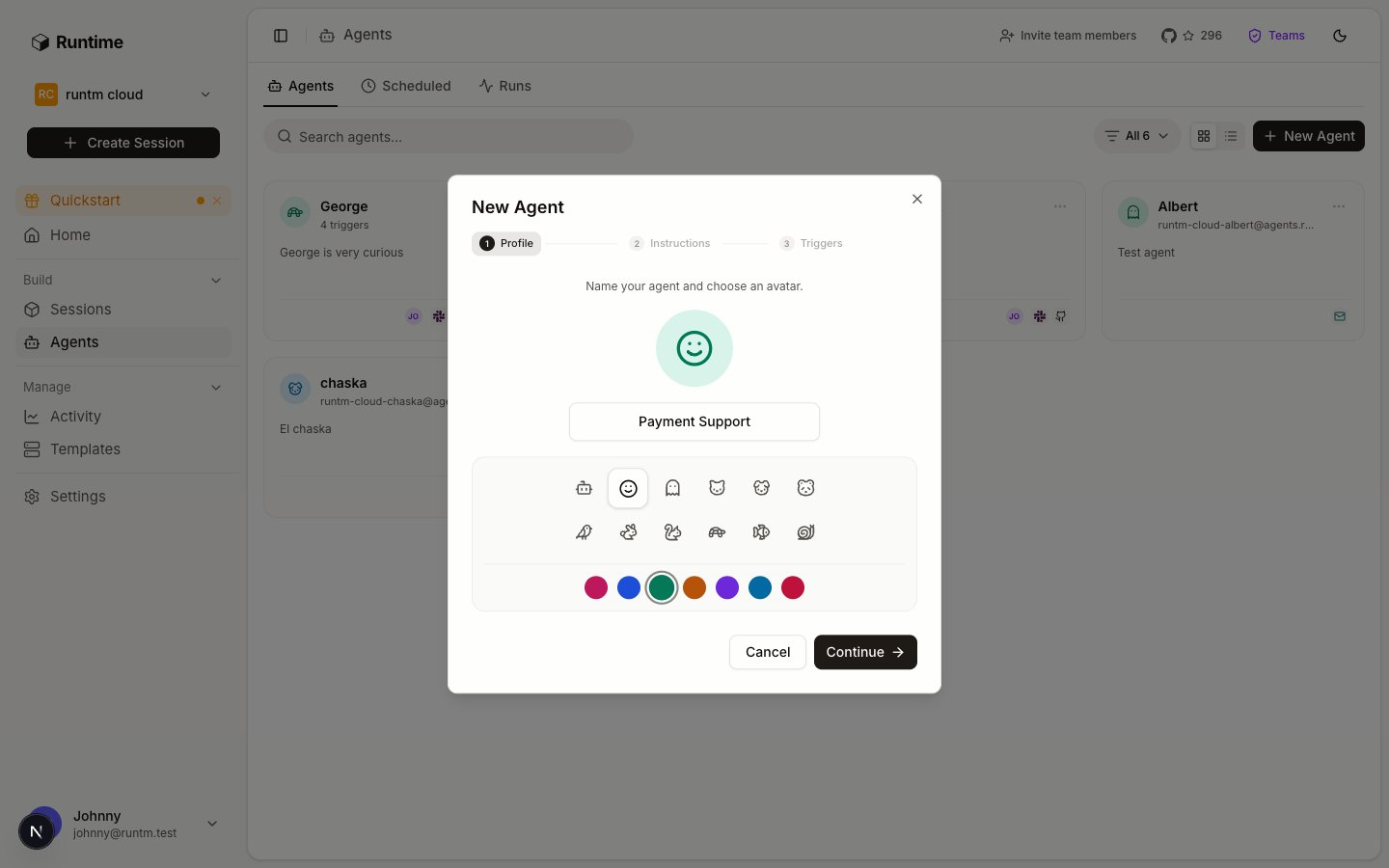
The dialog walks through Profile, Instructions, Triggers. Its own description says it: “Define the agent once, then connect it to Slack, Linear, and GitHub.”
Profile: the name is shared by every trigger; the avatar syncs to the Slack app icon.
Agent name is at most 34 characters and is what people will type after @ in Slack. Pick the avatar; when a Slack app is connected later, its icon is set from this.
2
Write the description and system instructions
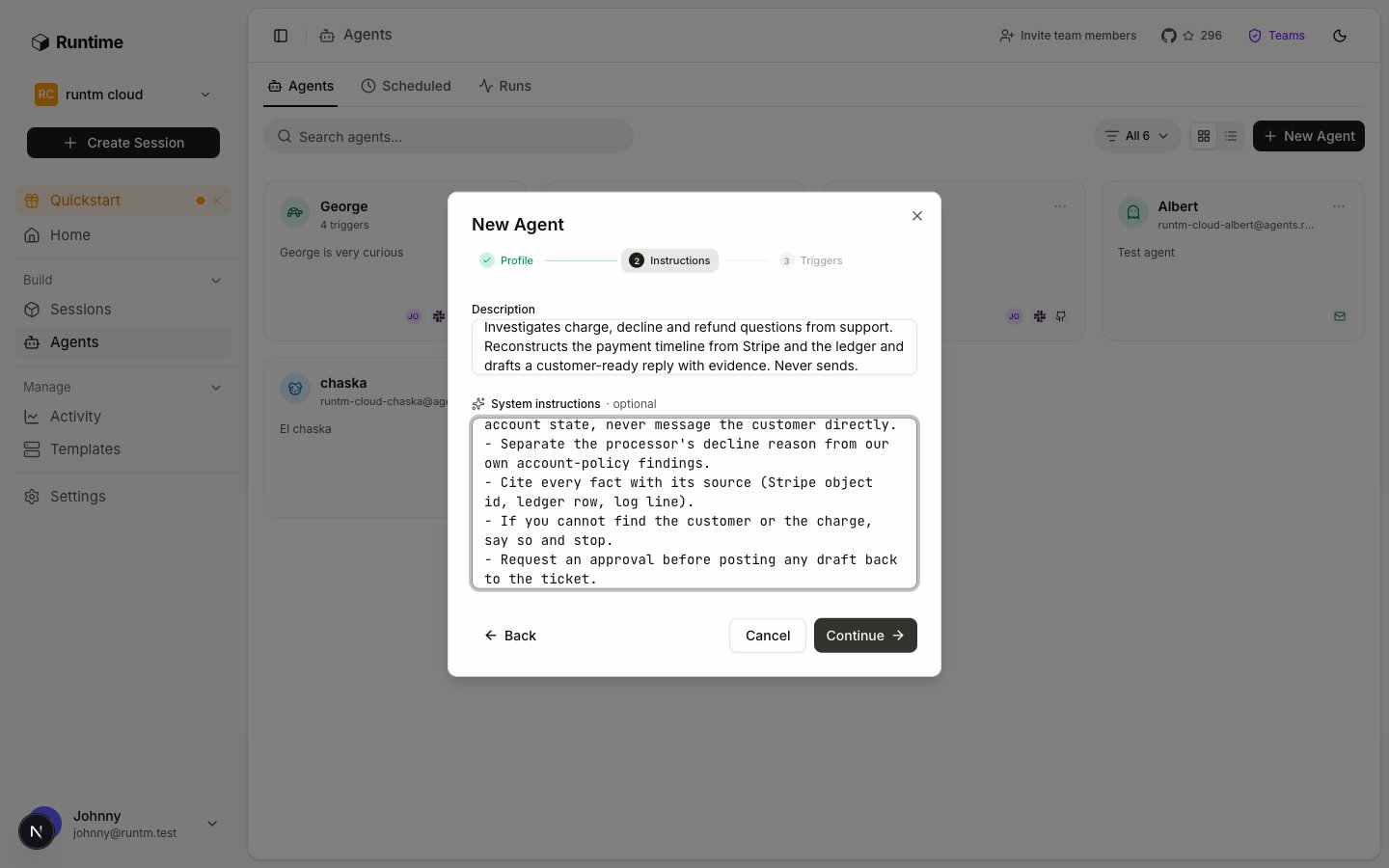
Instructions: one line of job, then the how and the never.
Description (up to 2,000 characters) is the objective sentence from Decide. It appears on the agent card and is what the onboarding flow calls the mirror line.System instructions (up to 20,000 characters) is the agent’s persona and method. A shape that works for operations agents:
You are the payment support investigator for Acme.Input: a Zendesk ticket ID or a Slack question about a specific charge.Output: a draft reply in the ticket's tone, followed by an evidencesection listing every Stripe object and ledger row you relied on.Method:1. Identify the customer from the ticket, never from free text in the message.2. Pull the charge, its payment intent, refunds and disputes from Stripe.3. Pull the matching ledger rows from the read-only database.4. Separate what the processor said from what our own policy did.Never:- Send, post or close anything in Zendesk. Draft only.- Issue refunds or touch any Stripe object that is not a read.- Look up more than the one customer the ticket names.When the ticket needs a refund, request an approval and stop.
Click Create agent. Skip Triggers for now; the Triggers page covers them.
3
Set the default template and coding agent
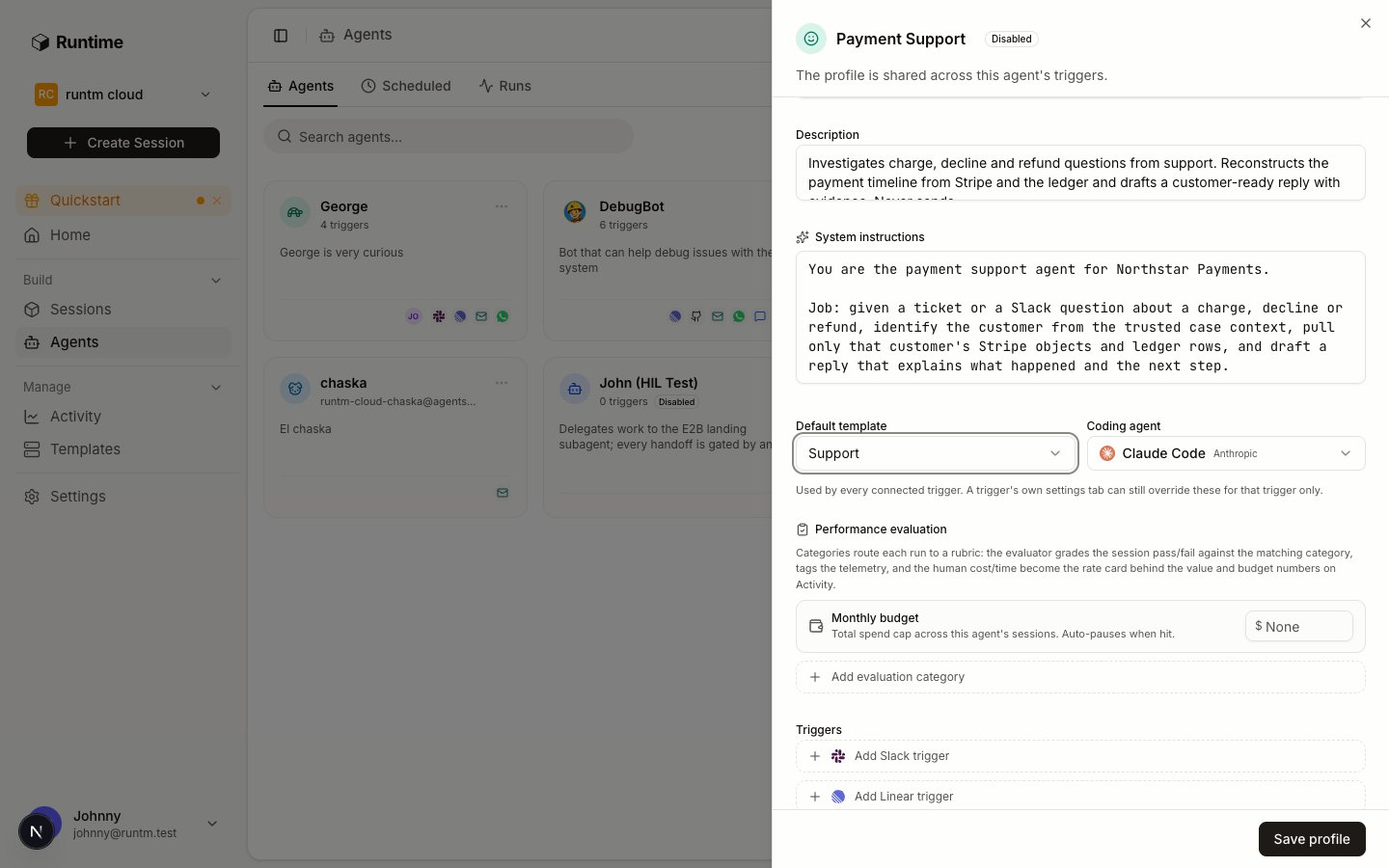
Click the new agent’s card to open its sheet. On the Profile tab, set Default template and Coding agent. The helper text explains the scope: “Used by every connected trigger. A trigger’s own settings tab can still override these for that trigger only.”
The agent sheet: default template and coding agent are shared by every trigger.
Click Save profile. Saving fans the profile out to every trigger already bound to the agent.
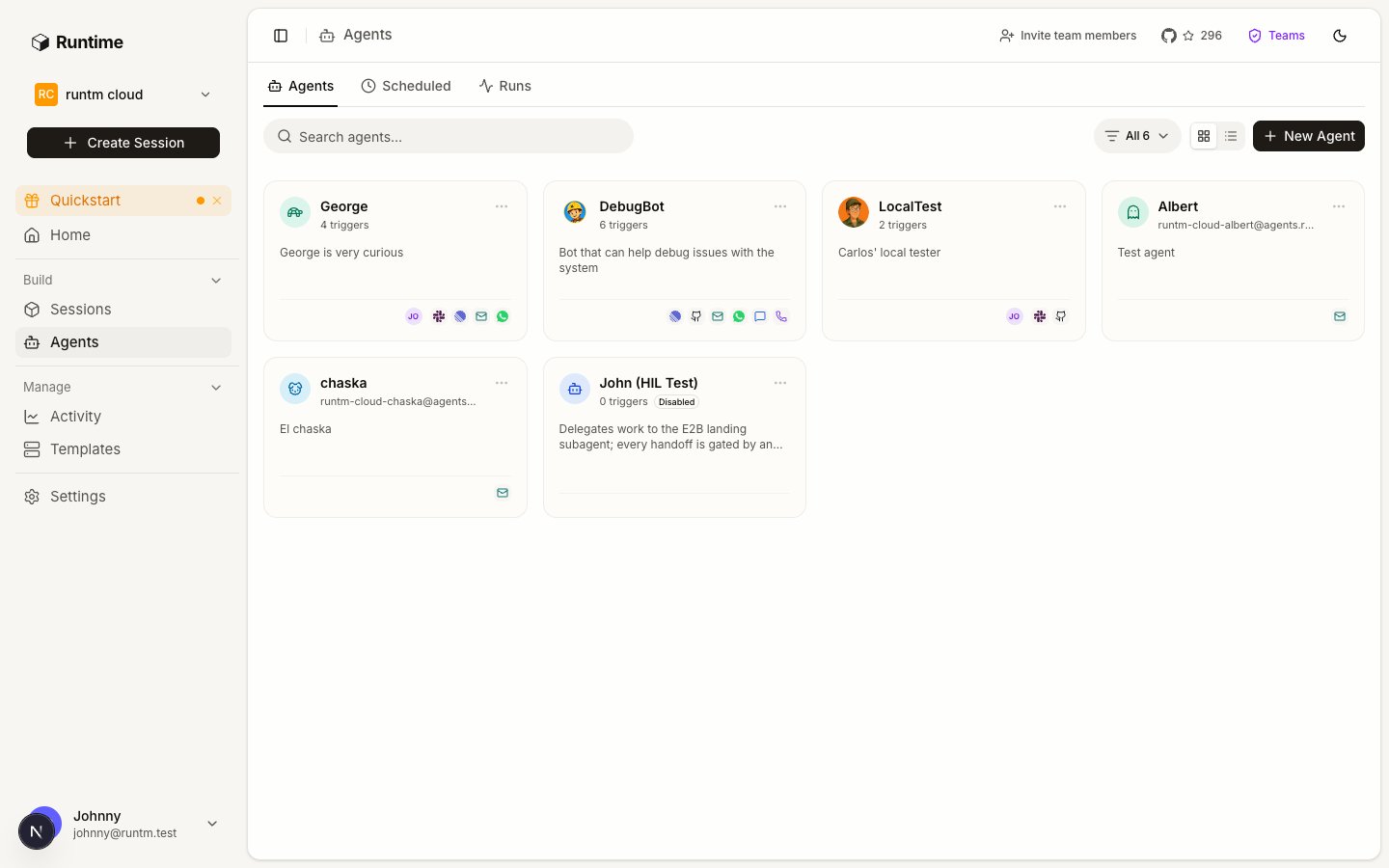
The roster: one card per agent with its description, trigger icons and creator.
Open Agents; the card shows the name and description. runtm-api agents get <agent_id> returns name, description, system_instructions, default_template and default_agent. If default_template is null, the agent will run on a bare sandbox.
System instructions are layer 5 of 9 in the instruction stack that Runtime writes into every session. Runtime’s own session instructions, the template’s environment notes and the agent’s communication channels come first; the organization’s custom instructions, the template’s context, the user’s defaults and any per-session override come after and win on conflict. So an org-wide instruction such as “never paste card numbers” beats anything an agent’s persona says, and a template’s “use the acme Postgres role” beats the agent’s generic database advice. Details in Instructions.
--template is the template’s name, not its ID. The roster agent stores default_template by name. runtm-api template list shows both.
An agent with no default template still launches. It just launches on a bare sandbox with no tools, no skills and no secrets, and the run fails for reasons that look like the agent’s fault.
Agents require an organization. In personal mode the Agents page says “Agents require an organization”. Switch to an org, and use an org-scoped API key for the CLI; a personal key cannot see org agents no matter which --org you pass.
Instructions are not enforcement. “Never issue refunds” in the persona is advice the model usually follows. A deny rule on the refund command in Guardrails is what makes it impossible.
Description is for people; instructions are for the model. Do not repeat the whole method in the description; the card truncates it to two lines.
Roster versus trigger in the CLI.runtm-api agents with no --type is the roster; --type slack|github|linear|email is a trigger integration. Same verb, different resource.
--clear-template clears; omitting --template leaves it alone.agents update is a partial patch, and clearing fans out to every linked trigger.
2. Measure success
Turn the objective into evaluation categories the grader can score.
Agents API
The agent object and every field.
{"docsConfig":{"$schema":"https://mintlify.com/docs.json","theme":"mint","name":"Runtime","colors":{"primary":"#18181b","light":"#71717a","dark":"#18181b"},"favicon":"https://mintcdn.com/runtm/5BRbZxh1joq_9si2/images/favicon.svg?fit=max\u0026auto=format\u0026n=5BRbZxh1joq_9si2\u0026q=85\u0026s=957716cbd1f84c5995ece94d6ac63ffd","logo":{"light":"https://mintcdn.com/runtm/5BRbZxh1joq_9si2/images/logo-light.svg?fit=max\u0026auto=format\u0026n=5BRbZxh1joq_9si2\u0026q=85\u0026s=dd91f6d3dfa4840b854b016d7add405d","dark":"https://mintcdn.com/runtm/5BRbZxh1joq_9si2/images/logo-dark.svg?fit=max\u0026auto=format\u0026n=5BRbZxh1joq_9si2\u0026q=85\u0026s=996520fef61624cf8b0b4583342e3300"},"api":{"mdx":{"server":"https://app.runtm.com/api/cloud","auth":{"method":"bearer","name":null}}},"appearance":{"default":"light","strict":null},"background":{"decoration":null,"color":{"light":"#fafafa","dark":"#18181b"}},"footer":{"socials":{"github":"https://github.com/runtm-ai/runtm","x":"https://twitter.com/runtm_ai"}},"styling":{"latex":true},"navigation":{"global":{"anchors":[{"anchor":"GitHub","href":"https://github.com/runtm-ai/runtm","icon":"github"}]},"pages":[]}},"deployment":{"deploymentMetadataValue":{"subdomain":"runtm","hasAudioNarration":false,"actualSubdomain":"runtm","customDomains":["docs.runtm.com"],"gitSource":{"type":"github","owner":"runtm-ai","repo":"runtm","deployBranch":"main","contentDirectory":"docs","isPrivate":true,"mountPath":"","label":""},"chroma":{"liveDeploymentHistoryId":"6ae513ed05ddb97afbab990f","collectionId":"63d087b9-cc50-4139-8512-4005e4c5a340","schemaVersion":"v3","latestBuiltDeploymentHistoryId":"6ae513ed05ddb97afbab990f"},"entitlements":{},"buildId":"6ae513ed05ddb97afbab990f","clientVersion":"0.0.4044","searchFilterCounts":[{"language":"default","tag":"API Reference","count":222},{"language":"default","tag":"Open Source","count":49},{"language":"default","tag":"Sessions","count":47},{"language":"default","tag":"Documentation","count":24},{"language":"default","tag":"Templates","count":22},{"language":"default","tag":"Context","count":21},{"language":"default","tag":"Guides","count":19},{"language":"default","tag":"CLI Reference","count":17},{"language":"default","tag":"Linear","count":16},{"language":"default","tag":"Skills","count":14}]},"assistantConfig":{"enableAskAiButton":false,"enableStarterQuestions":false,"enableAskAiSearchBar":true},"basePath":"","hasChatPermissions":false,"hasWebMcpPermissions":false,"toggles":[{"name":"kill-isr","enabled":true,"variant":{"name":"disabled","enabled":false,"feature_enabled":true},"impressionData":false},{"name":"agent-mintlify-slack","enabled":true,"variant":{"name":"disabled","enabled":false,"feature_enabled":true},"impressionData":false},{"name":"agent-integrations-settings","enabled":true,"variant":{"name":"disabled","enabled":false,"feature_enabled":true},"impressionData":false},{"name":"automations-pr-grouping","enabled":true,"variant":{"name":"disabled","enabled":false,"feature_enabled":true},"impressionData":false},{"name":"custom-prefix","enabled":true,"variant":{"name":"disabled","enabled":false,"feature_enabled":true},"impressionData":false},{"name":"analytics-v7","enabled":true,"variant":{"name":"disabled","enabled":false,"feature_enabled":true},"impressionData":false},{"name":"user-flows-analytics","enabled":true,"variant":{"name":"disabled","enabled":false,"feature_enabled":true},"impressionData":false},{"name":"no-publish-flow","enabled":true,"variant":{"name":"disabled","enabled":false,"feature_enabled":true},"impressionData":false},{"name":"workos-onboarding","enabled":true,"variant":{"name":"disabled","enabled":false,"feature_enabled":true},"impressionData":false},{"name":"llms-txt-v2","enabled":true,"variant":{"name":"disabled","enabled":false,"feature_enabled":true},"impressionData":false},{"name":"snapshot-serving-live","enabled":true,"variant":{"name":"disabled","enabled":false,"feature_enabled":true},"impressionData":false},{"name":"stripTemperatureMiddleware","enabled":true,"variant":{"name":"disabled","enabled":false,"feature_enabled":true},"impressionData":false},{"name":"support-platform-pylon-zendesk","enabled":true,"variant":{"name":"disabled","enabled":false,"feature_enabled":true},"impressionData":false},{"name":"snapshot-serving","enabled":true,"variant":{"name":"disabled","enabled":false,"feature_enabled":true},"impressionData":false},{"name":"instant-rollback","enabled":true,"variant":{"name":"disabled","enabled":false,"feature_enabled":true},"impressionData":false},{"name":"granular-notifications-server","enabled":true,"variant":{"name":"disabled","enabled":false,"feature_enabled":true},"impressionData":false},{"name":"granular-notifications","enabled":true,"variant":{"name":"disabled","enabled":false,"feature_enabled":true},"impressionData":false},{"name":"automations-fable","enabled":true,"variant":{"name":"disabled","enabled":false,"feature_enabled":true},"impressionData":false},{"name":"fixed-ai-action-pricing","enabled":true,"variant":{"name":"disabled","enabled":false,"feature_enabled":true},"impressionData":false},{"name":"automation-resolve-merge-conflict","enabled":true,"variant":{"name":"disabled","enabled":false,"feature_enabled":true},"impressionData":false},{"name":"scoped-publishing","enabled":true,"variant":{"name":"disabled","enabled":false,"feature_enabled":true},"impressionData":false},{"name":"mintql","enabled":true,"variant":{"name":"disabled","enabled":false,"feature_enabled":true},"impressionData":false},{"name":"page-level-analytics","enabled":true,"variant":{"name":"disabled","enabled":false,"feature_enabled":true},"impressionData":false},{"name":"editor-version-history-v2","enabled":true,"variant":{"name":"disabled","enabled":false,"feature_enabled":true},"impressionData":false},{"name":"billing-page-v2","enabled":true,"variant":{"name":"disabled","enabled":false,"feature_enabled":true},"impressionData":false},{"name":"full-page-search","enabled":true,"variant":{"name":"disabled","enabled":false,"feature_enabled":true},"impressionData":false},{"name":"workspace-projects","enabled":true,"variant":{"name":"disabled","enabled":false,"feature_enabled":true},"impressionData":false},{"name":"assistant-v5","enabled":true,"variant":{"name":"disabled","enabled":false,"feature_enabled":true},"impressionData":false},{"name":"byok-sep-25","enabled":true,"variant":{"name":"disabled","enabled":false,"feature_enabled":true},"impressionData":false},{"name":"fork-pr-previews","enabled":true,"variant":{"name":"disabled","enabled":false,"feature_enabled":true},"impressionData":false},{"name":"revalidation-jwt","enabled":true,"variant":{"name":"disabled","enabled":false,"feature_enabled":true},"impressionData":false},{"name":"vite-origin","enabled":true,"variant":{"name":"disabled","enabled":false,"feature_enabled":true},"impressionData":false},{"name":"billing-updated-9-15","enabled":true,"variant":{"name":"disabled","enabled":false,"feature_enabled":true},"impressionData":false},{"name":"workos-sso-scim","enabled":true,"variant":{"name":"disabled","enabled":false,"feature_enabled":true},"impressionData":false},{"name":"hobby-abuse-scan","enabled":true,"variant":{"name":"disabled","enabled":false,"feature_enabled":true},"impressionData":false},{"name":"dashboard-inbox","enabled":true,"variant":{"name":"disabled","enabled":false,"feature_enabled":true},"impressionData":false},{"name":"workos-signup","enabled":true,"variant":{"name":"disabled","enabled":false,"feature_enabled":true},"impressionData":false},{"name":"turbopuffer-dual-write","enabled":true,"variant":{"name":"disabled","enabled":false,"feature_enabled":true},"impressionData":false},{"name":"workos-enabled","enabled":true,"variant":{"name":"disabled","enabled":false,"feature_enabled":true},"impressionData":false},{"name":"approve-review-flow","enabled":true,"variant":{"name":"disabled","enabled":false,"feature_enabled":true},"impressionData":false},{"name":"sso-setup-deadline-banner","enabled":true,"variant":{"name":"disabled","enabled":false,"feature_enabled":true},"impressionData":false}],"googleFontsInlined":false},"customCss":[],"page":{"pagePath":"build/define-the-job","slug":"/build/define-the-job","pageMetadata":{"title":"1. Define the job","description":"Create a roster agent with a name, description, system instructions, default template and coding agent, and write an objective that states input, output and boundary. Read before `runtm-api agents create` or the Agents > New Agent dialog.","href":"/build/define-the-job"},"description":{"compiledSource":"\"use strict\";\nconst {jsx: _jsx, jsxs: _jsxs} = arguments[0];\nconst {useMDXComponents: _provideComponents} = arguments[0];\nfunction _createMdxContent(props) {\n const _components = {\n code: \"code\",\n p: \"p\",\n ..._provideComponents(),\n ...props.components\n };\n return _jsxs(_components.p, {\n children: [\"Create a roster agent with a name, description, system instructions, default template and coding agent, and write an objective that states input, output and boundary. Read before \", _jsx(_components.code, {\n children: \"runtm-api agents create\"\n }), \" or the Agents > New Agent dialog.\"]\n });\n}\nfunction MDXContent(props = {}) {\n const {wrapper: MDXLayout} = {\n ..._provideComponents(),\n ...props.components\n };\n return MDXLayout ? _jsx(MDXLayout, {\n ...props,\n children: _jsx(_createMdxContent, {\n ...props\n })\n }) : _createMdxContent(props);\n}\nreturn {\n default: MDXContent\n};\n","frontmatter":{},"scope":{}},"pageType":"default","mdx":{"mdxSource":{"compiledSource":"\"use strict\";const{Fragment:_Fragment,jsx:_jsx,jsxs:_jsxs}=arguments[0];const{useMDXComponents:_provideComponents}=arguments[0];function _createMdxContent(props){const _components={a:`a`,code:`code`,li:`li`,p:`p`,pre:`pre`,span:`span`,strong:`strong`,tbody:`tbody`,td:`td`,th:`th`,thead:`thead`,tr:`tr`,ul:`ul`,..._provideComponents(),...props.components},{Card,CardGroup,CodeBlock,Frame,Heading,OptimizedImage,Step,Steps,Table,Visibility}=_components;if(!Card)_missingMdxReference(`Card`,true);if(!CardGroup)_missingMdxReference(`CardGroup`,true);if(!CodeBlock)_missingMdxReference(`CodeBlock`,true);if(!Frame)_missingMdxReference(`Frame`,true);if(!Heading)_missingMdxReference(`Heading`,true);if(!OptimizedImage)_missingMdxReference(`OptimizedImage`,true);if(!Step)_missingMdxReference(`Step`,true);if(!Steps)_missingMdxReference(`Steps`,true);if(!Table)_missingMdxReference(`Table`,true);if(!Visibility)_missingMdxReference(`Visibility`,true);return _jsxs(_Fragment,{children:[_jsx(Heading,{level:`2`,id:`outcome`,children:`Outcome`}),`\n`,_jsx(_components.p,{children:`A roster agent exists with a one-line description that states its job and system instructions that say how to do it and what never to do. Every trigger you connect later inherits this profile.`}),`\n`,_jsx(Heading,{level:`2`,id:`decide`,children:`Decide`}),`\n`,_jsxs(_components.p,{children:[_jsx(_components.strong,{children:`What is the input, the output, and the boundary?`}),` An objective that names all three grades well and stays out of trouble.`]}),`\n`,_jsxs(Table,{children:[_jsx(_components.thead,{children:_jsxs(_components.tr,{children:[_jsx(_components.th,{}),_jsx(_components.th,{children:`Bad`}),_jsx(_components.th,{children:`Good`})]})}),_jsxs(_components.tbody,{children:[_jsxs(_components.tr,{children:[_jsx(_components.td,{children:`Objective`}),_jsx(_components.td,{children:`”Help with payments.\"`}),_jsx(_components.td,{children:`\"Given a Zendesk ticket about a charge, reconstruct the payment timeline from Stripe and the ledger and draft a customer reply. Never send it.”`})]}),_jsxs(_components.tr,{children:[_jsx(_components.td,{children:`Why`}),_jsx(_components.td,{children:`Nothing to grade, nothing to stop.`}),_jsx(_components.td,{children:`Input (a ticket), output (a draft with evidence), boundary (never send). The success criteria in step 2 write themselves.`})]})]})]}),`\n`,_jsxs(_components.p,{children:[_jsx(_components.strong,{children:`What does the agent never do?`}),` Money movement, status changes, customer-facing sends, account blocks. Write these as flat prohibitions in the system instructions now. Enforce them with guardrails in step 6, after the agent has proven in step 5 that it can do the job with read-only access. Instructions alone are advice; guardrails are enforcement; the order matters because a rule written before the first run is a guess.`]}),`\n`,_jsxs(_components.p,{children:[_jsx(_components.strong,{children:`Which coding agent runs it?`}),` The coding agent (harness) is the program that executes the run inside the sandbox. Templates and sessions accept five: `,_jsx(_components.code,{children:`claude-code`}),`, `,_jsx(_components.code,{children:`codex`}),`, `,_jsx(_components.code,{children:`opencode`}),`, `,_jsx(_components.code,{children:`cline`}),` and `,_jsx(_components.code,{children:`github-copilot`}),`. Cursor, Devin and Gemini exist as interactive terminal harnesses for hands-on sessions and need your own provider key; they have no prompt API, so triggers cannot drive them.`]}),`\n`,_jsxs(Table,{children:[_jsx(_components.thead,{children:_jsxs(_components.tr,{children:[_jsx(_components.th,{children:`Harness`}),_jsx(_components.th,{children:`Driven by triggers (prompt API)`}),_jsx(_components.th,{children:`Streaming, plan mode, todos`}),_jsx(_components.th,{children:`Attachments`}),_jsx(_components.th,{children:`Platform credits`}),_jsx(_components.th,{children:`Notes`})]})}),_jsxs(_components.tbody,{children:[_jsxs(_components.tr,{children:[_jsx(_components.td,{children:_jsx(_components.code,{children:`claude-code`})}),_jsx(_components.td,{children:`yes`}),_jsx(_components.td,{children:`yes`}),_jsx(_components.td,{children:`yes`}),_jsx(_components.td,{children:`yes`}),_jsxs(_components.td,{children:[`Default. Only harness with message editing (rewind and branch). Models: `,_jsx(_components.code,{children:`sonnet`}),`, `,_jsx(_components.code,{children:`opus`}),`, `,_jsx(_components.code,{children:`haiku`}),`, `,_jsx(_components.code,{children:`fable`}),`; free tier is sonnet and haiku.`]})]}),_jsxs(_components.tr,{children:[_jsx(_components.td,{children:_jsx(_components.code,{children:`codex`})}),_jsx(_components.td,{children:`yes`}),_jsx(_components.td,{children:`yes`}),_jsx(_components.td,{children:`yes`}),_jsx(_components.td,{children:`no`}),_jsxs(_components.td,{children:[`GPT models (`,_jsx(_components.code,{children:`gpt-5.4`}),`, `,_jsx(_components.code,{children:`gpt-5.5`}),`, `,_jsx(_components.code,{children:`gpt-5.6-sol`}),`, `,_jsx(_components.code,{children:`gpt-6-astra`}),`).`]})]}),_jsxs(_components.tr,{children:[_jsx(_components.td,{children:_jsx(_components.code,{children:`opencode`})}),_jsx(_components.td,{children:`yes`}),_jsx(_components.td,{children:`yes`}),_jsx(_components.td,{children:`yes`}),_jsx(_components.td,{children:`no`}),_jsxs(_components.td,{children:[`Provider-qualified model ids such as `,_jsx(_components.code,{children:`anthropic/claude-sonnet-5`}),` or `,_jsx(_components.code,{children:`moonshot/kimi-k3`}),`.`]})]}),_jsxs(_components.tr,{children:[_jsx(_components.td,{children:_jsx(_components.code,{children:`cline`})}),_jsx(_components.td,{children:`yes`}),_jsx(_components.td,{children:`no`}),_jsx(_components.td,{children:`no`}),_jsx(_components.td,{children:`no`}),_jsx(_components.td,{children:`Anthropic models only.`})]}),_jsxs(_components.tr,{children:[_jsx(_components.td,{children:_jsx(_components.code,{children:`github-copilot`})}),_jsx(_components.td,{children:`no`}),_jsx(_components.td,{children:`no`}),_jsx(_components.td,{children:`no`}),_jsx(_components.td,{children:`no`}),_jsxs(_components.td,{children:[`Terminal only; `,_jsx(_components.code,{children:`gh auth login`}),` with `,_jsx(_components.code,{children:`GH_TOKEN`}),`.`]})]})]})]}),`\n`,_jsxs(_components.p,{children:[`Pick `,_jsx(_components.code,{children:`claude-code`}),` unless you have a reason not to; every worked example in Guides uses it.`]}),`\n`,_jsxs(_components.p,{children:[_jsx(_components.strong,{children:`Which template does it run on?`}),` The template is where tools, MCP servers, secrets and skills live. If you have not built one yet, create a blank one now and fill it in during `,_jsx(_components.a,{href:`/build/give-it-tools`,children:`Give it tools`}),`. An agent without a default template launches on a bare sandbox and has no tools.`]}),`\n`,_jsx(Heading,{level:`2`,id:`do-it`,children:`Do it`}),`\n`,_jsxs(Steps,{children:[_jsxs(Step,{title:`Open Agents > New Agent`,children:[_jsxs(_components.p,{children:[`The dialog walks through `,_jsx(_components.strong,{children:`Profile`}),`, `,_jsx(_components.strong,{children:`Instructions`}),`, `,_jsx(_components.strong,{children:`Triggers`}),`. Its own description says it: “Define the agent once, then connect it to Slack, Linear, and GitHub.”`]}),_jsx(Frame,{caption:`Profile: the name is shared by every trigger; the avatar syncs to the Slack app icon.`,children:_jsx(OptimizedImage,{src:`https://mintcdn.com/runtm/N90MV6Hfql5ejv1J/images/dashboard/new-agent-profile.png?fit=max\u0026auto=format\u0026n=N90MV6Hfql5ejv1J\u0026q=85\u0026s=81ce9adcdb23dc92ef8cc4cbe3993a3d`,alt:`New Agent dialog, Profile step with name and avatar picker`,\"data-og-width\":`1440`,width:`1440`,\"data-og-height\":`900`,height:`900`,\"data-path\":`images/dashboard/new-agent-profile.png`,\"data-optimize\":`true`,\"data-opv\":`3`,srcset:`https://mintcdn.com/runtm/N90MV6Hfql5ejv1J/images/dashboard/new-agent-profile.png?w=280\u0026fit=max\u0026auto=format\u0026n=N90MV6Hfql5ejv1J\u0026q=85\u0026s=4d91960c8859171c1a47b282aec6fc61 280w, https://mintcdn.com/runtm/N90MV6Hfql5ejv1J/images/dashboard/new-agent-profile.png?w=560\u0026fit=max\u0026auto=format\u0026n=N90MV6Hfql5ejv1J\u0026q=85\u0026s=98a6323c670e5c8fa14b0cc36381d625 560w, https://mintcdn.com/runtm/N90MV6Hfql5ejv1J/images/dashboard/new-agent-profile.png?w=840\u0026fit=max\u0026auto=format\u0026n=N90MV6Hfql5ejv1J\u0026q=85\u0026s=a86c201a85fbbfcc092cb77ab1819f3f 840w, https://mintcdn.com/runtm/N90MV6Hfql5ejv1J/images/dashboard/new-agent-profile.png?w=1100\u0026fit=max\u0026auto=format\u0026n=N90MV6Hfql5ejv1J\u0026q=85\u0026s=d664f27638ff76db2f861f71256dc918 1100w, https://mintcdn.com/runtm/N90MV6Hfql5ejv1J/images/dashboard/new-agent-profile.png?w=1650\u0026fit=max\u0026auto=format\u0026n=N90MV6Hfql5ejv1J\u0026q=85\u0026s=97bb0938bc31c4d56ddd5afd74a25a78 1650w, https://mintcdn.com/runtm/N90MV6Hfql5ejv1J/images/dashboard/new-agent-profile.png?w=2500\u0026fit=max\u0026auto=format\u0026n=N90MV6Hfql5ejv1J\u0026q=85\u0026s=238694e1e48ff04f700fdedf5b47150a 2500w`})}),_jsxs(_components.p,{children:[_jsx(_components.strong,{children:`Agent name`}),` is at most 34 characters and is what people will type after `,_jsx(_components.code,{children:`@`}),` in Slack. Pick the avatar; when a Slack app is connected later, its icon is set from this.`]})]}),_jsxs(Step,{title:`Write the description and system instructions`,children:[_jsx(Frame,{caption:`Instructions: one line of job, then the how and the never.`,children:_jsx(OptimizedImage,{src:`https://mintcdn.com/runtm/N90MV6Hfql5ejv1J/images/dashboard/new-agent-instructions.png?fit=max\u0026auto=format\u0026n=N90MV6Hfql5ejv1J\u0026q=85\u0026s=aaf65c2124f9fe89c3501bed16996619`,alt:`New Agent dialog, Instructions step with Description and System instructions fields`,\"data-og-width\":`1440`,width:`1440`,\"data-og-height\":`900`,height:`900`,\"data-path\":`images/dashboard/new-agent-instructions.png`,\"data-optimize\":`true`,\"data-opv\":`3`,srcset:`https://mintcdn.com/runtm/N90MV6Hfql5ejv1J/images/dashboard/new-agent-instructions.png?w=280\u0026fit=max\u0026auto=format\u0026n=N90MV6Hfql5ejv1J\u0026q=85\u0026s=a547fbba925c26a4fb566a3962161a7c 280w, https://mintcdn.com/runtm/N90MV6Hfql5ejv1J/images/dashboard/new-agent-instructions.png?w=560\u0026fit=max\u0026auto=format\u0026n=N90MV6Hfql5ejv1J\u0026q=85\u0026s=3f5db62a30474f92a8d8353fc009d886 560w, https://mintcdn.com/runtm/N90MV6Hfql5ejv1J/images/dashboard/new-agent-instructions.png?w=840\u0026fit=max\u0026auto=format\u0026n=N90MV6Hfql5ejv1J\u0026q=85\u0026s=cd3d4762c7abee5dbd9b6c040a17b3a1 840w, https://mintcdn.com/runtm/N90MV6Hfql5ejv1J/images/dashboard/new-agent-instructions.png?w=1100\u0026fit=max\u0026auto=format\u0026n=N90MV6Hfql5ejv1J\u0026q=85\u0026s=fa85c3afe25fbfb5a3d5765671747117 1100w, https://mintcdn.com/runtm/N90MV6Hfql5ejv1J/images/dashboard/new-agent-instructions.png?w=1650\u0026fit=max\u0026auto=format\u0026n=N90MV6Hfql5ejv1J\u0026q=85\u0026s=8df416127012364a80c87a5a21f0203f 1650w, https://mintcdn.com/runtm/N90MV6Hfql5ejv1J/images/dashboard/new-agent-instructions.png?w=2500\u0026fit=max\u0026auto=format\u0026n=N90MV6Hfql5ejv1J\u0026q=85\u0026s=96efe67f0ef6e9d78aff15e6ee660585 2500w`})}),_jsxs(_components.p,{children:[_jsx(_components.strong,{children:`Description`}),` (up to 2,000 characters) is the objective sentence from Decide. It appears on the agent card and is what the onboarding flow calls the mirror line.`]}),_jsxs(_components.p,{children:[_jsx(_components.strong,{children:`System instructions`}),` (up to 20,000 characters) is the agent’s persona and method. A shape that works for operations agents:`]}),_jsx(CodeBlock,{filename:``,numberOfLines:`17`,language:`markdown`,children:_jsx(_components.pre,{className:`shiki shiki-themes github-light-default dark-plus`,style:{backgroundColor:`#ffffff`,\"--shiki-dark-bg\":`#0B0C0E`,color:`#1f2328`,\"--shiki-dark\":`#D4D4D4`},language:`markdown`,children:_jsxs(_components.code,{language:`markdown`,numberOfLines:`17`,children:[_jsx(_components.span,{className:`line`,children:_jsx(_components.span,{style:{color:`#1F2328`,\"--shiki-dark\":`#D4D4D4`},children:`You are the payment support investigator for Acme.`})}),`\n`,_jsx(_components.span,{className:`line`}),`\n`,_jsx(_components.span,{className:`line`,children:_jsx(_components.span,{style:{color:`#1F2328`,\"--shiki-dark\":`#D4D4D4`},children:`Input: a Zendesk ticket ID or a Slack question about a specific charge.`})}),`\n`,_jsx(_components.span,{className:`line`,children:_jsx(_components.span,{style:{color:`#1F2328`,\"--shiki-dark\":`#D4D4D4`},children:`Output: a draft reply in the ticket's tone, followed by an evidence`})}),`\n`,_jsx(_components.span,{className:`line`,children:_jsx(_components.span,{style:{color:`#1F2328`,\"--shiki-dark\":`#D4D4D4`},children:`section listing every Stripe object and ledger row you relied on.`})}),`\n`,_jsx(_components.span,{className:`line`}),`\n`,_jsx(_components.span,{className:`line`,children:_jsx(_components.span,{style:{color:`#1F2328`,\"--shiki-dark\":`#D4D4D4`},children:`Method:`})}),`\n`,_jsxs(_components.span,{className:`line`,children:[_jsx(_components.span,{style:{color:`#953800`,\"--shiki-dark\":`#6796E6`},children:`1.`}),_jsx(_components.span,{style:{color:`#1F2328`,\"--shiki-dark\":`#D4D4D4`},children:` Identify the customer from the ticket, never from free text in the message.`})]}),`\n`,_jsxs(_components.span,{className:`line`,children:[_jsx(_components.span,{style:{color:`#953800`,\"--shiki-dark\":`#6796E6`},children:`2.`}),_jsx(_components.span,{style:{color:`#1F2328`,\"--shiki-dark\":`#D4D4D4`},children:` Pull the charge, its payment intent, refunds and disputes from Stripe.`})]}),`\n`,_jsxs(_components.span,{className:`line`,children:[_jsx(_components.span,{style:{color:`#953800`,\"--shiki-dark\":`#6796E6`},children:`3.`}),_jsx(_components.span,{style:{color:`#1F2328`,\"--shiki-dark\":`#D4D4D4`},children:` Pull the matching ledger rows from the read-only database.`})]}),`\n`,_jsxs(_components.span,{className:`line`,children:[_jsx(_components.span,{style:{color:`#953800`,\"--shiki-dark\":`#6796E6`},children:`4.`}),_jsx(_components.span,{style:{color:`#1F2328`,\"--shiki-dark\":`#D4D4D4`},children:` Separate what the processor said from what our own policy did.`})]}),`\n`,_jsx(_components.span,{className:`line`}),`\n`,_jsx(_components.span,{className:`line`,children:_jsx(_components.span,{style:{color:`#1F2328`,\"--shiki-dark\":`#D4D4D4`},children:`Never:`})}),`\n`,_jsxs(_components.span,{className:`line`,children:[_jsx(_components.span,{style:{color:`#953800`,\"--shiki-dark\":`#6796E6`},children:`-`}),_jsx(_components.span,{style:{color:`#1F2328`,\"--shiki-dark\":`#D4D4D4`},children:` Send, post or close anything in Zendesk. Draft only.`})]}),`\n`,_jsxs(_components.span,{className:`line`,children:[_jsx(_components.span,{style:{color:`#953800`,\"--shiki-dark\":`#6796E6`},children:`-`}),_jsx(_components.span,{style:{color:`#1F2328`,\"--shiki-dark\":`#D4D4D4`},children:` Issue refunds or touch any Stripe object that is not a read.`})]}),`\n`,_jsxs(_components.span,{className:`line`,children:[_jsx(_components.span,{style:{color:`#953800`,\"--shiki-dark\":`#6796E6`},children:`-`}),_jsx(_components.span,{style:{color:`#1F2328`,\"--shiki-dark\":`#D4D4D4`},children:` Look up more than the one customer the ticket names.`})]}),`\n`,_jsx(_components.span,{className:`line`,children:_jsx(_components.span,{style:{color:`#1F2328`,\"--shiki-dark\":`#D4D4D4`},children:`When the ticket needs a refund, request an approval and stop.`})}),`\n`]})})}),_jsxs(_components.p,{children:[`Click `,_jsx(_components.strong,{children:`Create agent`}),`. Skip `,_jsx(_components.strong,{children:`Triggers`}),` for now; the `,_jsx(_components.a,{href:`/build/how-it-works/triggers`,children:`Triggers`}),` page covers them.`]}),_jsx(Visibility,{for:`agents`,children:_jsx(CodeBlock,{filename:``,numberOfLines:`2`,language:`text`,children:_jsx(_components.pre,{className:`shiki shiki-themes github-light-default dark-plus`,style:{backgroundColor:`#ffffff`,\"--shiki-dark-bg\":`#0B0C0E`,color:`#1f2328`,\"--shiki-dark\":`#D4D4D4`},language:`text`,children:_jsxs(_components.code,{language:`text`,numberOfLines:`2`,children:[_jsx(_components.span,{className:`line`,children:_jsx(_components.span,{children:`cli: runtm-api agents create --name \"Payment Support\" --description \"Given a Zendesk ticket about a charge, reconstruct the payment timeline from Stripe and the ledger and draft a customer reply. Never send it.\" --instructions \"$(cat instructions.md)\"`})}),`\n`,_jsx(_components.span,{className:`line`,children:_jsx(_components.span,{})})]})})})})]}),_jsxs(Step,{title:`Set the default template and coding agent`,children:[_jsxs(_components.p,{children:[`Click the new agent’s card to open its sheet. On the `,_jsx(_components.strong,{children:`Profile`}),` tab, set `,_jsx(_components.strong,{children:`Default template`}),` and `,_jsx(_components.strong,{children:`Coding agent`}),`. The helper text explains the scope: “Used by every connected trigger. A trigger’s own settings tab can still override these for that trigger only.”`]}),_jsx(Frame,{caption:`The agent sheet: default template and coding agent are shared by every trigger.`,children:_jsx(OptimizedImage,{src:`https://mintcdn.com/runtm/N90MV6Hfql5ejv1J/images/dashboard/agent-edit-profile.png?fit=max\u0026auto=format\u0026n=N90MV6Hfql5ejv1J\u0026q=85\u0026s=f13f94df5ceea6fb65acbc0a22768ca0`,alt:`Agent edit sheet, Profile tab with Default template and Coding agent selectors`,\"data-og-width\":`1440`,width:`1440`,\"data-og-height\":`900`,height:`900`,\"data-path\":`images/dashboard/agent-edit-profile.png`,\"data-optimize\":`true`,\"data-opv\":`3`,srcset:`https://mintcdn.com/runtm/N90MV6Hfql5ejv1J/images/dashboard/agent-edit-profile.png?w=280\u0026fit=max\u0026auto=format\u0026n=N90MV6Hfql5ejv1J\u0026q=85\u0026s=04d4cd3557e59e5e1e593fd26a567ab2 280w, https://mintcdn.com/runtm/N90MV6Hfql5ejv1J/images/dashboard/agent-edit-profile.png?w=560\u0026fit=max\u0026auto=format\u0026n=N90MV6Hfql5ejv1J\u0026q=85\u0026s=79f8cc34dd3b3dbaa6a16f5351d7135c 560w, https://mintcdn.com/runtm/N90MV6Hfql5ejv1J/images/dashboard/agent-edit-profile.png?w=840\u0026fit=max\u0026auto=format\u0026n=N90MV6Hfql5ejv1J\u0026q=85\u0026s=fa98bffc8bff58643acbf5939c7c20d7 840w, https://mintcdn.com/runtm/N90MV6Hfql5ejv1J/images/dashboard/agent-edit-profile.png?w=1100\u0026fit=max\u0026auto=format\u0026n=N90MV6Hfql5ejv1J\u0026q=85\u0026s=a29b85c85680c92a4cbcbdef68fdb540 1100w, https://mintcdn.com/runtm/N90MV6Hfql5ejv1J/images/dashboard/agent-edit-profile.png?w=1650\u0026fit=max\u0026auto=format\u0026n=N90MV6Hfql5ejv1J\u0026q=85\u0026s=cdda5315aba627f6e2b21b2141d5f407 1650w, https://mintcdn.com/runtm/N90MV6Hfql5ejv1J/images/dashboard/agent-edit-profile.png?w=2500\u0026fit=max\u0026auto=format\u0026n=N90MV6Hfql5ejv1J\u0026q=85\u0026s=6d4bae26d9f5063966595166c9677950 2500w`})}),_jsxs(_components.p,{children:[`Click `,_jsx(_components.strong,{children:`Save profile`}),`. Saving fans the profile out to every trigger already bound to the agent.`]}),_jsx(Visibility,{for:`agents`,children:_jsx(CodeBlock,{filename:``,numberOfLines:`3`,language:`text`,children:_jsx(_components.pre,{className:`shiki shiki-themes github-light-default dark-plus`,style:{backgroundColor:`#ffffff`,\"--shiki-dark-bg\":`#0B0C0E`,color:`#1f2328`,\"--shiki-dark\":`#D4D4D4`},language:`text`,children:_jsxs(_components.code,{language:`text`,numberOfLines:`3`,children:[_jsx(_components.span,{className:`line`,children:_jsx(_components.span,{children:`cli: runtm-api agents update \u003cagent_id> --template \u003ctemplate_name> --agent claude-code`})}),`\n`,_jsx(_components.span,{className:`line`,children:_jsx(_components.span,{children:`cli-verify: runtm-api agents get \u003cagent_id> | jq '{name, default_template, default_agent}'`})}),`\n`,_jsx(_components.span,{className:`line`,children:_jsx(_components.span,{})})]})})})})]})]}),`\n`,_jsx(Heading,{level:`2`,id:`verify`,children:`Verify`}),`\n`,_jsx(Frame,{caption:`The roster: one card per agent with its description, trigger icons and creator.`,children:_jsx(OptimizedImage,{src:`https://mintcdn.com/runtm/N90MV6Hfql5ejv1J/images/dashboard/agents-roster.png?fit=max\u0026auto=format\u0026n=N90MV6Hfql5ejv1J\u0026q=85\u0026s=b3e2e452bdbd4108671c716ad93a4b6d`,alt:`Agents page listing roster agents as cards`,\"data-og-width\":`1440`,width:`1440`,\"data-og-height\":`900`,height:`900`,\"data-path\":`images/dashboard/agents-roster.png`,\"data-optimize\":`true`,\"data-opv\":`3`,srcset:`https://mintcdn.com/runtm/N90MV6Hfql5ejv1J/images/dashboard/agents-roster.png?w=280\u0026fit=max\u0026auto=format\u0026n=N90MV6Hfql5ejv1J\u0026q=85\u0026s=f1340283f0822badb8143c598a683bca 280w, https://mintcdn.com/runtm/N90MV6Hfql5ejv1J/images/dashboard/agents-roster.png?w=560\u0026fit=max\u0026auto=format\u0026n=N90MV6Hfql5ejv1J\u0026q=85\u0026s=a302d63b5801db68da5f53c64cd092cd 560w, https://mintcdn.com/runtm/N90MV6Hfql5ejv1J/images/dashboard/agents-roster.png?w=840\u0026fit=max\u0026auto=format\u0026n=N90MV6Hfql5ejv1J\u0026q=85\u0026s=2f64b8a232febad9c72faa979a0c2150 840w, https://mintcdn.com/runtm/N90MV6Hfql5ejv1J/images/dashboard/agents-roster.png?w=1100\u0026fit=max\u0026auto=format\u0026n=N90MV6Hfql5ejv1J\u0026q=85\u0026s=615b4bc3a62d4176c60d64c97fbe9f13 1100w, https://mintcdn.com/runtm/N90MV6Hfql5ejv1J/images/dashboard/agents-roster.png?w=1650\u0026fit=max\u0026auto=format\u0026n=N90MV6Hfql5ejv1J\u0026q=85\u0026s=00dfa4f51a35acd885a9577d8f1f4a67 1650w, https://mintcdn.com/runtm/N90MV6Hfql5ejv1J/images/dashboard/agents-roster.png?w=2500\u0026fit=max\u0026auto=format\u0026n=N90MV6Hfql5ejv1J\u0026q=85\u0026s=200fd36aecd578f8803ba61e576ea30b 2500w`})}),`\n`,_jsxs(_components.p,{children:[`Open `,_jsx(_components.strong,{children:`Agents`}),`; the card shows the name and description. `,_jsx(_components.code,{children:`runtm-api agents get \u003cagent_id>`}),` returns `,_jsx(_components.code,{children:`name`}),`, `,_jsx(_components.code,{children:`description`}),`, `,_jsx(_components.code,{children:`system_instructions`}),`, `,_jsx(_components.code,{children:`default_template`}),` and `,_jsx(_components.code,{children:`default_agent`}),`. If `,_jsx(_components.code,{children:`default_template`}),` is null, the agent will run on a bare sandbox.`]}),`\n`,_jsx(Visibility,{for:`agents`,children:_jsx(CodeBlock,{filename:``,numberOfLines:`2`,language:`text`,children:_jsx(_components.pre,{className:`shiki shiki-themes github-light-default dark-plus`,style:{backgroundColor:`#ffffff`,\"--shiki-dark-bg\":`#0B0C0E`,color:`#1f2328`,\"--shiki-dark\":`#D4D4D4`},language:`text`,children:_jsxs(_components.code,{language:`text`,numberOfLines:`2`,children:[_jsx(_components.span,{className:`line`,children:_jsx(_components.span,{children:`cli-verify: runtm-api agents get \u003cagent_id>`})}),`\n`,_jsx(_components.span,{className:`line`,children:_jsx(_components.span,{})})]})})})}),`\n`,_jsx(Heading,{level:`2`,id:`where-instructions-sit`,children:`Where instructions sit`}),`\n`,_jsxs(_components.p,{children:[`System instructions are layer 5 of 9 in the instruction stack that Runtime writes into every session. Runtime’s own session instructions, the template’s environment notes and the agent’s communication channels come first; the organization’s custom instructions, the template’s context, the user’s defaults and any per-session override come after and win on conflict. So an org-wide instruction such as “never paste card numbers” beats anything an agent’s persona says, and a template’s “use the `,_jsx(_components.code,{children:`acme`}),` Postgres role” beats the agent’s generic database advice. Details in `,_jsx(_components.a,{href:`/build/how-it-works/instructions`,children:`Instructions`}),`.`]}),`\n`,_jsx(Heading,{level:`2`,id:`gotchas`,children:`Gotchas`}),`\n`,_jsxs(_components.ul,{children:[`\n`,_jsxs(_components.li,{children:[_jsxs(_components.strong,{children:[_jsx(_components.code,{children:`--template`}),` is the template’s name, not its ID.`]}),` The roster agent stores `,_jsx(_components.code,{children:`default_template`}),` by name. `,_jsx(_components.code,{children:`runtm-api template list`}),` shows both.`]}),`\n`,_jsxs(_components.li,{children:[_jsx(_components.strong,{children:`An agent with no default template still launches.`}),` It just launches on a bare sandbox with no tools, no skills and no secrets, and the run fails for reasons that look like the agent’s fault.`]}),`\n`,_jsxs(_components.li,{children:[_jsx(_components.strong,{children:`Agents require an organization.`}),` In personal mode the Agents page says “Agents require an organization”. Switch to an org, and use an org-scoped API key for the CLI; a personal key cannot see org agents no matter which `,_jsx(_components.code,{children:`--org`}),` you pass.`]}),`\n`,_jsxs(_components.li,{children:[_jsx(_components.strong,{children:`Instructions are not enforcement.`}),` “Never issue refunds” in the persona is advice the model usually follows. A deny rule on the refund command in `,_jsx(_components.a,{href:`/build/guardrails-and-approvals`,children:`Guardrails`}),` is what makes it impossible.`]}),`\n`,_jsxs(_components.li,{children:[_jsx(_components.strong,{children:`Description is for people; instructions are for the model.`}),` Do not repeat the whole method in the description; the card truncates it to two lines.`]}),`\n`,_jsxs(_components.li,{children:[_jsx(_components.strong,{children:`Roster versus trigger in the CLI.`}),` `,_jsx(_components.code,{children:`runtm-api agents`}),` with no `,_jsx(_components.code,{children:`--type`}),` is the roster; `,_jsx(_components.code,{children:`--type slack|github|linear|email`}),` is a trigger integration. Same verb, different resource.`]}),`\n`,_jsxs(_components.li,{children:[_jsxs(_components.strong,{children:[_jsx(_components.code,{children:`--clear-template`}),` clears; omitting `,_jsx(_components.code,{children:`--template`}),` leaves it alone.`]}),` `,_jsx(_components.code,{children:`agents update`}),` is a partial patch, and clearing fans out to every linked trigger.`]}),`\n`]}),`\n`,_jsxs(CardGroup,{cols:2,children:[_jsx(Card,{title:`2. Measure success`,icon:`chart-line`,href:`/build/measure-success`,children:_jsx(_components.p,{children:`Turn the objective into evaluation categories the grader can score.`})}),_jsx(Card,{title:`Agents API`,icon:`code`,href:`/cloud-api/agents/overview`,children:_jsx(_components.p,{children:`The agent object and every field.`})})]})]})}function MDXContent(props={}){const{wrapper:MDXLayout}={..._provideComponents(),...props.components};return MDXLayout?_jsx(MDXLayout,{...props,children:_jsx(_createMdxContent,{...props})}):_createMdxContent(props)}return{default:MDXContent};function _missingMdxReference(id,component){throw new Error(`Expected `+(component?`component`:`object`)+\" `\"+id+\"` to be defined: you likely forgot to import, pass, or provide it.\")}","frontmatter":{},"scope":{"config":{},"pageMetadata":{"title":"1. Define the job","description":"Create a roster agent with a name, description, system instructions, default template and coding agent, and write an objective that states input, output and boundary. Read before `runtm-api agents create` or the Agents > New Agent dialog.","href":"/build/define-the-job"}}},"mdxSourceWithNoJs":null},"mdxExtracts":{"tableOfContents":[{"title":"Outcome","slug":"outcome","depth":2,"children":[]},{"title":"Decide","slug":"decide","depth":2,"children":[]},{"title":"Do it","slug":"do-it","depth":2,"children":[]},{"title":"Verify","slug":"verify","depth":2,"children":[]},{"title":"Where instructions sit","slug":"where-instructions-sit","depth":2,"children":[]},{"title":"Gotchas","slug":"gotchas","depth":2,"children":[]}],"codeExamples":{}},"jsLinks":[],"subdomain":"runtm","siteName":"Runtime","title":"1. Define the job - Runtime","navMaps":{"firstHrefInVersion":{},"firstHrefInLanguage":{}},"lastModified":"2026-09-25T16:35:13.784Z","originalFileLocation":"build/define-the-job.mdx"},"headHtml":"\u003cscript data-mint-head>(function(){var d=document.documentElement,p=null;if(!p){try{p=localStorage.getItem(\"isDarkMode\")}catch(e){}if(p==='true')p='dark';else if(p==='false')p='light';if(p!=='light'\u0026\u0026p!=='dark'\u0026\u0026p!=='system')p=\"light\"}var r=p==='system'?(matchMedia(\"(prefers-color-scheme: dark)\").matches?'dark':'light'):p;d.classList.remove(r==='dark'?'light':'dark');d.classList.add(r);d.setAttribute(\"data-theme-preference\",p)})();\u003c/script>\u003cmeta data-mint-head name=\"description\" content=\"Create a roster agent with a name, description, system instructions, default template and coding agent, and write an objective that states input, output and boundary. Read before runtm-api agents create or the Agents \u0026gt; New Agent dialog.\">\u003cmeta data-mint-head name=\"application-name\" content=\"Runtime\">\u003cmeta data-mint-head name=\"generator\" content=\"Mintlify\">\u003clink data-mint-head rel=\"icon\" type=\"image/png\" sizes=\"192x192\" href=\"/mintlify-assets/_mintlify/favicons/runtm/FI6B-a_qdEC-_rSp/_generated/favicon/android-chrome-192x192.png\" media=\"(prefers-color-scheme: light)\">\u003clink data-mint-head rel=\"apple-touch-icon\" type=\"image/png\" sizes=\"180x180\" href=\"/mintlify-assets/_mintlify/favicons/runtm/FI6B-a_qdEC-_rSp/_generated/favicon/apple-touch-icon.png\">\u003clink data-mint-head rel=\"icon\" type=\"image/png\" sizes=\"16x16\" href=\"/mintlify-assets/_mintlify/favicons/runtm/FI6B-a_qdEC-_rSp/_generated/favicon/favicon-16x16.png\" media=\"(prefers-color-scheme: light)\">\u003clink data-mint-head rel=\"icon\" type=\"image/png\" sizes=\"32x32\" href=\"/mintlify-assets/_mintlify/favicons/runtm/FI6B-a_qdEC-_rSp/_generated/favicon/favicon-32x32.png\" media=\"(prefers-color-scheme: light)\">\u003clink data-mint-head rel=\"shortcut icon\" type=\"image/x-icon\" href=\"/mintlify-assets/_mintlify/favicons/runtm/FI6B-a_qdEC-_rSp/_generated/favicon/favicon.ico\" media=\"(prefers-color-scheme: light)\">\u003clink data-mint-head rel=\"icon\" type=\"image/png\" sizes=\"192x192\" href=\"/mintlify-assets/_mintlify/favicons/runtm/FI6B-a_qdEC-_rSp/_generated/favicon-dark/android-chrome-192x192.png\" media=\"(prefers-color-scheme: dark)\">\u003clink data-mint-head rel=\"icon\" type=\"image/png\" sizes=\"16x16\" href=\"/mintlify-assets/_mintlify/favicons/runtm/FI6B-a_qdEC-_rSp/_generated/favicon-dark/favicon-16x16.png\" media=\"(prefers-color-scheme: dark)\">\u003clink data-mint-head rel=\"icon\" type=\"image/png\" sizes=\"32x32\" href=\"/mintlify-assets/_mintlify/favicons/runtm/FI6B-a_qdEC-_rSp/_generated/favicon-dark/favicon-32x32.png\" media=\"(prefers-color-scheme: dark)\">\u003clink data-mint-head rel=\"shortcut icon\" type=\"image/x-icon\" href=\"/mintlify-assets/_mintlify/favicons/runtm/FI6B-a_qdEC-_rSp/_generated/favicon-dark/favicon.ico\" media=\"(prefers-color-scheme: dark)\">\u003cmeta data-mint-head property=\"og:title\" content=\"1. Define the job - Runtime\">\u003cmeta data-mint-head property=\"og:description\" content=\"Create a roster agent with a name, description, system instructions, default template and coding agent, and write an objective that states input, output and boundary. Read before runtm-api agents create or the Agents \u0026gt; New Agent dialog.\">\u003cmeta data-mint-head property=\"og:site_name\" content=\"Runtime\">\u003cmeta data-mint-head property=\"og:url\" content=\"https://docs.runtm.com/build/define-the-job\">\u003cmeta data-mint-head property=\"og:type\" content=\"website\">\u003cmeta data-mint-head property=\"og:image\" content=\"https://runtm.mintlify.app/_mintlify/api/og/v2?division=Build+an+agent\u0026amp;title=1.+Define+the+job\u0026amp;description=Create+a+roster+agent+with+a+name%2C+description%2C+system+instructions%2C+default+template+and+coding+agent%2C+and+write+an+objective+that+states+input%2C+output+and+bou\u0026amp;theme=091400d6292a704b2a8cfd77\u0026amp;signature=c5fc339dcc7988c8449d3fb9dd22aa8619e1814ac6069eba5e5d41b8f1a2ce23\">\u003cmeta data-mint-head property=\"og:image:width\" content=\"1200\">\u003cmeta data-mint-head property=\"og:image:height\" content=\"630\">\u003cmeta data-mint-head name=\"twitter:card\" content=\"summary_large_image\">\u003cmeta data-mint-head name=\"twitter:title\" content=\"1. Define the job - Runtime\">\u003cmeta data-mint-head name=\"twitter:description\" content=\"Create a roster agent with a name, description, system instructions, default template and coding agent, and write an objective that states input, output and boundary. Read before runtm-api agents create or the Agents \u0026gt; New Agent dialog.\">\u003cmeta data-mint-head name=\"twitter:image\" content=\"https://runtm.mintlify.app/_mintlify/api/og/v2?division=Build+an+agent\u0026amp;title=1.+Define+the+job\u0026amp;description=Create+a+roster+agent+with+a+name%2C+description%2C+system+instructions%2C+default+template+and+coding+agent%2C+and+write+an+objective+that+states+input%2C+output+and+bou\u0026amp;theme=091400d6292a704b2a8cfd77\u0026amp;signature=c5fc339dcc7988c8449d3fb9dd22aa8619e1814ac6069eba5e5d41b8f1a2ce23\">\u003cmeta data-mint-head name=\"twitter:image:width\" content=\"1200\">\u003cmeta data-mint-head name=\"twitter:image:height\" content=\"630\">\u003cmeta data-mint-head name=\"msapplication-config\" content=\"/mintlify-assets/_mintlify/favicons/runtm/FI6B-a_qdEC-_rSp/_generated/favicon/browserconfig.xml\">\u003cmeta data-mint-head name=\"apple-mobile-web-app-title\" content=\"Runtime\">\u003cmeta data-mint-head name=\"msapplication-TileColor\" content=\"#18181b\">\u003clink data-mint-head rel=\"canonical\" href=\"https://docs.runtm.com/build/define-the-job\">\u003clink data-mint-head rel=\"alternate\" type=\"application/xml\" href=\"/sitemap.xml\">\u003clink data-mint-head rel=\"alternate\" type=\"text/markdown\" href=\"/build/define-the-job.md\">\u003cscript data-mint-head type=\"application/ld+json\">{\"@context\":\"https://schema.org\",\"@graph\":[{\"@type\":\"Organization\",\"@id\":\"https://docs.runtm.com/#organization\",\"name\":\"Runtime\",\"url\":\"https://docs.runtm.com\",\"logo\":{\"@type\":\"ImageObject\",\"url\":\"https://mintcdn.com/runtm/5BRbZxh1joq_9si2/images/logo-light.svg?fit=max\u0026auto=format\u0026n=5BRbZxh1joq_9si2\u0026q=85\u0026s=dd91f6d3dfa4840b854b016d7add405d\"}},{\"@type\":\"WebSite\",\"@id\":\"https://docs.runtm.com#website\",\"name\":\"Runtime\",\"url\":\"https://docs.runtm.com\",\"publisher\":{\"@id\":\"https://docs.runtm.com/#organization\"}},{\"@type\":\"WebPage\",\"@id\":\"https://docs.runtm.com/build/define-the-job#webpage\",\"url\":\"https://docs.runtm.com/build/define-the-job\",\"name\":\"1. Define the job\",\"description\":\"Create a roster agent with a name, description, system instructions, default template and coding agent, and write an objective that states input, output and boundary. Read before runtm-api agents create or the Agents > New Agent dialog.\",\"dateModified\":\"2026-09-25T16:35:13.784Z\",\"isPartOf\":{\"@id\":\"https://docs.runtm.com#website\"},\"breadcrumb\":{\"@id\":\"https://docs.runtm.com/build/define-the-job#breadcrumb\"}},{\"@type\":\"BreadcrumbList\",\"@id\":\"https://docs.runtm.com/build/define-the-job#breadcrumb\",\"itemListElement\":[{\"@type\":\"ListItem\",\"position\":1,\"name\":\"Build an agent\",\"item\":\"https://docs.runtm.com/build/overview\"},{\"@type\":\"ListItem\",\"position\":2,\"name\":\"1. Define the job\",\"item\":\"https://docs.runtm.com/build/define-the-job\"}]},{\"@type\":[\"Article\",\"TechArticle\"],\"@id\":\"https://docs.runtm.com/build/define-the-job#article\",\"headline\":\"1. Define the job\",\"name\":\"1. Define the job\",\"description\":\"Create a roster agent with a name, description, system instructions, default template and coding agent, and write an objective that states input, output and boundary. Read before runtm-api agents create or the Agents > New Agent dialog.\",\"url\":\"https://docs.runtm.com/build/define-the-job\",\"mainEntityOfPage\":{\"@id\":\"https://docs.runtm.com/build/define-the-job#webpage\"},\"dateModified\":\"2026-09-25T16:35:13.784Z\",\"publisher\":{\"@id\":\"https://docs.runtm.com/#organization\"},\"isPartOf\":{\"@id\":\"https://docs.runtm.com#website\"}}]}\u003c/script>\u003cscript data-mint-head type=\"application/ld+json\">{\"@context\":\"https://schema.org\",\"@type\":\"WebSite\",\"name\":\"Runtime\",\"creator\":{\"@type\":\"Organization\",\"name\":\"Mintlify\",\"url\":\"https://mintlify.com\"}}\u003c/script>","siteName":"Runtime","nav":{"global":{"anchors":[{"anchor":"GitHub","href":"https://github.com/runtm-ai/runtm","icon":"github"}]},"tabs":[{"tab":"Documentation","groups":[{"group":"Get Started","pages":[{"title":"Introduction","href":"/introduction"},{"title":"Quickstart: build your first agent","href":"/quickstart"}]},{"group":"Build an agent","pages":[{"title":"Build an agent","description":"The six steps that build a Runtime agent in the right order: define the job, measure success, give it tools, define how it works, prove it on seeded cases, then add guardrails. Start here before creating or changing any agent, and read the order before adding a single guardrail.","href":"/build/overview"},{"title":"1. Define the job","href":"/build/define-the-job"},{"title":"2. Measure success","description":"Add evaluation categories (when a run belongs, how to grade it pass or fail, what a human would spend), set a monthly budget, and read the scorecard. Read before `runtm-api agents update --evaluator-criteria` or the Performance evaluation section.","href":"/build/measure-success"},{"title":"3. Give it tools","href":"/build/give-it-tools"},{"group":"4. Define how it works","pages":[{"title":"4. Define how it works","href":"/build/how-it-works/overview"},{"title":"Skills and runbooks","href":"/build/how-it-works/skills"},{"title":"Instructions","href":"/build/how-it-works/instructions"},{"title":"Triggers","href":"/build/how-it-works/triggers"}]},{"title":"5. Prove it works and iterate","href":"/build/launch-and-iterate"},{"title":"6. Add guardrails and approvals","href":"/build/guardrails-and-approvals"}]},{"group":"Platform reference","pages":[{"title":"Sessions","href":"/concepts/sessions"},{"title":"Coding Agents","href":"/concepts/coding-agents"},{"title":"Templates","href":"/concepts/templates"},{"title":"Context","href":"/concepts/context"},{"title":"Skills","href":"/concepts/skills"},{"title":"Guardrails","href":"/concepts/guardrails"},{"title":"Deployments","href":"/concepts/deployments"},{"title":"Integrations","href":"/concepts/integrations"},{"title":"Tools and connections","href":"/concepts/tools"},{"title":"Organizations","href":"/concepts/organizations"},{"title":"Observability","href":"/concepts/observability"},{"title":"Real-time","href":"/concepts/real-time"}]}]},{"tab":"Guides","pages":[{"title":"Guides","href":"/guides/overview"}]},{"tab":"API Reference","pages":[{"title":"API Reference","href":"/cloud-api/overview"}]},{"tab":"Open Source","pages":[{"title":"Open Source","href":"/open-source/overview"}]},{"tab":"Release notes","pages":[{"title":"Release notes","href":"/release-notes"}]}]},"basePath":"","title":"1. Define the job - Runtime","buildId":"dpl_DeHjVRGfFnhYQwHnfC2pjeXXv8h9","deploymentId":"dpl_DeHjVRGfFnhYQwHnfC2pjeXXv8h9","dynamics":["07c022d89b","a74be98ba7"],"chunks":["Frame-DXXFP6nH.js","DynamicMarkdown-B54_zNBF.js","zoom-image-lightbox-BG6oD64b.js","lightbox-handle-r17bVUz3.js"]}