

Outcome
Your agent is reachable where the work already happens: a Slack mention, an assigned Linear issue, a pull request, an email to its own inbox, a phone number, or a clock. Every trigger launches a session from the agent’s template, sends the event as the first prompt, and replies in the same place.Decide
Where does the work arrive today? Pick the trigger that matches the queue, not the one that looks most impressive.- Bad: “Slack, Email, Linear and a schedule, so it is always available.” Four entry points means four sets of rate limits, allowlists and reply formats to maintain before the agent has proven itself on one.
- Good: “Support asks about charges in
#payments-support, so a Slack mention. Add a nightly sweep later if the queue backs up.”
How triggers relate to the agent
A trigger is an integration row (a Slack app, a Linear bot, a GitHub App, an email inbox, a phone number) bound to the agent throughconfig.agent_id. The agent is the source of truth: its name, description, avatar, system instructions, default template and coding agent fan out to every linked trigger when you save the profile. Each trigger can still override the template or model for itself, which is how one agent answers in Slack from one template and in Linear from another.
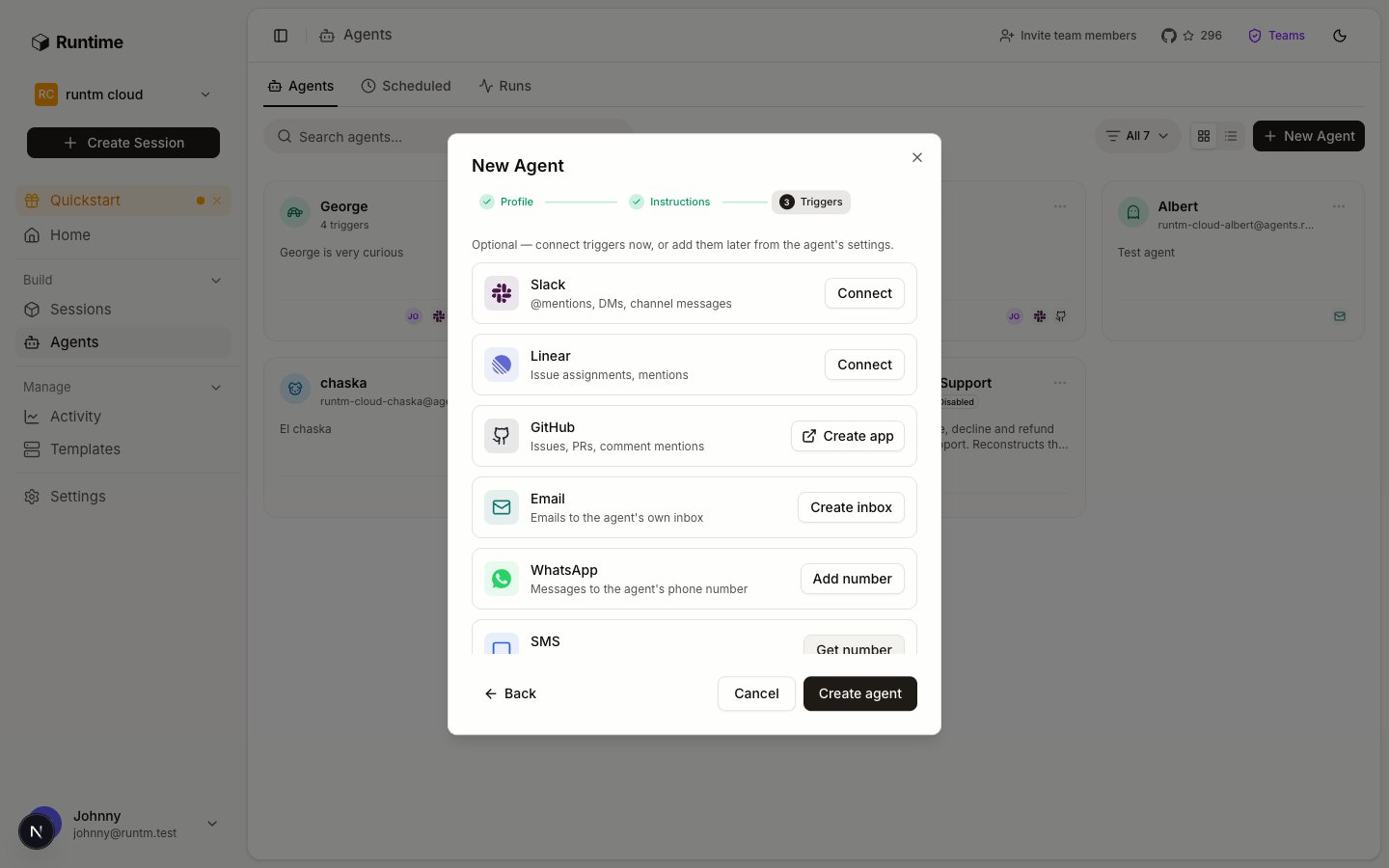
The New Agent dialog ends on the Triggers step. Connect one now or add more later from the agent's settings.
What exists
Voice provisions a number that is shared with the agent’s SMS and WhatsApp triggers, but inbound calls are not answered yet. Do not plan a workflow around it.
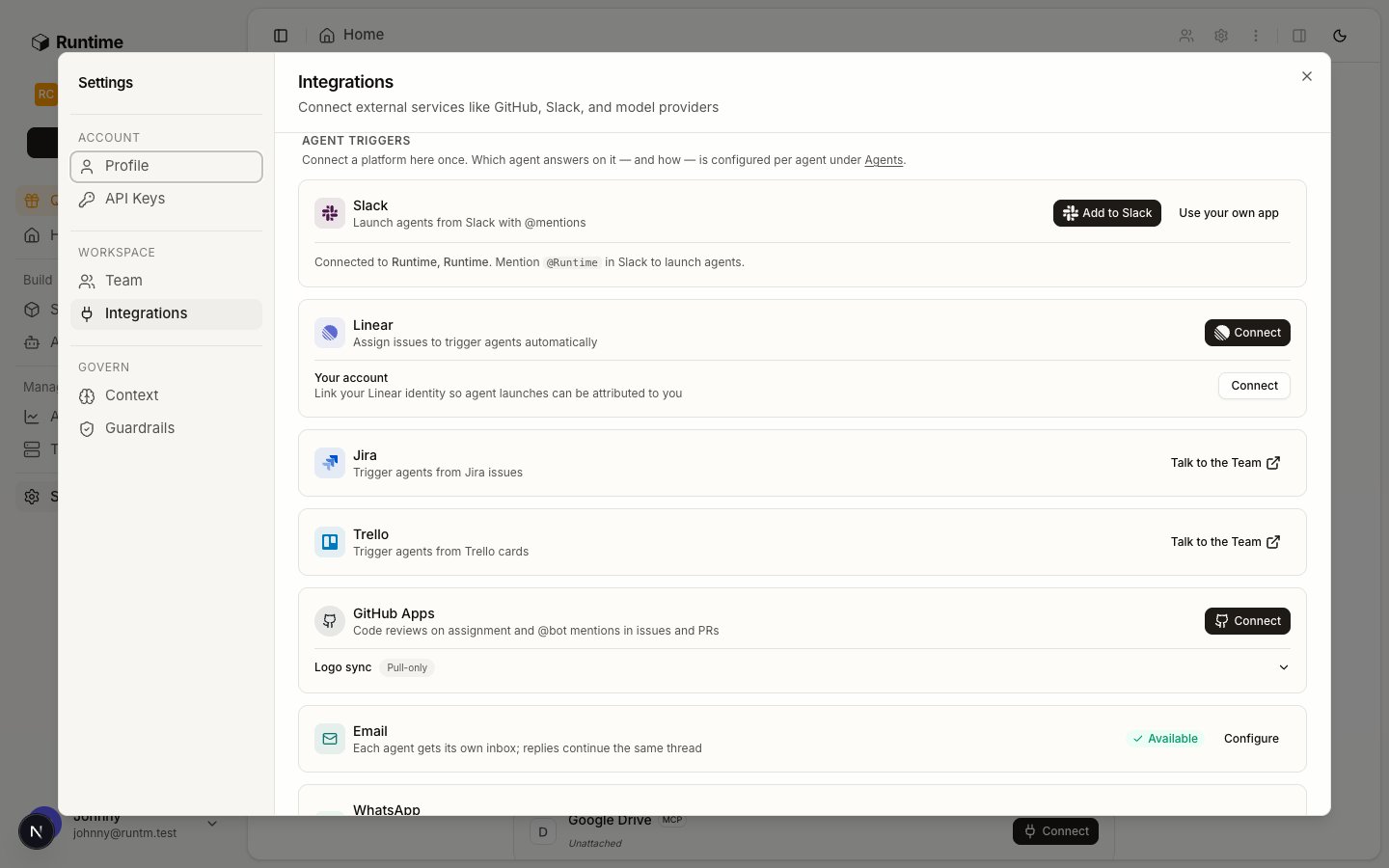
The Integrations page groups live triggers. Cards with a Talk to the Team button are not implemented.
Do it
Create the agent first, then attach triggers. Triggers created from the New Agent dialog or the agent’s settings sheet are bound to the agent automatically.1
Open the agent's Triggers list
On Agents, open your agent. The edit sheet’s Profile tab ends with a Triggers list and dashed
Add Slack trigger, Add Linear trigger, Add GitHub trigger, Add Email trigger rows. The sheet says “The profile is shared across this agent’s triggers.”2
Slack: create the app for this agent
Click Connect on the Slack row. The dialog builds a Slack app from a manifest under your workspace, or you paste an App ID, an
xoxb- bot token and the signing secret. Once connected, open the trigger’s Slack tab and set the four launch toggles (“Auto-launch on new channel messages”, “Auto-launch on bot channel messages”, “Auto-reply to thread follow-ups”, “Auto-launch on direct messages”), the default template, the Event context fields, and any Channel → template overrides.3
Linear: authorize the workspace
Click Connect on the Linear row. Linear OAuth runs with the managed client or your own
client_id and client_secret. Afterwards the Linear tab has Agent name, the default template, Default agent, Rate limit (per hour), and Team overrides (“Route specific Linear teams to a different template.”).4
GitHub: create a customer-owned App
Click Create app on the GitHub row. GitHub’s manifest flow creates an App under your account or org and returns you to Agents. In the GitHub tab, enable
Code review on assignment, Review when ready for review, Re-review when review is re-requested, Comment mentions with its Mention prefix (default @<app_slug>), and optionally a Filter label so the bot only acts on labeled pull requests.5
Email: mint the inbox
Click Create inbox on the Email row. One click provisions
<org-slug>-<agent-slug>@agents.runtm.com. In the Email tab, add a sender allowlist (one address or @domain per line) and a signature. The default rate limit is 15 emails per hour.6
WhatsApp or SMS: claim a number
Click Add number (WhatsApp) or Get number (SMS). Both share one Vonage number per agent. Set the sender allowlist in international format (
+1 415 738 6102, or a prefix such as +1415*). WhatsApp additionally requires business account onboarding with Meta before messages flow.The CLI has no WhatsApp or SMS surface. Use the dashboard or POST /api/cloud/v1/whatsapp and POST /api/cloud/v1/sms.7
Scheduled: write the prompt, validate, then enable
On Agents, open the Scheduled tab and click the new-schedule button. The dialog is prompt-first:
Name this scheduled agent, the prompt (“Describe what the agent should do on each run…”), a run-as choice between Harness (“Pick the coding agent, model and template yourself”) and Agent (“Run as a named agent, using its own harness and template”), the schedule popover (Time of day with frequency and timezone, or Interval presets), Personal or Team visibility, and an optional Post target: one Slack channel, one email address, or one WhatsApp number.Create it disabled, run it once, read the session, then enable. run-now executes the identical code path a cron tick takes, so a misconfigured schedule fails in front of you instead of silently at 03:00 UTC.8
API: launch from your own code
Create a session from the agent’s template and send a prompt. Every launch records
metadata.trigger and metadata.source, so API runs show up in Runs next to the others.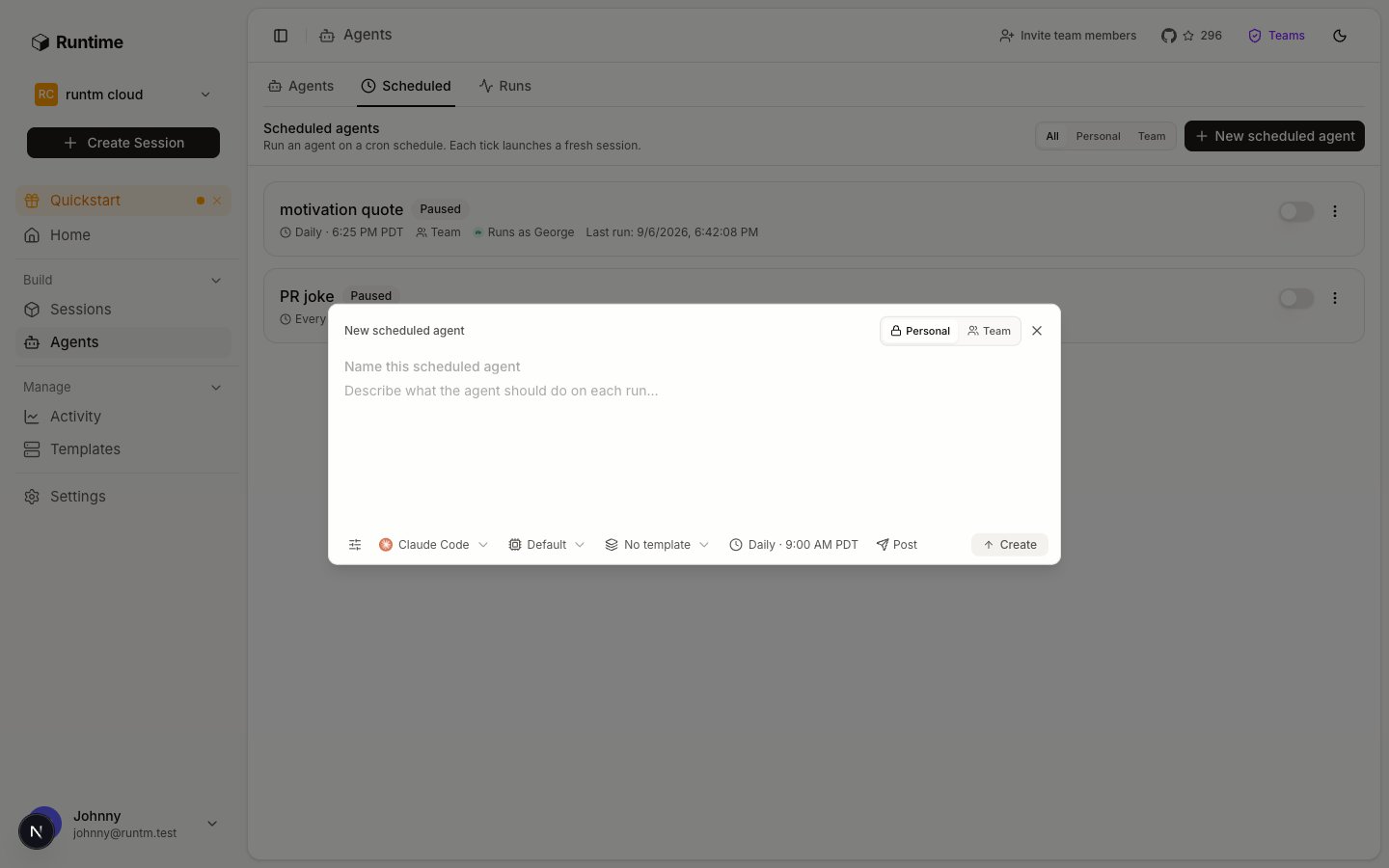
A scheduled agent is a prompt, a cron expression in UTC, a template, and at most one post target.
Verify
- The agent card on Agents shows a trigger count (
4 triggers) and one icon per source. runtm-api agents get <agent_id>lists linked triggers withconfig.agent_idequal to the agent’s id.- For Slack, mention the bot in a test channel and confirm a session appears under Runs with the thread reply.
- For schedules,
runtm-api scheduled-agents run-now <id>returns a session id, andruntm-api scheduled-agents get <id>showslast_run_atandnext_run_atonce enabled.
Agent-to-agent
One agent can start another. There is no dedicated trigger for it: the parent runs a script from its sandbox that creates a session on the child’s template with the child’sagent_id, forwards the prompt, and returns the reply, with a PreToolUse hook turning every handoff into a human approval. The dashboard draws a “Delegated work to subagent” card from the command text. See Delegate work to another agent and the multi-agent example.
Gotchas
- Trigger with no template. A trigger whose agent has no
default_templatelaunches from the base image with none of your tools or skills. Set the template on the agent profile first. - Schedule enabled without a run. An enabled schedule that was never validated with
run-nowfails at its first tick where nobody is watching. Create disabled, run once, then enable. - Cron is UTC. There is no per-agent time zone.
0 18 * * 1is Mondays 11:00 Pacific in winter and 10:00 in summer. - Context fields are launch-only. Slack event context is appended when a new session launches, not on thread follow-ups.
- Email has no acknowledgment. By design the agent sends one reply when it finishes. Set expectations with senders, or use Slack where a thinking status is shown.
- Rate limits are per trigger. Each integration row has
rate_limit_per_hour. A busy channel hitting the cap drops launches until the window resets. - Reply backstop covers Slack and schedules only. If the delivery task dies mid-run, the reaper reposts the result for Slack and scheduled triggers. Linear, GitHub, Email, WhatsApp and SMS replies are not retried.
- Delete triggers before the agent. Deleting a roster agent with linked triggers fails; remove or reassign the triggers first.
- Slack needs the org’s Slack app configuration token first. It is set once in the dashboard and has no CLI equivalent; a bare 400 on creating a Slack trigger is almost always this.
- Slack, GitHub and managed Linear finish in a browser. Only Email and manual Linear (a personal API key plus a service user) are fully headless. Unattended setups should prefer Email or a schedule and hand the browser step to a person.
- A trigger not bound to the roster agent carries none of its identity. The binding is
config.agent_id. Email takes--agent-idat create; other triggers are bound by editing their config. - Trigger updates are partial patches. Only the flags or config keys you pass change;
configmerges server-side, so a one-key change never clobberstriggersorchannel_template_map. - Deleting the roster row while a trigger still points at it does not stick. The trigger’s lazy sync recreates it. Delete or reassign the triggers first.
- A schedule’s Slack post target is a pair. Integration id and channel id must be set together; find integration ids with
runtm-api agents list --type slack. - Scheduled prompts that end with “post the JSON” paste raw JSON into Slack. Ask for a short plain-text summary when a person reads the channel.