Add evaluation categories (when a run belongs, how to grade it pass or fail, what a human would spend), set a monthly budget, and read the scorecard. Read before runtm-api agents update --evaluator-criteria or the Performance evaluation section.
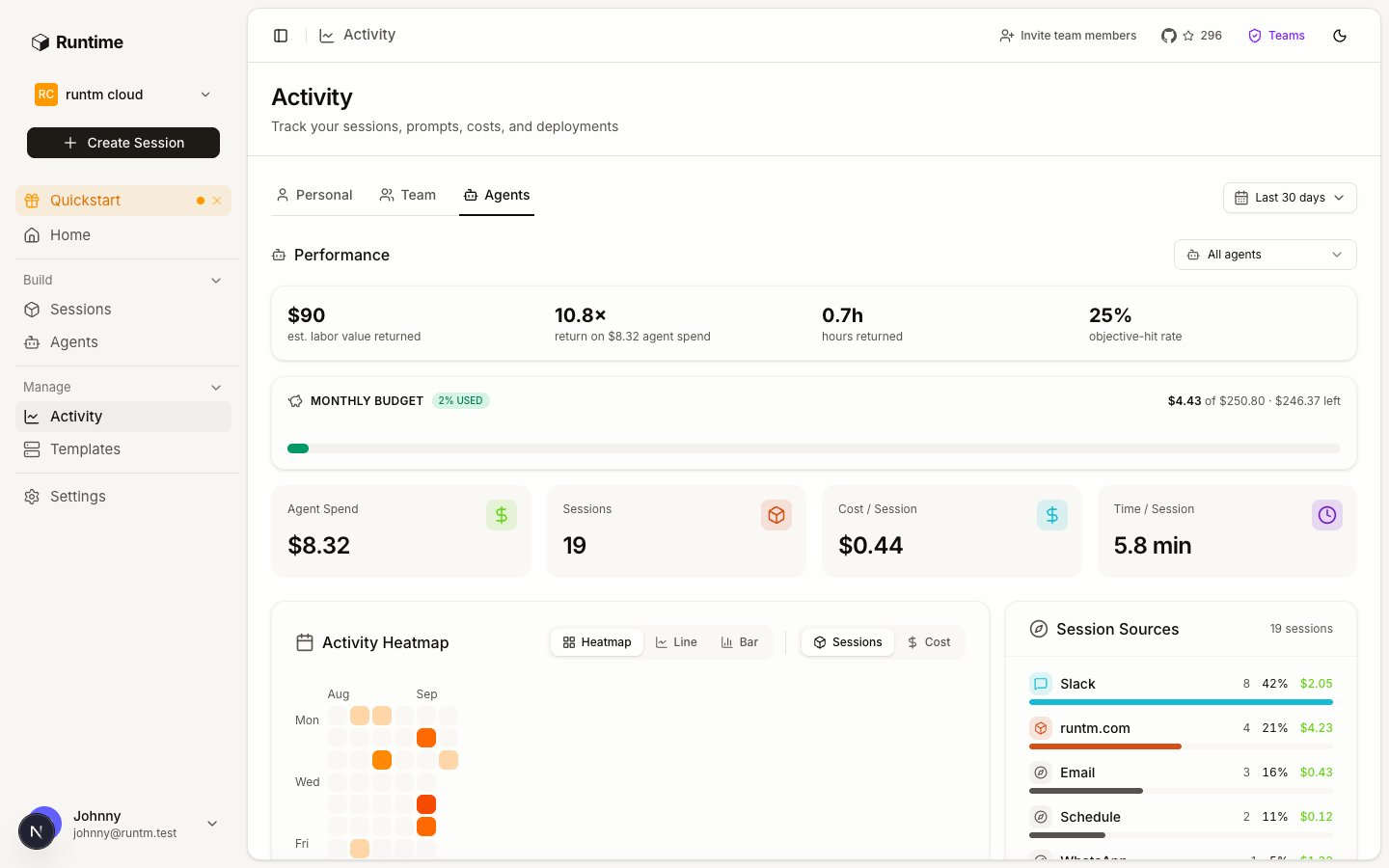
Every finished run of the agent is routed to one evaluation category, graded pass or fail with a reason, and rolled into a scorecard that shows hit rate, value returned and budget state. Without this step nothing is graded and the scorecard shows zeros.
What are the two to five kinds of work this agent does? Each becomes a category. Categories are routing units: the grader reads the run and picks the one whose description matches. Too many and the grader misroutes; one catch-all and you learn nothing.What does a passing run look like, in one sentence a stranger could check? This is the success criterion. It is graded true or false, so write it as a checklist of observable facts, not a quality adjective.
Bad
Good
Category
support
duplicate-charge
When to use
”Any support question."
"The customer reports two charges for one order.”
Success criteria
”The reply is helpful and accurate."
"The draft cites both charge IDs, states which one settled, proposes the refund amount, and contains no other customer’s data.”
What does the same task cost a person? Enter the average human cost in dollars and time in minutes per category. These are the rate card: every successful run is valued at that cost, and time saved is the human minutes minus the agent’s minutes. Ask the team lead; a defensible estimate beats none.How much may the agent spend per month? The monthly budget is a cap in dollars across all of the agent’s sessions. It is observed, not enforced: crossing it flags the agent on the scorecard and writes an audit event. Launches continue. If you need hard limits, set them at the organization level under Guardrails > Limits.
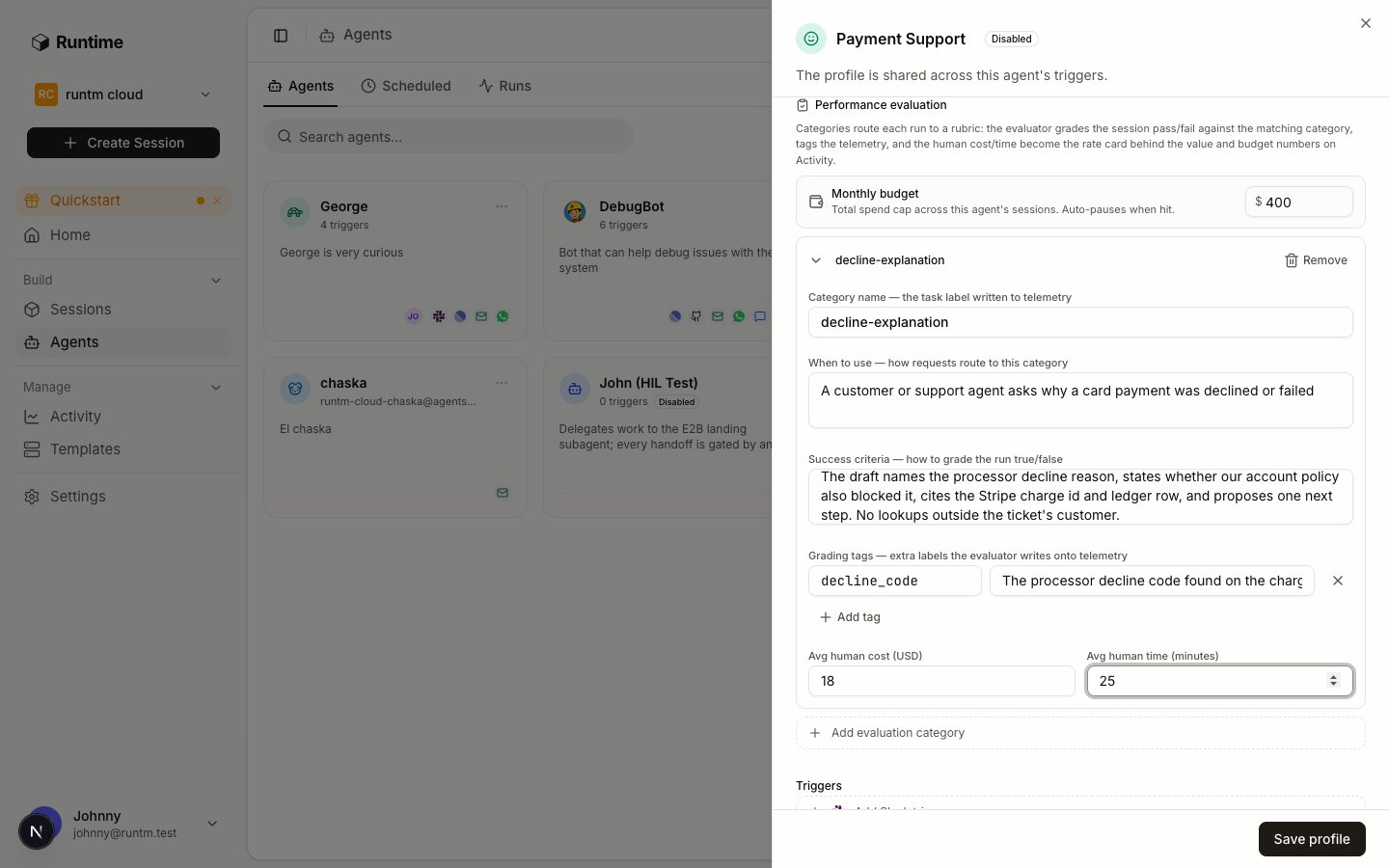
Go to Agents, click the agent, and scroll the Profile tab to Performance evaluation. The helper text describes the whole loop: categories route each run to a rubric, the evaluator grades the session pass or fail against the matching category, tags the telemetry, and the human cost and time become the rate card behind the value and budget numbers on Activity.
Performance evaluation: monthly budget, then one card per category.
2
Add a category
Click Add evaluation category and fill the card:
Field
What to enter
Category name
A short slug. It becomes the task label on telemetry and the key in the rate card. Example: duplicate-charge.
When to use
How requests route here. “The customer reports two charges for one order.”
Success criteria
How to grade the run true or false. Observable facts only.
Grading tags
Optional extra labels the grader writes onto telemetry, each with an instruction for picking its value. Example: refund_recommended with “true if the draft proposes a refund”.
Avg human cost (USD)
What the task costs when a person does it.
Avg human time (minutes)
How long it takes a person.
Repeat for each kind of work. A payments support agent might carry:
Category
When to use
Success criteria
Human cost / time
decline-explanation
Customer asks why a payment was declined
Draft names the processor decline code and, separately, any account-policy reason of ours; no other customer’s data appears
$12 / 15 min
duplicate-charge
Customer reports two charges for one order
Draft cites both charge IDs, states which one settled, proposes the refund amount
$18 / 25 min
refund-status
Customer asks where a refund is
Draft states the refund ID, its Stripe status, the date issued and the expected arrival window
$8 / 10 min
Click Save profile.The JSON the CLI takes has this shape; the server bumps version on every write:
{ "categories": [ { "key": "duplicate-charge", "description": "The customer reports two charges for one order", "success_criteria": "Draft cites both charge IDs, states which one settled, proposes the refund amount, contains no other customer's data", "tags": { "refund_recommended": "true if the draft proposes a refund" }, "human_cost_usd": 18, "human_minutes": 25 } ]}
Human cost and time are also mirrored into the agent’s economics.tasks map, which is what the scorecard reads.
3
Set the monthly budget
At the top of the section, enter Monthly budget in dollars. Leave it empty for no cap. Click Save profile.Spend is metered from each turn’s token usage against the model’s pricing, so it lags real spend by about one turn.
Knowing the mechanics makes the rubric easier to write.
When. A background job runs each time a session’s transcript is uploaded and shows completed turns. Grading never happens inline in the run.
What the grader sees. The rendered categories, the first prompt of the session, the agent’s last message (or its structured output), and the turn count. It does not see tool call logs, so the success criteria must be checkable from the final answer. If the evidence matters, instruct the agent to put it in the reply.
What it returns. One routed category and one boolean, plus a reason and the declared tags. There are no scores, no weights and no per-criterion marks. A run with no matching category gets an empty category and counts as ungraded work.
Which model. A small fast model (Claude Haiku by default). The grade is only as good as the criteria you wrote; ambiguous criteria produce inconsistent grades.
Regrading. Every save of the categories bumps the rubric version. A run is graded once per (rubric version, last completed turn), so editing the rubric regrades runs as their next transcript arrives, and the new grade records which one it supersedes.
When it cannot run. Without a provider API key or when the model call fails, the grade records grader_unavailable and nothing else is written.
No categories, no grades. An agent without evaluation categories is never graded. The scorecard shows the sessions and spend but zero graded runs. This is the most common reason “evaluation is not working”.
Criteria the grader cannot see. If success depends on what the agent did (queried the right table, called the right endpoint) rather than what it said, have the instructions require an evidence section in the final reply and grade that.
One category per run. The grader picks a single category. If a run does two kinds of work, it is graded on one. Keep categories at the granularity of a single request.
Budget does not stop anything.monthly_usd_cap flags and audits. It does not pause launches or reject prompts. Hard concurrency and spend limits live under Guardrails > Limits at the organization level.
Human cost is the value. A category with no cost makes every success worth $0 and shows up as unpriced_runs.
Personal mode has no scorecard. Roster agents are organization-scoped; use an org-scoped key for the CLI.
Every grade records the rubric version that produced it. The version bumps on every edit, so a verdict can always be traced to the criteria text that was live when it was written.
3. Give it tools
The template that carries the agent’s tools, MCP servers and secrets.
Agent Scorecard API
Every field of the aggregate.
{"docsConfig":{"$schema":"https://mintlify.com/docs.json","theme":"mint","name":"Runtime","colors":{"primary":"#18181b","light":"#71717a","dark":"#18181b"},"favicon":"https://mintcdn.com/runtm/5BRbZxh1joq_9si2/images/favicon.svg?fit=max\u0026auto=format\u0026n=5BRbZxh1joq_9si2\u0026q=85\u0026s=957716cbd1f84c5995ece94d6ac63ffd","logo":{"light":"https://mintcdn.com/runtm/5BRbZxh1joq_9si2/images/logo-light.svg?fit=max\u0026auto=format\u0026n=5BRbZxh1joq_9si2\u0026q=85\u0026s=dd91f6d3dfa4840b854b016d7add405d","dark":"https://mintcdn.com/runtm/5BRbZxh1joq_9si2/images/logo-dark.svg?fit=max\u0026auto=format\u0026n=5BRbZxh1joq_9si2\u0026q=85\u0026s=996520fef61624cf8b0b4583342e3300"},"api":{"mdx":{"server":"https://app.runtm.com/api/cloud","auth":{"method":"bearer","name":null}}},"appearance":{"default":"light","strict":null},"background":{"decoration":null,"color":{"light":"#fafafa","dark":"#18181b"}},"footer":{"socials":{"github":"https://github.com/runtm-ai/runtm","x":"https://twitter.com/runtm_ai"}},"styling":{"latex":true},"navigation":{"global":{"anchors":[{"anchor":"GitHub","href":"https://github.com/runtm-ai/runtm","icon":"github"}]},"pages":[]}},"deployment":{"deploymentMetadataValue":{"subdomain":"runtm","hasAudioNarration":false,"actualSubdomain":"runtm","customDomains":["docs.runtm.com"],"gitSource":{"type":"github","owner":"runtm-ai","repo":"runtm","deployBranch":"main","contentDirectory":"docs","isPrivate":true,"mountPath":"","label":""},"chroma":{"liveDeploymentHistoryId":"6ae513ed05ddb97afbab990f","collectionId":"63d087b9-cc50-4139-8512-4005e4c5a340","schemaVersion":"v3","latestBuiltDeploymentHistoryId":"6ae513ed05ddb97afbab990f"},"entitlements":{},"buildId":"6ae513ed05ddb97afbab990f","clientVersion":"0.0.4044","searchFilterCounts":[{"language":"default","tag":"API Reference","count":222},{"language":"default","tag":"Open Source","count":49},{"language":"default","tag":"Sessions","count":47},{"language":"default","tag":"Documentation","count":24},{"language":"default","tag":"Templates","count":22},{"language":"default","tag":"Context","count":21},{"language":"default","tag":"Guides","count":19},{"language":"default","tag":"CLI Reference","count":17},{"language":"default","tag":"Linear","count":16},{"language":"default","tag":"Skills","count":14}]},"assistantConfig":{"enableAskAiButton":false,"enableStarterQuestions":false,"enableAskAiSearchBar":true},"basePath":"","hasChatPermissions":false,"hasWebMcpPermissions":false,"toggles":[{"name":"kill-isr","enabled":true,"variant":{"name":"disabled","enabled":false,"feature_enabled":true},"impressionData":false},{"name":"agent-mintlify-slack","enabled":true,"variant":{"name":"disabled","enabled":false,"feature_enabled":true},"impressionData":false},{"name":"agent-integrations-settings","enabled":true,"variant":{"name":"disabled","enabled":false,"feature_enabled":true},"impressionData":false},{"name":"automations-pr-grouping","enabled":true,"variant":{"name":"disabled","enabled":false,"feature_enabled":true},"impressionData":false},{"name":"custom-prefix","enabled":true,"variant":{"name":"disabled","enabled":false,"feature_enabled":true},"impressionData":false},{"name":"analytics-v7","enabled":true,"variant":{"name":"disabled","enabled":false,"feature_enabled":true},"impressionData":false},{"name":"user-flows-analytics","enabled":true,"variant":{"name":"disabled","enabled":false,"feature_enabled":true},"impressionData":false},{"name":"no-publish-flow","enabled":true,"variant":{"name":"disabled","enabled":false,"feature_enabled":true},"impressionData":false},{"name":"workos-onboarding","enabled":true,"variant":{"name":"disabled","enabled":false,"feature_enabled":true},"impressionData":false},{"name":"llms-txt-v2","enabled":true,"variant":{"name":"disabled","enabled":false,"feature_enabled":true},"impressionData":false},{"name":"snapshot-serving-live","enabled":true,"variant":{"name":"disabled","enabled":false,"feature_enabled":true},"impressionData":false},{"name":"stripTemperatureMiddleware","enabled":true,"variant":{"name":"disabled","enabled":false,"feature_enabled":true},"impressionData":false},{"name":"support-platform-pylon-zendesk","enabled":true,"variant":{"name":"disabled","enabled":false,"feature_enabled":true},"impressionData":false},{"name":"snapshot-serving","enabled":true,"variant":{"name":"disabled","enabled":false,"feature_enabled":true},"impressionData":false},{"name":"instant-rollback","enabled":true,"variant":{"name":"disabled","enabled":false,"feature_enabled":true},"impressionData":false},{"name":"granular-notifications-server","enabled":true,"variant":{"name":"disabled","enabled":false,"feature_enabled":true},"impressionData":false},{"name":"granular-notifications","enabled":true,"variant":{"name":"disabled","enabled":false,"feature_enabled":true},"impressionData":false},{"name":"automations-fable","enabled":true,"variant":{"name":"disabled","enabled":false,"feature_enabled":true},"impressionData":false},{"name":"fixed-ai-action-pricing","enabled":true,"variant":{"name":"disabled","enabled":false,"feature_enabled":true},"impressionData":false},{"name":"automation-resolve-merge-conflict","enabled":true,"variant":{"name":"disabled","enabled":false,"feature_enabled":true},"impressionData":false},{"name":"scoped-publishing","enabled":true,"variant":{"name":"disabled","enabled":false,"feature_enabled":true},"impressionData":false},{"name":"mintql","enabled":true,"variant":{"name":"disabled","enabled":false,"feature_enabled":true},"impressionData":false},{"name":"page-level-analytics","enabled":true,"variant":{"name":"disabled","enabled":false,"feature_enabled":true},"impressionData":false},{"name":"editor-version-history-v2","enabled":true,"variant":{"name":"disabled","enabled":false,"feature_enabled":true},"impressionData":false},{"name":"billing-page-v2","enabled":true,"variant":{"name":"disabled","enabled":false,"feature_enabled":true},"impressionData":false},{"name":"full-page-search","enabled":true,"variant":{"name":"disabled","enabled":false,"feature_enabled":true},"impressionData":false},{"name":"workspace-projects","enabled":true,"variant":{"name":"disabled","enabled":false,"feature_enabled":true},"impressionData":false},{"name":"assistant-v5","enabled":true,"variant":{"name":"disabled","enabled":false,"feature_enabled":true},"impressionData":false},{"name":"byok-sep-25","enabled":true,"variant":{"name":"disabled","enabled":false,"feature_enabled":true},"impressionData":false},{"name":"fork-pr-previews","enabled":true,"variant":{"name":"disabled","enabled":false,"feature_enabled":true},"impressionData":false},{"name":"revalidation-jwt","enabled":true,"variant":{"name":"disabled","enabled":false,"feature_enabled":true},"impressionData":false},{"name":"vite-origin","enabled":true,"variant":{"name":"disabled","enabled":false,"feature_enabled":true},"impressionData":false},{"name":"billing-updated-9-15","enabled":true,"variant":{"name":"disabled","enabled":false,"feature_enabled":true},"impressionData":false},{"name":"workos-sso-scim","enabled":true,"variant":{"name":"disabled","enabled":false,"feature_enabled":true},"impressionData":false},{"name":"hobby-abuse-scan","enabled":true,"variant":{"name":"disabled","enabled":false,"feature_enabled":true},"impressionData":false},{"name":"dashboard-inbox","enabled":true,"variant":{"name":"disabled","enabled":false,"feature_enabled":true},"impressionData":false},{"name":"workos-signup","enabled":true,"variant":{"name":"disabled","enabled":false,"feature_enabled":true},"impressionData":false},{"name":"turbopuffer-dual-write","enabled":true,"variant":{"name":"disabled","enabled":false,"feature_enabled":true},"impressionData":false},{"name":"workos-enabled","enabled":true,"variant":{"name":"disabled","enabled":false,"feature_enabled":true},"impressionData":false},{"name":"approve-review-flow","enabled":true,"variant":{"name":"disabled","enabled":false,"feature_enabled":true},"impressionData":false},{"name":"sso-setup-deadline-banner","enabled":true,"variant":{"name":"disabled","enabled":false,"feature_enabled":true},"impressionData":false}],"googleFontsInlined":false},"customCss":[],"page":{"pagePath":"build/measure-success","slug":"/build/measure-success","pageMetadata":{"title":"2. Measure success","description":"Add evaluation categories (when a run belongs, how to grade it pass or fail, what a human would spend), set a monthly budget, and read the scorecard. Read before `runtm-api agents update --evaluator-criteria` or the Performance evaluation section.","href":"/build/measure-success"},"description":{"compiledSource":"\"use strict\";\nconst {jsx: _jsx, jsxs: _jsxs} = arguments[0];\nconst {useMDXComponents: _provideComponents} = arguments[0];\nfunction _createMdxContent(props) {\n const _components = {\n code: \"code\",\n p: \"p\",\n ..._provideComponents(),\n ...props.components\n };\n return _jsxs(_components.p, {\n children: [\"Add evaluation categories (when a run belongs, how to grade it pass or fail, what a human would spend), set a monthly budget, and read the scorecard. Read before \", _jsx(_components.code, {\n children: \"runtm-api agents update --evaluator-criteria\"\n }), \" or the Performance evaluation section.\"]\n });\n}\nfunction MDXContent(props = {}) {\n const {wrapper: MDXLayout} = {\n ..._provideComponents(),\n ...props.components\n };\n return MDXLayout ? _jsx(MDXLayout, {\n ...props,\n children: _jsx(_createMdxContent, {\n ...props\n })\n }) : _createMdxContent(props);\n}\nreturn {\n default: MDXContent\n};\n","frontmatter":{},"scope":{}},"pageType":"default","mdx":{"mdxSource":{"compiledSource":"\"use strict\";const{Fragment:_Fragment,jsx:_jsx,jsxs:_jsxs}=arguments[0];const{useMDXComponents:_provideComponents}=arguments[0];function _createMdxContent(props){const _components={a:`a`,code:`code`,li:`li`,p:`p`,pre:`pre`,span:`span`,strong:`strong`,tbody:`tbody`,td:`td`,th:`th`,thead:`thead`,tr:`tr`,ul:`ul`,..._provideComponents(),...props.components},{Card,CardGroup,CodeBlock,Frame,Heading,OptimizedImage,Step,Steps,Table,Visibility}=_components;if(!Card)_missingMdxReference(`Card`,true);if(!CardGroup)_missingMdxReference(`CardGroup`,true);if(!CodeBlock)_missingMdxReference(`CodeBlock`,true);if(!Frame)_missingMdxReference(`Frame`,true);if(!Heading)_missingMdxReference(`Heading`,true);if(!OptimizedImage)_missingMdxReference(`OptimizedImage`,true);if(!Step)_missingMdxReference(`Step`,true);if(!Steps)_missingMdxReference(`Steps`,true);if(!Table)_missingMdxReference(`Table`,true);if(!Visibility)_missingMdxReference(`Visibility`,true);return _jsxs(_Fragment,{children:[_jsx(Heading,{level:`2`,id:`outcome`,children:`Outcome`}),`\n`,_jsx(_components.p,{children:`Every finished run of the agent is routed to one evaluation category, graded pass or fail with a reason, and rolled into a scorecard that shows hit rate, value returned and budget state. Without this step nothing is graded and the scorecard shows zeros.`}),`\n`,_jsx(Heading,{level:`2`,id:`decide`,children:`Decide`}),`\n`,_jsxs(_components.p,{children:[_jsx(_components.strong,{children:`What are the two to five kinds of work this agent does?`}),` Each becomes a category. Categories are routing units: the grader reads the run and picks the one whose description matches. Too many and the grader misroutes; one catch-all and you learn nothing.`]}),`\n`,_jsxs(_components.p,{children:[_jsx(_components.strong,{children:`What does a passing run look like, in one sentence a stranger could check?`}),` This is the success criterion. It is graded true or false, so write it as a checklist of observable facts, not a quality adjective.`]}),`\n`,_jsxs(Table,{children:[_jsx(_components.thead,{children:_jsxs(_components.tr,{children:[_jsx(_components.th,{}),_jsx(_components.th,{children:`Bad`}),_jsx(_components.th,{children:`Good`})]})}),_jsxs(_components.tbody,{children:[_jsxs(_components.tr,{children:[_jsx(_components.td,{children:`Category`}),_jsx(_components.td,{children:_jsx(_components.code,{children:`support`})}),_jsx(_components.td,{children:_jsx(_components.code,{children:`duplicate-charge`})})]}),_jsxs(_components.tr,{children:[_jsx(_components.td,{children:`When to use`}),_jsx(_components.td,{children:`”Any support question.\"`}),_jsx(_components.td,{children:`\"The customer reports two charges for one order.”`})]}),_jsxs(_components.tr,{children:[_jsx(_components.td,{children:`Success criteria`}),_jsx(_components.td,{children:`”The reply is helpful and accurate.\"`}),_jsx(_components.td,{children:`\"The draft cites both charge IDs, states which one settled, proposes the refund amount, and contains no other customer’s data.”`})]})]})]}),`\n`,_jsxs(_components.p,{children:[_jsx(_components.strong,{children:`What does the same task cost a person?`}),` Enter the average human cost in dollars and time in minutes per category. These are the rate card: every successful run is valued at that cost, and time saved is the human minutes minus the agent’s minutes. Ask the team lead; a defensible estimate beats none.`]}),`\n`,_jsxs(_components.p,{children:[_jsx(_components.strong,{children:`How much may the agent spend per month?`}),` The monthly budget is a cap in dollars across all of the agent’s sessions. It is observed, not enforced: crossing it flags the agent on the scorecard and writes an audit event. Launches continue. If you need hard limits, set them at the organization level under `,_jsx(_components.strong,{children:`Guardrails > Limits`}),`.`]}),`\n`,_jsx(Heading,{level:`2`,id:`do-it`,children:`Do it`}),`\n`,_jsxs(Steps,{children:[_jsxs(Step,{title:`Open the agent's Performance evaluation section`,children:[_jsxs(_components.p,{children:[`Go to `,_jsx(_components.strong,{children:`Agents`}),`, click the agent, and scroll the `,_jsx(_components.strong,{children:`Profile`}),` tab to `,_jsx(_components.strong,{children:`Performance evaluation`}),`. The helper text describes the whole loop: categories route each run to a rubric, the evaluator grades the session pass or fail against the matching category, tags the telemetry, and the human cost and time become the rate card behind the value and budget numbers on Activity.`]}),_jsx(Frame,{caption:`Performance evaluation: monthly budget, then one card per category.`,children:_jsx(OptimizedImage,{src:`https://mintcdn.com/runtm/N90MV6Hfql5ejv1J/images/dashboard/agent-evaluation.png?fit=max\u0026auto=format\u0026n=N90MV6Hfql5ejv1J\u0026q=85\u0026s=ebf1a9bc89691a9ae5f54a36be35745d`,alt:`Performance evaluation section with the monthly budget field and an evaluation category card`,\"data-og-width\":`1440`,width:`1440`,\"data-og-height\":`900`,height:`900`,\"data-path\":`images/dashboard/agent-evaluation.png`,\"data-optimize\":`true`,\"data-opv\":`3`,srcset:`https://mintcdn.com/runtm/N90MV6Hfql5ejv1J/images/dashboard/agent-evaluation.png?w=280\u0026fit=max\u0026auto=format\u0026n=N90MV6Hfql5ejv1J\u0026q=85\u0026s=3c1b7ed6d17ccbb04b500e0492601ea9 280w, https://mintcdn.com/runtm/N90MV6Hfql5ejv1J/images/dashboard/agent-evaluation.png?w=560\u0026fit=max\u0026auto=format\u0026n=N90MV6Hfql5ejv1J\u0026q=85\u0026s=ab3632f9edbeff20431127dadfe39a01 560w, https://mintcdn.com/runtm/N90MV6Hfql5ejv1J/images/dashboard/agent-evaluation.png?w=840\u0026fit=max\u0026auto=format\u0026n=N90MV6Hfql5ejv1J\u0026q=85\u0026s=b2d48aed79e74a215da50634450ca000 840w, https://mintcdn.com/runtm/N90MV6Hfql5ejv1J/images/dashboard/agent-evaluation.png?w=1100\u0026fit=max\u0026auto=format\u0026n=N90MV6Hfql5ejv1J\u0026q=85\u0026s=6441b1b357b3b3f0bf403924b19b7450 1100w, https://mintcdn.com/runtm/N90MV6Hfql5ejv1J/images/dashboard/agent-evaluation.png?w=1650\u0026fit=max\u0026auto=format\u0026n=N90MV6Hfql5ejv1J\u0026q=85\u0026s=7d2f0420fd2f77385c635f35fc2da853 1650w, https://mintcdn.com/runtm/N90MV6Hfql5ejv1J/images/dashboard/agent-evaluation.png?w=2500\u0026fit=max\u0026auto=format\u0026n=N90MV6Hfql5ejv1J\u0026q=85\u0026s=2ad54cf642f5a94303a67e8b892f7d34 2500w`})})]}),_jsxs(Step,{title:`Add a category`,children:[_jsxs(_components.p,{children:[`Click `,_jsx(_components.strong,{children:`Add evaluation category`}),` and fill the card:`]}),_jsxs(Table,{children:[_jsx(_components.thead,{children:_jsxs(_components.tr,{children:[_jsx(_components.th,{children:`Field`}),_jsx(_components.th,{children:`What to enter`})]})}),_jsxs(_components.tbody,{children:[_jsxs(_components.tr,{children:[_jsx(_components.td,{children:`Category name`}),_jsxs(_components.td,{children:[`A short slug. It becomes the `,_jsx(_components.code,{children:`task`}),` label on telemetry and the key in the rate card. Example: `,_jsx(_components.code,{children:`duplicate-charge`}),`.`]})]}),_jsxs(_components.tr,{children:[_jsx(_components.td,{children:`When to use`}),_jsx(_components.td,{children:`How requests route here. “The customer reports two charges for one order.”`})]}),_jsxs(_components.tr,{children:[_jsx(_components.td,{children:`Success criteria`}),_jsx(_components.td,{children:`How to grade the run true or false. Observable facts only.`})]}),_jsxs(_components.tr,{children:[_jsx(_components.td,{children:`Grading tags`}),_jsxs(_components.td,{children:[`Optional extra labels the grader writes onto telemetry, each with an instruction for picking its value. Example: `,_jsx(_components.code,{children:`refund_recommended`}),` with “true if the draft proposes a refund”.`]})]}),_jsxs(_components.tr,{children:[_jsx(_components.td,{children:`Avg human cost (USD)`}),_jsx(_components.td,{children:`What the task costs when a person does it.`})]}),_jsxs(_components.tr,{children:[_jsx(_components.td,{children:`Avg human time (minutes)`}),_jsx(_components.td,{children:`How long it takes a person.`})]})]})]}),_jsx(_components.p,{children:`Repeat for each kind of work. A payments support agent might carry:`}),_jsxs(Table,{children:[_jsx(_components.thead,{children:_jsxs(_components.tr,{children:[_jsx(_components.th,{children:`Category`}),_jsx(_components.th,{children:`When to use`}),_jsx(_components.th,{children:`Success criteria`}),_jsx(_components.th,{children:`Human cost / time`})]})}),_jsxs(_components.tbody,{children:[_jsxs(_components.tr,{children:[_jsx(_components.td,{children:_jsx(_components.code,{children:`decline-explanation`})}),_jsx(_components.td,{children:`Customer asks why a payment was declined`}),_jsx(_components.td,{children:`Draft names the processor decline code and, separately, any account-policy reason of ours; no other customer’s data appears`}),_jsx(_components.td,{children:`$12 / 15 min`})]}),_jsxs(_components.tr,{children:[_jsx(_components.td,{children:_jsx(_components.code,{children:`duplicate-charge`})}),_jsx(_components.td,{children:`Customer reports two charges for one order`}),_jsx(_components.td,{children:`Draft cites both charge IDs, states which one settled, proposes the refund amount`}),_jsx(_components.td,{children:`$18 / 25 min`})]}),_jsxs(_components.tr,{children:[_jsx(_components.td,{children:_jsx(_components.code,{children:`refund-status`})}),_jsx(_components.td,{children:`Customer asks where a refund is`}),_jsx(_components.td,{children:`Draft states the refund ID, its Stripe status, the date issued and the expected arrival window`}),_jsx(_components.td,{children:`$8 / 10 min`})]})]})]}),_jsxs(_components.p,{children:[`Click `,_jsx(_components.strong,{children:`Save profile`}),`.`]}),_jsx(Visibility,{for:`agents`,children:_jsx(CodeBlock,{filename:``,numberOfLines:`2`,language:`text`,children:_jsx(_components.pre,{className:`shiki shiki-themes github-light-default dark-plus`,style:{backgroundColor:`#ffffff`,\"--shiki-dark-bg\":`#0B0C0E`,color:`#1f2328`,\"--shiki-dark\":`#D4D4D4`},language:`text`,children:_jsxs(_components.code,{language:`text`,numberOfLines:`2`,children:[_jsx(_components.span,{className:`line`,children:_jsx(_components.span,{children:`cli: runtm-api agents update \u003cagent_id> --evaluator-criteria \"$(cat rubric.json)\"`})}),`\n`,_jsx(_components.span,{className:`line`,children:_jsx(_components.span,{})})]})})})}),_jsxs(_components.p,{children:[`The JSON the CLI takes has this shape; the server bumps `,_jsx(_components.code,{children:`version`}),` on every write:`]}),_jsx(CodeBlock,{filename:``,numberOfLines:`12`,language:`json`,children:_jsx(_components.pre,{className:`shiki shiki-themes github-light-default dark-plus`,style:{backgroundColor:`#ffffff`,\"--shiki-dark-bg\":`#0B0C0E`,color:`#1f2328`,\"--shiki-dark\":`#D4D4D4`},language:`json`,children:_jsxs(_components.code,{language:`json`,numberOfLines:`12`,children:[_jsx(_components.span,{className:`line`,children:_jsx(_components.span,{style:{color:`#1F2328`,\"--shiki-dark\":`#D4D4D4`},children:`{`})}),`\n`,_jsxs(_components.span,{className:`line`,children:[_jsx(_components.span,{style:{color:`#116329`,\"--shiki-dark\":`#9CDCFE`},children:` \"categories\"`}),_jsx(_components.span,{style:{color:`#1F2328`,\"--shiki-dark\":`#D4D4D4`},children:`: [`})]}),`\n`,_jsx(_components.span,{className:`line`,children:_jsx(_components.span,{style:{color:`#1F2328`,\"--shiki-dark\":`#D4D4D4`},children:` {`})}),`\n`,_jsxs(_components.span,{className:`line`,children:[_jsx(_components.span,{style:{color:`#116329`,\"--shiki-dark\":`#9CDCFE`},children:` \"key\"`}),_jsx(_components.span,{style:{color:`#1F2328`,\"--shiki-dark\":`#D4D4D4`},children:`: `}),_jsx(_components.span,{style:{color:`#0A3069`,\"--shiki-dark\":`#CE9178`},children:`\"duplicate-charge\"`}),_jsx(_components.span,{style:{color:`#1F2328`,\"--shiki-dark\":`#D4D4D4`},children:`,`})]}),`\n`,_jsxs(_components.span,{className:`line`,children:[_jsx(_components.span,{style:{color:`#116329`,\"--shiki-dark\":`#9CDCFE`},children:` \"description\"`}),_jsx(_components.span,{style:{color:`#1F2328`,\"--shiki-dark\":`#D4D4D4`},children:`: `}),_jsx(_components.span,{style:{color:`#0A3069`,\"--shiki-dark\":`#CE9178`},children:`\"The customer reports two charges for one order\"`}),_jsx(_components.span,{style:{color:`#1F2328`,\"--shiki-dark\":`#D4D4D4`},children:`,`})]}),`\n`,_jsxs(_components.span,{className:`line`,children:[_jsx(_components.span,{style:{color:`#116329`,\"--shiki-dark\":`#9CDCFE`},children:` \"success_criteria\"`}),_jsx(_components.span,{style:{color:`#1F2328`,\"--shiki-dark\":`#D4D4D4`},children:`: `}),_jsx(_components.span,{style:{color:`#0A3069`,\"--shiki-dark\":`#CE9178`},children:`\"Draft cites both charge IDs, states which one settled, proposes the refund amount, contains no other customer's data\"`}),_jsx(_components.span,{style:{color:`#1F2328`,\"--shiki-dark\":`#D4D4D4`},children:`,`})]}),`\n`,_jsxs(_components.span,{className:`line`,children:[_jsx(_components.span,{style:{color:`#116329`,\"--shiki-dark\":`#9CDCFE`},children:` \"tags\"`}),_jsx(_components.span,{style:{color:`#1F2328`,\"--shiki-dark\":`#D4D4D4`},children:`: { `}),_jsx(_components.span,{style:{color:`#116329`,\"--shiki-dark\":`#9CDCFE`},children:`\"refund_recommended\"`}),_jsx(_components.span,{style:{color:`#1F2328`,\"--shiki-dark\":`#D4D4D4`},children:`: `}),_jsx(_components.span,{style:{color:`#0A3069`,\"--shiki-dark\":`#CE9178`},children:`\"true if the draft proposes a refund\"`}),_jsx(_components.span,{style:{color:`#1F2328`,\"--shiki-dark\":`#D4D4D4`},children:` },`})]}),`\n`,_jsxs(_components.span,{className:`line`,children:[_jsx(_components.span,{style:{color:`#116329`,\"--shiki-dark\":`#9CDCFE`},children:` \"human_cost_usd\"`}),_jsx(_components.span,{style:{color:`#1F2328`,\"--shiki-dark\":`#D4D4D4`},children:`: `}),_jsx(_components.span,{style:{color:`#0550AE`,\"--shiki-dark\":`#B5CEA8`},children:`18`}),_jsx(_components.span,{style:{color:`#1F2328`,\"--shiki-dark\":`#D4D4D4`},children:`,`})]}),`\n`,_jsxs(_components.span,{className:`line`,children:[_jsx(_components.span,{style:{color:`#116329`,\"--shiki-dark\":`#9CDCFE`},children:` \"human_minutes\"`}),_jsx(_components.span,{style:{color:`#1F2328`,\"--shiki-dark\":`#D4D4D4`},children:`: `}),_jsx(_components.span,{style:{color:`#0550AE`,\"--shiki-dark\":`#B5CEA8`},children:`25`})]}),`\n`,_jsx(_components.span,{className:`line`,children:_jsx(_components.span,{style:{color:`#1F2328`,\"--shiki-dark\":`#D4D4D4`},children:` }`})}),`\n`,_jsx(_components.span,{className:`line`,children:_jsx(_components.span,{style:{color:`#1F2328`,\"--shiki-dark\":`#D4D4D4`},children:` ]`})}),`\n`,_jsx(_components.span,{className:`line`,children:_jsx(_components.span,{style:{color:`#1F2328`,\"--shiki-dark\":`#D4D4D4`},children:`}`})}),`\n`]})})}),_jsxs(_components.p,{children:[`Human cost and time are also mirrored into the agent’s `,_jsx(_components.code,{children:`economics.tasks`}),` map, which is what the scorecard reads.`]})]}),_jsxs(Step,{title:`Set the monthly budget`,children:[_jsxs(_components.p,{children:[`At the top of the section, enter `,_jsx(_components.strong,{children:`Monthly budget`}),` in dollars. Leave it empty for no cap. Click `,_jsx(_components.strong,{children:`Save profile`}),`.`]}),_jsx(Visibility,{for:`agents`,children:_jsx(CodeBlock,{filename:``,numberOfLines:`2`,language:`text`,children:_jsx(_components.pre,{className:`shiki shiki-themes github-light-default dark-plus`,style:{backgroundColor:`#ffffff`,\"--shiki-dark-bg\":`#0B0C0E`,color:`#1f2328`,\"--shiki-dark\":`#D4D4D4`},language:`text`,children:_jsxs(_components.code,{language:`text`,numberOfLines:`2`,children:[_jsx(_components.span,{className:`line`,children:_jsx(_components.span,{children:`cli: runtm-api agents update \u003cagent_id> --economics '{\"budget\":{\"monthly_usd_cap\":400}}'`})}),`\n`,_jsx(_components.span,{className:`line`,children:_jsx(_components.span,{})})]})})})}),_jsx(_components.p,{children:`Spend is metered from each turn’s token usage against the model’s pricing, so it lags real spend by about one turn.`})]})]}),`\n`,_jsx(Heading,{level:`2`,id:`verify`,children:`Verify`}),`\n`,_jsxs(_components.p,{children:[`Run the agent once (see `,_jsx(_components.a,{href:`/build/launch-and-iterate`,children:`Prove it works and iterate`}),`), wait a few minutes after the run finishes, then:`]}),`\n`,_jsxs(_components.ul,{children:[`\n`,_jsxs(_components.li,{children:[_jsx(_components.strong,{children:`Activity > Agents`}),` shows the agent with one graded run, its hit rate and value.`]}),`\n`,_jsxs(_components.li,{children:[_jsx(_components.code,{children:`runtm-api session grade \u003csession_id>`}),` returns the verdict for that run.`]}),`\n`]}),`\n`,_jsx(Visibility,{for:`agents`,children:_jsx(CodeBlock,{filename:``,numberOfLines:`3`,language:`text`,children:_jsx(_components.pre,{className:`shiki shiki-themes github-light-default dark-plus`,style:{backgroundColor:`#ffffff`,\"--shiki-dark-bg\":`#0B0C0E`,color:`#1f2328`,\"--shiki-dark\":`#D4D4D4`},language:`text`,children:_jsxs(_components.code,{language:`text`,numberOfLines:`3`,children:[_jsx(_components.span,{className:`line`,children:_jsx(_components.span,{children:`cli-verify: runtm-api session grade \u003csession_id> # {\"graded\": true, \"success\": true, \"reason\": \"...\", \"task\": \"duplicate-charge\"}`})}),`\n`,_jsx(_components.span,{className:`line`,children:_jsx(_components.span,{children:`cli-verify: runtm-api agents scorecard --days 7`})}),`\n`,_jsx(_components.span,{className:`line`,children:_jsx(_components.span,{})})]})})})}),`\n`,_jsx(Frame,{caption:`Activity > Agents: the scorecard for every roster agent over the selected window.`,children:_jsx(OptimizedImage,{src:`https://mintcdn.com/runtm/N90MV6Hfql5ejv1J/images/dashboard/activity-agents-scorecard.png?fit=max\u0026auto=format\u0026n=N90MV6Hfql5ejv1J\u0026q=85\u0026s=bf15a66f695fa34e12bc447a0506c37d`,alt:`Activity page, Agents tab showing per-agent graded runs, hit rate, spend and value`,\"data-og-width\":`1440`,width:`1440`,\"data-og-height\":`900`,height:`900`,\"data-path\":`images/dashboard/activity-agents-scorecard.png`,\"data-optimize\":`true`,\"data-opv\":`3`,srcset:`https://mintcdn.com/runtm/N90MV6Hfql5ejv1J/images/dashboard/activity-agents-scorecard.png?w=280\u0026fit=max\u0026auto=format\u0026n=N90MV6Hfql5ejv1J\u0026q=85\u0026s=de2b134cdb0cd0c41e12009bbc4ef7f2 280w, https://mintcdn.com/runtm/N90MV6Hfql5ejv1J/images/dashboard/activity-agents-scorecard.png?w=560\u0026fit=max\u0026auto=format\u0026n=N90MV6Hfql5ejv1J\u0026q=85\u0026s=4923a39388b2f8c7ac9ee38651369420 560w, https://mintcdn.com/runtm/N90MV6Hfql5ejv1J/images/dashboard/activity-agents-scorecard.png?w=840\u0026fit=max\u0026auto=format\u0026n=N90MV6Hfql5ejv1J\u0026q=85\u0026s=aac87ed06cec57130a5418c121bcbabe 840w, https://mintcdn.com/runtm/N90MV6Hfql5ejv1J/images/dashboard/activity-agents-scorecard.png?w=1100\u0026fit=max\u0026auto=format\u0026n=N90MV6Hfql5ejv1J\u0026q=85\u0026s=fc41da4ab2b04d76dee123cd1619ea9b 1100w, https://mintcdn.com/runtm/N90MV6Hfql5ejv1J/images/dashboard/activity-agents-scorecard.png?w=1650\u0026fit=max\u0026auto=format\u0026n=N90MV6Hfql5ejv1J\u0026q=85\u0026s=950c39fabf690aed6bc4fe8832e9c21a 1650w, https://mintcdn.com/runtm/N90MV6Hfql5ejv1J/images/dashboard/activity-agents-scorecard.png?w=2500\u0026fit=max\u0026auto=format\u0026n=N90MV6Hfql5ejv1J\u0026q=85\u0026s=5a4ea98ba750bff0e394dc92e3fe54a5 2500w`})}),`\n`,_jsx(Heading,{level:`2`,id:`how-grading-works`,children:`How grading works`}),`\n`,_jsx(_components.p,{children:`Knowing the mechanics makes the rubric easier to write.`}),`\n`,_jsxs(_components.ul,{children:[`\n`,_jsxs(_components.li,{children:[_jsx(_components.strong,{children:`When.`}),` A background job runs each time a session’s transcript is uploaded and shows completed turns. Grading never happens inline in the run.`]}),`\n`,_jsxs(_components.li,{children:[_jsx(_components.strong,{children:`What the grader sees.`}),` The rendered categories, the first prompt of the session, the agent’s last message (or its structured output), and the turn count. It does not see tool call logs, so the success criteria must be checkable from the final answer. If the evidence matters, instruct the agent to put it in the reply.`]}),`\n`,_jsxs(_components.li,{children:[_jsx(_components.strong,{children:`What it returns.`}),` One routed category and one boolean, plus a reason and the declared tags. There are no scores, no weights and no per-criterion marks. A run with no matching category gets an empty category and counts as ungraded work.`]}),`\n`,_jsxs(_components.li,{children:[_jsx(_components.strong,{children:`Which model.`}),` A small fast model (Claude Haiku by default). The grade is only as good as the criteria you wrote; ambiguous criteria produce inconsistent grades.`]}),`\n`,_jsxs(_components.li,{children:[_jsx(_components.strong,{children:`Regrading.`}),` Every save of the categories bumps the rubric version. A run is graded once per (rubric version, last completed turn), so editing the rubric regrades runs as their next transcript arrives, and the new grade records which one it supersedes.`]}),`\n`,_jsxs(_components.li,{children:[_jsx(_components.strong,{children:`When it cannot run.`}),` Without a provider API key or when the model call fails, the grade records `,_jsx(_components.code,{children:`grader_unavailable`}),` and nothing else is written.`]}),`\n`]}),`\n`,_jsx(Heading,{level:`2`,id:`the-scorecard`,children:`The scorecard`}),`\n`,_jsxs(_components.p,{children:[_jsx(_components.strong,{children:`Activity > Agents`}),` and `,_jsx(_components.code,{children:`runtm-api agents scorecard`}),` aggregate per agent over a rolling window (default 30 days, or an explicit start and end):`]}),`\n`,_jsxs(Table,{children:[_jsx(_components.thead,{children:_jsxs(_components.tr,{children:[_jsx(_components.th,{children:`Field`}),_jsx(_components.th,{children:`Meaning`})]})}),_jsxs(_components.tbody,{children:[_jsxs(_components.tr,{children:[_jsxs(_components.td,{children:[_jsx(_components.code,{children:`sessions`}),`, `,_jsx(_components.code,{children:`turns`}),`, `,_jsx(_components.code,{children:`tokens`}),`, `,_jsx(_components.code,{children:`spend_usd`}),`, `,_jsx(_components.code,{children:`duration_ms`})]}),_jsx(_components.td,{children:`Volume and cost.`})]}),_jsxs(_components.tr,{children:[_jsxs(_components.td,{children:[_jsx(_components.code,{children:`graded_runs`}),`, `,_jsx(_components.code,{children:`successful_runs`})]}),_jsx(_components.td,{children:`Runs the grader scored, and how many passed. The latest grade per session wins.`})]}),_jsxs(_components.tr,{children:[_jsx(_components.td,{children:_jsx(_components.code,{children:`objective_hit_rate`})}),_jsxs(_components.td,{children:[_jsx(_components.code,{children:`successful_runs / graded_runs`}),`.`]})]}),_jsxs(_components.tr,{children:[_jsx(_components.td,{children:_jsx(_components.code,{children:`tasks`})}),_jsx(_components.td,{children:`Per category: runs and successes.`})]}),_jsxs(_components.tr,{children:[_jsx(_components.td,{children:_jsx(_components.code,{children:`value_usd`})}),_jsx(_components.td,{children:`Sum over successful runs of the category’s human cost.`})]}),_jsxs(_components.tr,{children:[_jsx(_components.td,{children:_jsx(_components.code,{children:`minutes_returned`})}),_jsx(_components.td,{children:`Sum over successful runs of human minutes minus agent minutes, floored at zero.`})]}),_jsxs(_components.tr,{children:[_jsx(_components.td,{children:_jsx(_components.code,{children:`budget`})}),_jsxs(_components.td,{children:[_jsx(_components.code,{children:`monthly_usd_cap`}),`, this month’s spend, and `,_jsx(_components.code,{children:`exceeded`}),`.`]})]}),_jsxs(_components.tr,{children:[_jsx(_components.td,{children:_jsx(_components.code,{children:`unpriced_runs`})}),_jsx(_components.td,{children:`Successful runs whose category has no human cost, so they add no value.`})]})]})]}),`\n`,_jsx(_components.p,{children:`Nothing here is stored. Editing a category’s cost re-values history the next time you load the page.`}),`\n`,_jsx(Heading,{level:`2`,id:`gotchas`,children:`Gotchas`}),`\n`,_jsxs(_components.ul,{children:[`\n`,_jsxs(_components.li,{children:[_jsx(_components.strong,{children:`No categories, no grades.`}),` An agent without evaluation categories is never graded. The scorecard shows the sessions and spend but zero graded runs. This is the most common reason “evaluation is not working”.`]}),`\n`,_jsxs(_components.li,{children:[_jsx(_components.strong,{children:`Criteria the grader cannot see.`}),` If success depends on what the agent did (queried the right table, called the right endpoint) rather than what it said, have the instructions require an evidence section in the final reply and grade that.`]}),`\n`,_jsxs(_components.li,{children:[_jsx(_components.strong,{children:`One category per run.`}),` The grader picks a single category. If a run does two kinds of work, it is graded on one. Keep categories at the granularity of a single request.`]}),`\n`,_jsxs(_components.li,{children:[_jsx(_components.strong,{children:`Budget does not stop anything.`}),` `,_jsx(_components.code,{children:`monthly_usd_cap`}),` flags and audits. It does not pause launches or reject prompts. Hard concurrency and spend limits live under `,_jsx(_components.strong,{children:`Guardrails > Limits`}),` at the organization level.`]}),`\n`,_jsxs(_components.li,{children:[_jsx(_components.strong,{children:`Human cost is the value.`}),` A category with no cost makes every success worth $0 and shows up as `,_jsx(_components.code,{children:`unpriced_runs`}),`.`]}),`\n`,_jsxs(_components.li,{children:[_jsx(_components.strong,{children:`Personal mode has no scorecard.`}),` Roster agents are organization-scoped; use an org-scoped key for the CLI.`]}),`\n`,_jsxs(_components.li,{children:[_jsx(_components.strong,{children:`Every grade records the rubric version that produced it.`}),` The version bumps on every edit, so a verdict can always be traced to the criteria text that was live when it was written.`]}),`\n`]}),`\n`,_jsxs(CardGroup,{cols:2,children:[_jsx(Card,{title:`3. Give it tools`,icon:`plug`,href:`/build/give-it-tools`,children:_jsx(_components.p,{children:`The template that carries the agent’s tools, MCP servers and secrets.`})}),_jsx(Card,{title:`Agent Scorecard API`,icon:`code`,href:`/cloud-api/activity/agent-scorecard`,children:_jsx(_components.p,{children:`Every field of the aggregate.`})})]})]})}function MDXContent(props={}){const{wrapper:MDXLayout}={..._provideComponents(),...props.components};return MDXLayout?_jsx(MDXLayout,{...props,children:_jsx(_createMdxContent,{...props})}):_createMdxContent(props)}return{default:MDXContent};function _missingMdxReference(id,component){throw new Error(`Expected `+(component?`component`:`object`)+\" `\"+id+\"` to be defined: you likely forgot to import, pass, or provide it.\")}","frontmatter":{},"scope":{"config":{},"pageMetadata":{"title":"2. Measure success","description":"Add evaluation categories (when a run belongs, how to grade it pass or fail, what a human would spend), set a monthly budget, and read the scorecard. Read before `runtm-api agents update --evaluator-criteria` or the Performance evaluation section.","href":"/build/measure-success"}}},"mdxSourceWithNoJs":null},"mdxExtracts":{"tableOfContents":[{"title":"Outcome","slug":"outcome","depth":2,"children":[]},{"title":"Decide","slug":"decide","depth":2,"children":[]},{"title":"Do it","slug":"do-it","depth":2,"children":[]},{"title":"Verify","slug":"verify","depth":2,"children":[]},{"title":"How grading works","slug":"how-grading-works","depth":2,"children":[]},{"title":"The scorecard","slug":"the-scorecard","depth":2,"children":[]},{"title":"Gotchas","slug":"gotchas","depth":2,"children":[]}],"codeExamples":{}},"jsLinks":[],"subdomain":"runtm","siteName":"Runtime","title":"2. Measure success - Runtime","navMaps":{"firstHrefInVersion":{},"firstHrefInLanguage":{}},"lastModified":"2026-09-25T16:35:13.782Z","originalFileLocation":"build/measure-success.mdx"},"headHtml":"\u003cscript data-mint-head>(function(){var d=document.documentElement,p=null;if(!p){try{p=localStorage.getItem(\"isDarkMode\")}catch(e){}if(p==='true')p='dark';else if(p==='false')p='light';if(p!=='light'\u0026\u0026p!=='dark'\u0026\u0026p!=='system')p=\"light\"}var r=p==='system'?(matchMedia(\"(prefers-color-scheme: dark)\").matches?'dark':'light'):p;d.classList.remove(r==='dark'?'light':'dark');d.classList.add(r);d.setAttribute(\"data-theme-preference\",p)})();\u003c/script>\u003cmeta data-mint-head name=\"description\" content=\"Add evaluation categories (when a run belongs, how to grade it pass or fail, what a human would spend), set a monthly budget, and read the scorecard. Read before runtm-api agents update --evaluator-criteria or the Performance evaluation section.\">\u003cmeta data-mint-head name=\"application-name\" content=\"Runtime\">\u003cmeta data-mint-head name=\"generator\" content=\"Mintlify\">\u003clink data-mint-head rel=\"icon\" type=\"image/png\" sizes=\"192x192\" href=\"/mintlify-assets/_mintlify/favicons/runtm/FI6B-a_qdEC-_rSp/_generated/favicon/android-chrome-192x192.png\" media=\"(prefers-color-scheme: light)\">\u003clink data-mint-head rel=\"apple-touch-icon\" type=\"image/png\" sizes=\"180x180\" href=\"/mintlify-assets/_mintlify/favicons/runtm/FI6B-a_qdEC-_rSp/_generated/favicon/apple-touch-icon.png\">\u003clink data-mint-head rel=\"icon\" type=\"image/png\" sizes=\"16x16\" href=\"/mintlify-assets/_mintlify/favicons/runtm/FI6B-a_qdEC-_rSp/_generated/favicon/favicon-16x16.png\" media=\"(prefers-color-scheme: light)\">\u003clink data-mint-head rel=\"icon\" type=\"image/png\" sizes=\"32x32\" href=\"/mintlify-assets/_mintlify/favicons/runtm/FI6B-a_qdEC-_rSp/_generated/favicon/favicon-32x32.png\" media=\"(prefers-color-scheme: light)\">\u003clink data-mint-head rel=\"shortcut icon\" type=\"image/x-icon\" href=\"/mintlify-assets/_mintlify/favicons/runtm/FI6B-a_qdEC-_rSp/_generated/favicon/favicon.ico\" media=\"(prefers-color-scheme: light)\">\u003clink data-mint-head rel=\"icon\" type=\"image/png\" sizes=\"192x192\" href=\"/mintlify-assets/_mintlify/favicons/runtm/FI6B-a_qdEC-_rSp/_generated/favicon-dark/android-chrome-192x192.png\" media=\"(prefers-color-scheme: dark)\">\u003clink data-mint-head rel=\"icon\" type=\"image/png\" sizes=\"16x16\" href=\"/mintlify-assets/_mintlify/favicons/runtm/FI6B-a_qdEC-_rSp/_generated/favicon-dark/favicon-16x16.png\" media=\"(prefers-color-scheme: dark)\">\u003clink data-mint-head rel=\"icon\" type=\"image/png\" sizes=\"32x32\" href=\"/mintlify-assets/_mintlify/favicons/runtm/FI6B-a_qdEC-_rSp/_generated/favicon-dark/favicon-32x32.png\" media=\"(prefers-color-scheme: dark)\">\u003clink data-mint-head rel=\"shortcut icon\" type=\"image/x-icon\" href=\"/mintlify-assets/_mintlify/favicons/runtm/FI6B-a_qdEC-_rSp/_generated/favicon-dark/favicon.ico\" media=\"(prefers-color-scheme: dark)\">\u003cmeta data-mint-head property=\"og:title\" content=\"2. Measure success - Runtime\">\u003cmeta data-mint-head property=\"og:description\" content=\"Add evaluation categories (when a run belongs, how to grade it pass or fail, what a human would spend), set a monthly budget, and read the scorecard. Read before runtm-api agents update --evaluator-criteria or the Performance evaluation section.\">\u003cmeta data-mint-head property=\"og:site_name\" content=\"Runtime\">\u003cmeta data-mint-head property=\"og:url\" content=\"https://docs.runtm.com/build/measure-success\">\u003cmeta data-mint-head property=\"og:type\" content=\"website\">\u003cmeta data-mint-head property=\"og:image\" content=\"https://runtm.mintlify.app/_mintlify/api/og/v2?division=Build+an+agent\u0026amp;title=2.+Measure+success\u0026amp;description=Add+evaluation+categories+%28when+a+run+belongs%2C+how+to+grade+it+pass+or+fail%2C+what+a+human+would+spend%29%2C+set+a+monthly+budget%2C+and+read+the+scorecard.+Read+befor\u0026amp;theme=091400d6292a704b2a8cfd77\u0026amp;signature=2fb6f5bba1d094e78881e548c707036c559ca97e33090d97db24cc8b9bb3dc5e\">\u003cmeta data-mint-head property=\"og:image:width\" content=\"1200\">\u003cmeta data-mint-head property=\"og:image:height\" content=\"630\">\u003cmeta data-mint-head name=\"twitter:card\" content=\"summary_large_image\">\u003cmeta data-mint-head name=\"twitter:title\" content=\"2. Measure success - Runtime\">\u003cmeta data-mint-head name=\"twitter:description\" content=\"Add evaluation categories (when a run belongs, how to grade it pass or fail, what a human would spend), set a monthly budget, and read the scorecard. Read before runtm-api agents update --evaluator-criteria or the Performance evaluation section.\">\u003cmeta data-mint-head name=\"twitter:image\" content=\"https://runtm.mintlify.app/_mintlify/api/og/v2?division=Build+an+agent\u0026amp;title=2.+Measure+success\u0026amp;description=Add+evaluation+categories+%28when+a+run+belongs%2C+how+to+grade+it+pass+or+fail%2C+what+a+human+would+spend%29%2C+set+a+monthly+budget%2C+and+read+the+scorecard.+Read+befor\u0026amp;theme=091400d6292a704b2a8cfd77\u0026amp;signature=2fb6f5bba1d094e78881e548c707036c559ca97e33090d97db24cc8b9bb3dc5e\">\u003cmeta data-mint-head name=\"twitter:image:width\" content=\"1200\">\u003cmeta data-mint-head name=\"twitter:image:height\" content=\"630\">\u003cmeta data-mint-head name=\"msapplication-config\" content=\"/mintlify-assets/_mintlify/favicons/runtm/FI6B-a_qdEC-_rSp/_generated/favicon/browserconfig.xml\">\u003cmeta data-mint-head name=\"apple-mobile-web-app-title\" content=\"Runtime\">\u003cmeta data-mint-head name=\"msapplication-TileColor\" content=\"#18181b\">\u003clink data-mint-head rel=\"canonical\" href=\"https://docs.runtm.com/build/measure-success\">\u003clink data-mint-head rel=\"alternate\" type=\"application/xml\" href=\"/sitemap.xml\">\u003clink data-mint-head rel=\"alternate\" type=\"text/markdown\" href=\"/build/measure-success.md\">\u003cscript data-mint-head type=\"application/ld+json\">{\"@context\":\"https://schema.org\",\"@graph\":[{\"@type\":\"Organization\",\"@id\":\"https://docs.runtm.com/#organization\",\"name\":\"Runtime\",\"url\":\"https://docs.runtm.com\",\"logo\":{\"@type\":\"ImageObject\",\"url\":\"https://mintcdn.com/runtm/5BRbZxh1joq_9si2/images/logo-light.svg?fit=max\u0026auto=format\u0026n=5BRbZxh1joq_9si2\u0026q=85\u0026s=dd91f6d3dfa4840b854b016d7add405d\"}},{\"@type\":\"WebSite\",\"@id\":\"https://docs.runtm.com#website\",\"name\":\"Runtime\",\"url\":\"https://docs.runtm.com\",\"publisher\":{\"@id\":\"https://docs.runtm.com/#organization\"}},{\"@type\":\"WebPage\",\"@id\":\"https://docs.runtm.com/build/measure-success#webpage\",\"url\":\"https://docs.runtm.com/build/measure-success\",\"name\":\"2. Measure success\",\"description\":\"Add evaluation categories (when a run belongs, how to grade it pass or fail, what a human would spend), set a monthly budget, and read the scorecard. Read before runtm-api agents update --evaluator-criteria or the Performance evaluation section.\",\"dateModified\":\"2026-09-25T16:35:13.782Z\",\"isPartOf\":{\"@id\":\"https://docs.runtm.com#website\"},\"breadcrumb\":{\"@id\":\"https://docs.runtm.com/build/measure-success#breadcrumb\"}},{\"@type\":\"BreadcrumbList\",\"@id\":\"https://docs.runtm.com/build/measure-success#breadcrumb\",\"itemListElement\":[{\"@type\":\"ListItem\",\"position\":1,\"name\":\"Build an agent\",\"item\":\"https://docs.runtm.com/build/overview\"},{\"@type\":\"ListItem\",\"position\":2,\"name\":\"2. Measure success\",\"item\":\"https://docs.runtm.com/build/measure-success\"}]},{\"@type\":[\"Article\",\"TechArticle\"],\"@id\":\"https://docs.runtm.com/build/measure-success#article\",\"headline\":\"2. Measure success\",\"name\":\"2. Measure success\",\"description\":\"Add evaluation categories (when a run belongs, how to grade it pass or fail, what a human would spend), set a monthly budget, and read the scorecard. Read before runtm-api agents update --evaluator-criteria or the Performance evaluation section.\",\"url\":\"https://docs.runtm.com/build/measure-success\",\"mainEntityOfPage\":{\"@id\":\"https://docs.runtm.com/build/measure-success#webpage\"},\"dateModified\":\"2026-09-25T16:35:13.782Z\",\"publisher\":{\"@id\":\"https://docs.runtm.com/#organization\"},\"isPartOf\":{\"@id\":\"https://docs.runtm.com#website\"}}]}\u003c/script>\u003cscript data-mint-head type=\"application/ld+json\">{\"@context\":\"https://schema.org\",\"@type\":\"WebSite\",\"name\":\"Runtime\",\"creator\":{\"@type\":\"Organization\",\"name\":\"Mintlify\",\"url\":\"https://mintlify.com\"}}\u003c/script>","siteName":"Runtime","nav":{"global":{"anchors":[{"anchor":"GitHub","href":"https://github.com/runtm-ai/runtm","icon":"github"}]},"tabs":[{"tab":"Documentation","groups":[{"group":"Get Started","pages":[{"title":"Introduction","href":"/introduction"},{"title":"Quickstart: build your first agent","href":"/quickstart"}]},{"group":"Build an agent","pages":[{"title":"Build an agent","href":"/build/overview"},{"title":"1. Define the job","description":"Create a roster agent with a name, description, system instructions, default template and coding agent, and write an objective that states input, output and boundary. Read before `runtm-api agents create` or the Agents > New Agent dialog.","href":"/build/define-the-job"},{"title":"2. Measure success","href":"/build/measure-success"},{"title":"3. Give it tools","description":"Attach tool providers, MCP servers, secrets and repos to the template an agent runs on, and understand which of them a session actually receives. Covers choosing CLI, then SDK, then API, then browser for reaching a vendor, and handing the person a /connect link so credentials go to Runtime and never to the agent. Read before `runtm-api tools providers create`, `runtm-api mcp create`, asking anyone for a credential, or `runtm-api template build`.","href":"/build/give-it-tools"},{"group":"4. Define how it works","pages":[{"title":"4. Define how it works","href":"/build/how-it-works/overview"},{"title":"Skills and runbooks","href":"/build/how-it-works/skills"},{"title":"Instructions","href":"/build/how-it-works/instructions"},{"title":"Triggers","href":"/build/how-it-works/triggers"}]},{"title":"5. Prove it works and iterate","href":"/build/launch-and-iterate"},{"title":"6. Add guardrails and approvals","href":"/build/guardrails-and-approvals"}]},{"group":"Platform reference","pages":[{"title":"Sessions","href":"/concepts/sessions"},{"title":"Coding Agents","href":"/concepts/coding-agents"},{"title":"Templates","href":"/concepts/templates"},{"title":"Context","href":"/concepts/context"},{"title":"Skills","href":"/concepts/skills"},{"title":"Guardrails","href":"/concepts/guardrails"},{"title":"Deployments","href":"/concepts/deployments"},{"title":"Integrations","href":"/concepts/integrations"},{"title":"Tools and connections","href":"/concepts/tools"},{"title":"Organizations","href":"/concepts/organizations"},{"title":"Observability","href":"/concepts/observability"},{"title":"Real-time","href":"/concepts/real-time"}]}]},{"tab":"Guides","pages":[{"title":"Guides","href":"/guides/overview"}]},{"tab":"API Reference","pages":[{"title":"API Reference","href":"/cloud-api/overview"}]},{"tab":"Open Source","pages":[{"title":"Open Source","href":"/open-source/overview"}]},{"tab":"Release notes","pages":[{"title":"Release notes","href":"/release-notes"}]}]},"basePath":"","title":"2. Measure success - Runtime","buildId":"dpl_DeHjVRGfFnhYQwHnfC2pjeXXv8h9","deploymentId":"dpl_DeHjVRGfFnhYQwHnfC2pjeXXv8h9","dynamics":["07c022d89b","a74be98ba7","a9bb46feb3"],"chunks":["Frame-DXXFP6nH.js","DynamicMarkdown-B54_zNBF.js","zoom-image-lightbox-BG6oD64b.js","lightbox-handle-r17bVUz3.js","Markdown-DfhCTwyA.js","clsx-xpJZXxdP.js","lib-DuNMoZ05.js","lib-B8HbPgcC.js","html-void-elements-mCSPHezU.js","dist-BTZUMDnx.js","katex-YMM-FMeD.js","marked.esm-CZWythHk.js","AssistantPageLink-DqdKa2R4.js"]}